MB-335 · Question #191
Drag and Drop Question A company uses the production control module in Dynamics 365 Supply Chain Management. Production workers require precise instructions to know which tools and parts to use and…
The correct answer is Configure Guides integration.; Set the size of the rendered QR code.; Add a Guide to a resource.; Associate a Guide to a bill of material. Configuring Dynamics 365 Guides for Production Workers Overview This question tests knowledge of the setup sequence for integrating Dynamics 365 Guides (mixed reality work instructions) with the Production Control module. Order matters because each step is a prerequisite for…
Question
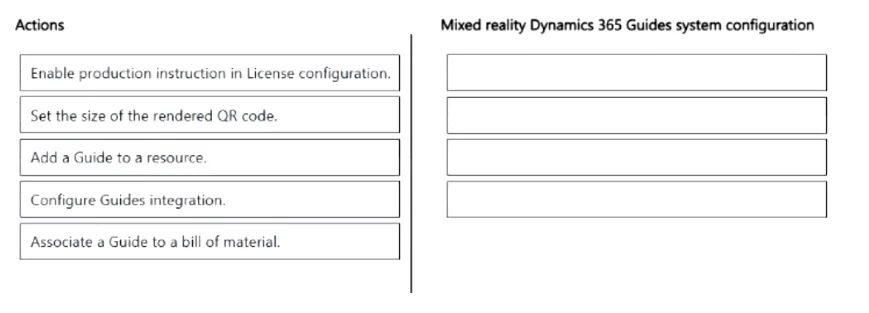
Drag and Drop Question A company uses the production control module in Dynamics 365 Supply Chain Management. Production workers require precise instructions to know which tools and parts to use and how to use them when the workers put things together during the assembly process. You need to configure the system to initiate mixed reality Dynamics 365 Guides for production workers. Which four actions should you recommend be performed in sequence? To answer, move the appropriate actions from the list of actions to the answer area and arrange them in the correct order. Answer:
Exhibit
Answer Area
Drag items
Correct arrangement
- Configure Guides integration.
- Set the size of the rendered QR code.
- Add a Guide to a resource.
- Associate a Guide to a bill of material.
Explanation
Configuring Dynamics 365 Guides for Production Workers
Overview
This question tests knowledge of the setup sequence for integrating Dynamics 365 Guides (mixed reality work instructions) with the Production Control module. Order matters because each step is a prerequisite for the next.
Why This Sequence?
Step 1: Configure Guides Integration
Position rationale: This is the foundational prerequisite. Before anything else, you must establish the connection between Dynamics 365 Supply Chain Management and the Dynamics 365 Guides service. This configures the API link, environment connection, and enables the Guides features within SCM. Without this, no subsequent Guide-related configuration is possible.
Step 2: Set the Size of the Rendered QR Code
Position rationale: After integration is live, you configure how QR codes are physically rendered and printed. Workers scan these QR codes with a HoloLens device to launch the correct Guide at a workstation. This is a system-wide setting that must be established before you start assigning Guides to specific resources or BOMs - otherwise, the codes won't render correctly for scanning.
Step 3: Add a Guide to a Resource
Position rationale: A resource represents a machine, tool, or work center. Attaching a Guide to a resource creates the location-level association - the Guide becomes available when a worker is operating at that specific workstation. This must come before BOM association because the resource anchor determines where the Guide physically surfaces.
Step 4: Associate a Guide to a Bill of Material
Position rationale: This is the most granular, product-specific step. Linking a Guide to a BOM (or BOM line) ties instructions to a specific product's assembly steps and components. It depends on all prior steps being complete because it references the integration, requires the QR infrastructure, and typically complements the resource-level setup to give workers context-appropriate instructions.
The Distractor: "Enable production instruction in License configuration"
This item is intentionally excluded from the correct four. It sounds plausible because D365 F&O has a License configuration area, but enabling Guides for production is handled through "Configure Guides integration" - not through the License configuration node. Candidates who confuse license/feature flags with integration setup often incorrectly include this step.
Common Mistakes
| Mistake | Why It's Wrong |
|---|---|
| Putting QR code setup last | QR codes are infrastructure - they must exist before workers can scan anything |
| Starting with BOM association | BOMs reference resources; resources must be Guide-enabled first |
| Including the License configuration step | This is the distractor; integration config replaces this need |
| Swapping steps 3 and 4 | Resource association is broader scope; BOM is product-specific and comes last |
Topics
Community Discussion
No community discussion yet for this question.
