
MB-335 · Question #190
Drag and Drop Question A company uses manufacturing execution for processing of production orders. Multiple production orders from last week need to be ended. You need to process time registrations…
The correct answer is Add clock-out registrations.; Calculate registrations.; Approve registrations.; Transfer registrations. MES Time Registration Processing - Sequence Explained This question is from Microsoft Dynamics 365 Finance & Operations, specifically the Manufacturing Execution (shop floor) module. The scenario: workers registered time via MES terminals, and you need to fully process those…
Question
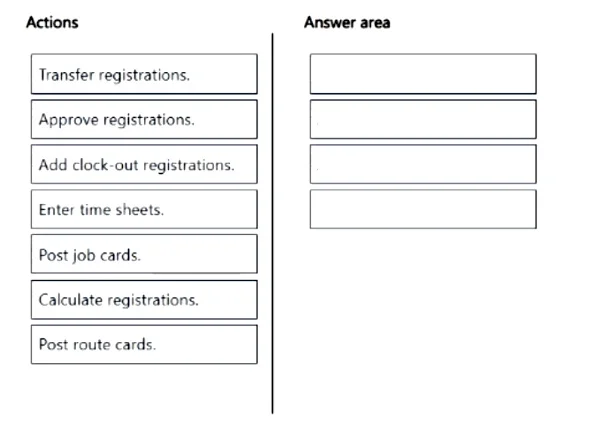
Drag and Drop Question A company uses manufacturing execution for processing of production orders. Multiple production orders from last week need to be ended. You need to process time registrations for all employees to allow the orders to end. Which four steps should you perform in sequence? To answer, move the appropriate actions from the list of actions to the answer area and arrange them in the correct order. Answer:
Exhibit
Answer Area
Drag items
Correct arrangement
- Add clock-out registrations.
- Calculate registrations.
- Approve registrations.
- Transfer registrations.
Explanation
MES Time Registration Processing - Sequence Explained
This question is from Microsoft Dynamics 365 Finance & Operations, specifically the Manufacturing Execution (shop floor) module. The scenario: workers registered time via MES terminals, and you need to fully process those registrations so production orders can be ended.
The Correct Sequence
Step 1 - Add clock-out registrations
Why first: Raw registrations from MES terminals may be incomplete - workers who forgot to clock out leave "open" records with no end time. The system cannot calculate duration on an open registration. You must close all open records by adding clock-outs before anything else can proceed.
This is the prerequisite gate. Everything downstream requires complete, bounded time records.
Step 2 - Calculate registrations
Why second: Once all registrations are closed, the Calculate job processes the raw timestamps. It applies pay agreements, categorizes hours (regular, overtime, absence, etc.), and transforms the raw data into structured, reviewable entries. Nothing exists to approve until this calculation runs.
Common mistake: assuming you can approve first. There is nothing to approve until the calculation produces output.
Step 3 - Approve registrations
Why third: A supervisor reviews the calculated output and approves it. This is a validation checkpoint - it confirms the processed hours are correct before they permanently affect production journals or payroll. Approval is a mandatory gate before transfer in most D365 configurations.
Common mistake: treating this as optional. Without approval, the Transfer step will not pick up the registrations.
Step 4 - Transfer registrations
Why last: Transfer posts the approved registrations to the relevant production journals, updating the production orders with actual labor time. This is what allows the orders to be ended, because the system now has confirmed, posted time against them.
This is the "commit" step - it finalizes everything upstream.
Why the Other Items Are Excluded
| Item | Why excluded |
|---|---|
| Enter time sheets | Alternative entry method for workers not using MES terminals. The scenario already has MES registrations - no manual timesheet entry needed. |
| Post job cards | A separate production journal action, not part of the MES time registration approval workflow. The Transfer step handles pushing data to production. |
| Post route cards | Same reason - route card posting is a distinct routing/operations flow, not a step in the MES time registration pipeline. |
Key Misconception Summary
- Approve ≠ first - you can only approve what has been calculated.
- Transfer ≠ Post - Transfer is the MES-specific action that finalizes approved registrations; "Post job/route cards" are different journal actions from a different workflow.
- Clock-out must come before calculate - open registrations silently block the entire process.
Topics
Community Discussion
No community discussion yet for this question.