MB-335 · Question #139
Drag and Drop Question A manufacturer is implementing Dynamics 365 Supply Chain Management to create blends of oil and industrial lubricant. The manufacturer requires detailed documentation for the…
The correct answer is Create a batch order.; Estimate the order.; Schedule production jobs.; Start the order.; Report the batch order as finished. Production Life Cycle in Dynamics 365 SCM - Batch Order Sequence --- Why These Five Steps (And Not Others) The critical context clue is "blends of oil and industrial lubricant." This signals process manufacturing, which uses batch orders (formula-based), not discrete…
Question
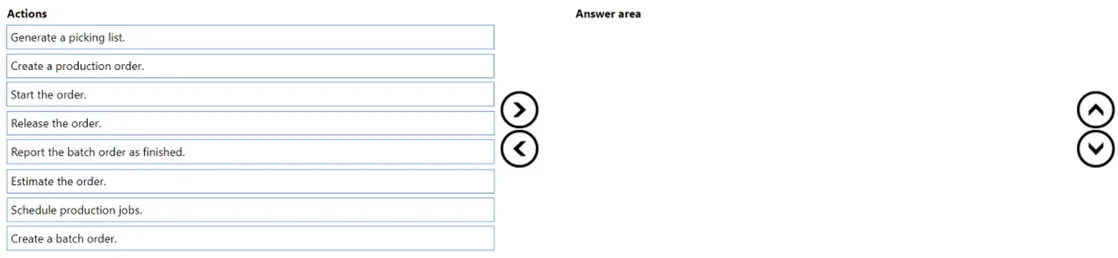
Drag and Drop Question A manufacturer is implementing Dynamics 365 Supply Chain Management to create blends of oil and industrial lubricant. The manufacturer requires detailed documentation for the production order process before manufacturing begins for the products. The shop floor must review, approve, and anticipate all production runs. Before production starts, the manufacturer wants to ensure that the order can be completed by a certain timeframe based on capacity. You need to define the production life cycle stages. Which five actions should you perform in sequence? To answer, move the appropriate actions from the list of actions to the answer area and arrange them in the correct order. Answer:
Exhibit
Answer Area
Drag items
Correct arrangement
- Create a batch order.
- Estimate the order.
- Schedule production jobs.
- Start the order.
- Report the batch order as finished.
Explanation
Production Life Cycle in Dynamics 365 SCM - Batch Order Sequence
Why These Five Steps (And Not Others)
The critical context clue is "blends of oil and industrial lubricant." This signals process manufacturing, which uses batch orders (formula-based), not discrete manufacturing production orders. This immediately eliminates two distractors.
Step-by-Step Breakdown
1. Create a batch order
Not "Create a production order"
Batch orders are the correct order type for process manufacturing (formulas/blends). A standard production order is for discrete, BOM-based manufacturing. Using batch orders enables formula management, co-products, by-products, and potency-based calculations. This puts the order in Created status - the entry point for the lifecycle.
Common mistake: Selecting "Create a production order" instead. The word "production" in that option is a trap - the scenario explicitly involves blending, which requires batch orders.
2. Estimate the order
Estimation calculates material consumption quantities, resource requirements, and expected costs based on the formula and routing. The question states the manufacturer requires detailed documentation before manufacturing begins - estimation produces this cost and material data. The order moves to Estimated status.
Common mistake: Skipping to scheduling. Estimation must precede scheduling because scheduling uses the estimated resource and time data to place jobs on the capacity calendar.
3. Schedule production jobs
Scheduling answers the question's explicit requirement: "ensure that the order can be completed by a certain timeframe based on capacity." Job scheduling breaks the route into individual operations, assigns them to resources, and checks finite/infinite capacity. The order moves to Scheduled status. This is also when the shop floor can anticipate upcoming production runs.
Common mistake: Placing scheduling before estimation, or conflating it with "Start the order." Scheduling is a planning step - no physical production begins yet.
4. Start the order
Starting the order releases it to the shop floor for execution. This triggers the generation of route cards and picking lists (which is why "Generate a picking list" is a distractor - it is a sub-action of starting, not a standalone lifecycle stage). The order moves to Started status and physical production can now begin.
Common mistake: Inserting "Generate a picking list" as a separate lifecycle step. Picking list generation occurs within the start process, not as its own phase in the sequence.
5. Report the batch order as finished
Once production is complete, this step records the finished quantity, updates on-hand inventory, posts consumption of raw materials, and closes the order financially. It moves the order to Reported as finished status, completing the lifecycle.
Items Excluded and Why
| Item | Why Excluded |
|---|---|
| Create a production order | Wrong order type - discrete manufacturing only |
| Generate a picking list | A sub-task within "Start the order," not a lifecycle stage |
The Lifecycle Flow at a Glance
Create batch order → Estimate → Schedule jobs → Start → Report as finished
(Created) (Estimated) (Scheduled) (Started) (Reported as finished)
Each status is a gate - D365 enforces this sequence and prevents out-of-order transitions, which is why understanding the why behind each step matters for both the exam and real-world implementation.
Topics
Community Discussion
No community discussion yet for this question.
