
MB-335 · Question #166
Drag and Drop Question You are a manufacturer using Dynamics 365 Supply Chain Management. A new series of orders is authorized for production. You need to identify which documents to use for the…
The correct answer is Job card; Route card. D365 Supply Chain Management: Production Order Documents The Three Documents Explained Route card - Reports time and quantities at the operation level. Used when tracking progress across a complete route step (e.g., an entire machining operation). Less granular; covers the…
Question
Drag and Drop Question You are a manufacturer using Dynamics 365 Supply Chain Management. A new series of orders is authorized for production. You need to identify which documents to use for the released production order. Which document should you use for each requirement? To answer, drag the appropriate documents to the correct requirements. Each document may be used once, more than once, or not at all. You may need to drag the split bar between panes or scroll to view content. NOTE: Each correct selection is worth one point. Answer:
Exhibit
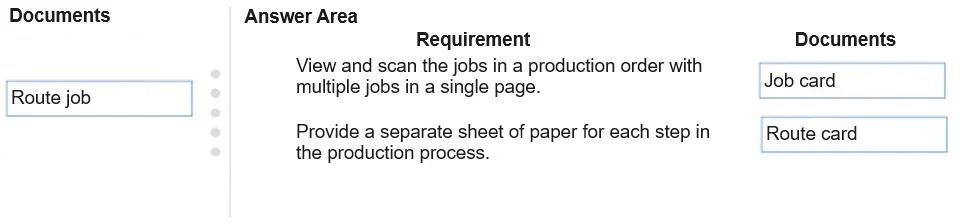
Answer Area
Drag items
Correct arrangement
- Job card
- Route card
Explanation
D365 Supply Chain Management: Production Order Documents
The Three Documents Explained
Route card - Reports time and quantities at the operation level. Used when tracking progress across a complete route step (e.g., an entire machining operation). Less granular; covers the whole operation in one entry.
Route job - Represents individual jobs that exist within an operation under job scheduling (setup, process, transport, etc.). This is a scheduling concept, not a primary reporting document for released orders.
Job card - Reports time and quantities at the individual job level. The most granular reporting document. Used when workers need to clock in/out or report progress on a specific job within an operation.
Why the Correct Arrangement is 1 → Job card, 2 → Route card
| Position | Typical Requirement | Document | Reason |
|---|---|---|---|
| 1 | Track/report individual job progress (e.g., per worker, per machine) | Job card | Captures time at the finest granularity - a single job within an operation |
| 2 | Report quantities and time for an entire operation or route | Route card | Covers an entire operation in one entry without job-level breakdown |
Common Mistakes
- Confusing Route job with Route card: "Route job" sounds like a document but is a scheduling entity, not a production reporting form. It's rarely the correct answer for document-type questions.
- Using Route card for detailed tracking: Route card is operation-level, not job-level. If the requirement mentions individual worker time or machine-level granularity, Job card is correct.
- Assuming Job card is only for workers: Job cards can report on both labor and machine resources at the job level.
Key Rule of Thumb
Job card = most detailed (job level) → Route card = broader (operation level)
Topics
Community Discussion
No community discussion yet for this question.