
MB-335 · Question #170
Drag and Drop Question A skateboard manufacturer uses route operations to schedule resources and estimate units per hour. All products use the same sub assembly item and resource sanding process…
The correct answer is In the engineering tab of the subassembly item, select route.; Select times on the operation that use the resource.; In the Process qty. field, update the quantity. Explanation: Adjusting Route Operation Process Quantity in D365 SCM This question tests knowledge of Microsoft Dynamics 365 Supply Chain Management - specifically how to update a route operation's process quantity to permanently reflect increased resource output. --- Core…
Question
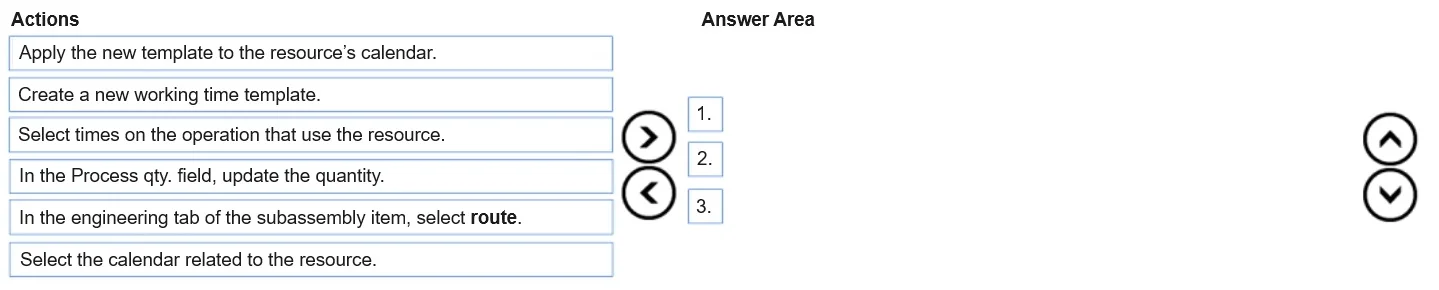
Drag and Drop Question A skateboard manufacturer uses route operations to schedule resources and estimate units per hour. All products use the same sub assembly item and resource sanding process. You observe an increase in the number of units a sanding belt resource can produce. The production schedule is now inaccurate due to the number of units the sanding belt line can produce. You must make a permanent change to the number of units the resource can produce for all future orders. You need to adjust the process quantity on the route operation. Which three actions should you perform in sequence? To answer, move the appropriate actions from the list of actions to the answer area and arrange them in the correct order. Answer:
Exhibit
Answer Area
Drag items
Correct arrangement
- In the engineering tab of the subassembly item, select route.
- Select times on the operation that use the resource.
- In the Process qty. field, update the quantity.
Explanation
Explanation: Adjusting Route Operation Process Quantity in D365 SCM
This question tests knowledge of Microsoft Dynamics 365 Supply Chain Management - specifically how to update a route operation's process quantity to permanently reflect increased resource output.
Core Concept
A route defines the sequence of operations to produce an item. Each operation has timing and quantity fields, including Process qty - how many units the resource handles per cycle. Since all products share the same sub-assembly item and its route, updating that route's operation fixes the schedule for all future orders at once.
Step-by-Step Breakdown
Step 1: In the engineering tab of the subassembly item, select route.
This is the correct entry point. Because all products use the same sub-assembly item, its route is the single source of truth for the sanding operation. Opening the route from the item's Engineering tab ensures you're editing the shared route that affects all future production orders - not a one-off order or a resource-level setting.
Common mistake: Going directly to the resource or work center. That controls capacity/availability, not process quantity per operation.
Step 2: Select times on the operation that use the resource.
Once inside the route, you must locate the specific operation tied to the sanding belt resource. Route operations contain time details (setup, process, queue times) per resource. Selecting the relevant operation's times is required before any field-level editing is possible - you must be on the right record.
Common mistake: Trying to edit the route header or operation list directly without drilling into the operation's time/resource details.
Step 3: In the Process qty. field, update the quantity.
This is the actual fix. The Process qty field defines how many units the resource processes per operation cycle. Updating it here permanently corrects the scheduling calculation for all future orders that use this route.
Why the Distractors Are Wrong
The three unused options - Create a new working time template, Apply the new template to the resource's calendar, and Select the calendar related to the resource - all relate to working time calendars, which control when a resource is available (shifts, hours). They have no effect on how many units the resource produces per cycle. Using them would solve a different problem entirely (capacity scheduling, not process throughput).
Summary
| Step | Action | Why |
|---|---|---|
| 1 | Open route from sub-assembly item's Engineering tab | Targets the shared route affecting all products |
| 2 | Select the operation times using the sanding resource | Navigates to the editable record |
| 3 | Update Process qty | Permanently changes units per cycle for future orders |
Topics
Community Discussion
No community discussion yet for this question.