
MB-335 · Question #155
Drag and Drop Question A manufacturing company is implementing Dynamics 365 Supply Chain Management. Bill of materials (BOM) calculations are typically based on the item cost price. For a subset of…
The correct answer is Default calculation group on released products.; Default calculation group on inventory management parameters; Alternative cost price. BOM Calculation Group Configuration in D365 Supply Chain Management Background: How Calculation Groups Work In D365 SCM, BOM Calculation Groups define which price type is used when calculating BOM costs. They can be assigned at two levels: Inventory Management Parameters →…
Question
Drag and Drop Question A manufacturing company is implementing Dynamics 365 Supply Chain Management. Bill of materials (BOM) calculations are typically based on the item cost price. For a subset of items, the trade agreement price must be used in calculations. If a trade agreement does not exist, the purchase price must be used. You need to set up the BOM calculations for the items by using the fewest configurations. Which configurations should you use? To answer, drag the appropriate configurations to the correct requirements. Each configuration may be used once, more than once, or not at all. You may need to drag the split bar between panes or scroll to view content. NOTE: Each correct selection is worth one point. Answer:
Exhibit
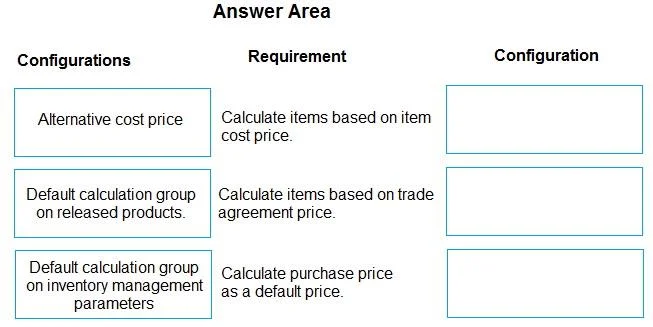
Answer Area
Drag items
Correct arrangement
- Default calculation group on released products.
- Default calculation group on inventory management parameters
- Alternative cost price
Explanation
BOM Calculation Group Configuration in D365 Supply Chain Management
Background: How Calculation Groups Work
In D365 SCM, BOM Calculation Groups define which price type is used when calculating BOM costs. They can be assigned at two levels:
- Inventory Management Parameters → global default (applies to ALL items unless overridden)
- Released Product → item-level override (applies only to that specific item)
The hierarchy is: Released Product setting overrides the Parameters default.
The Three Requirements (Slots) and Why Each Answer Fits
Slot 1 → Default calculation group on released products
This covers the subset of items that must use trade agreement pricing.
- You assign a special calculation group directly on each released product in the subset.
- This overrides the global default for only those items.
- "Fewest configurations" is achieved because you only touch the items that deviate from the norm - all other items inherit the global default automatically.
Slot 2 → Default calculation group on inventory management parameters
This covers the majority of items that use the standard item cost price.
- Setting the default here means every item automatically inherits this behavior without needing individual configuration.
- You configure it once; it applies everywhere unless overridden.
- This is the "fewest configurations" lever - no need to assign a calculation group to each normal item.
Slot 3 → Alternative cost price
This is the price type setting inside the special calculation group assigned to the subset.
- "Alternative cost price" in D365 SCM means: try trade agreement price first → fall back to purchase price if no trade agreement exists.
- This is exactly the business rule: "trade agreement must be used; if none exists, use purchase price."
- No custom logic or additional groups are needed - this single option handles both conditions.
Summary of the Full Setup
| Configuration | Purpose |
|---|---|
| Calculation group (cost price type = standard cost) at Inventory Mgt. Parameters | Default for all items |
| Calculation group (cost price type = Alternative cost price) at Released Products | Override for the subset |
You create 2 calculation groups total and only configure the subset items explicitly - everything else inherits.
Common Mistakes
-
Assigning a calculation group to every released product - unnecessary and violates "fewest configurations." The parameters default handles the majority automatically.
-
Not knowing "Alternative cost price" exists - candidates sometimes try to solve the trade agreement + fallback requirement with two separate groups or manual workarounds, when a single price type option handles it.
-
Reversing the hierarchy - thinking you set the exception at Parameters and the default at the Released Product level. It's the opposite: Parameters = global default, Released Product = exception.
-
Confusing "Purchase price" with "Alternative cost price" - selecting "Purchase price" directly would skip trade agreement lookup entirely. "Alternative cost price" is the only option that checks trade agreements first.
Topics
Community Discussion
No community discussion yet for this question.