nerdexam
Microsoft

MB-335 · Question #207

Drag and Drop Question A customer is implementing Dynamics 365 Supply Chain Management within a single legal entity. The company has five warehouses in Mexico. The company must configure a new item…

The correct answer is Storage dimension groups; Inventory statuses; Warehouse management parameters. D365 SCM: Inventory Status Configuration Explained The Core Requirement Configure an item as "not sellable" upon entering any warehouse - configured once, applied to all five warehouses automatically. --- Why This Arrangement? The three pages form a prerequisite chain: each…

Configure production prerequisites

Question

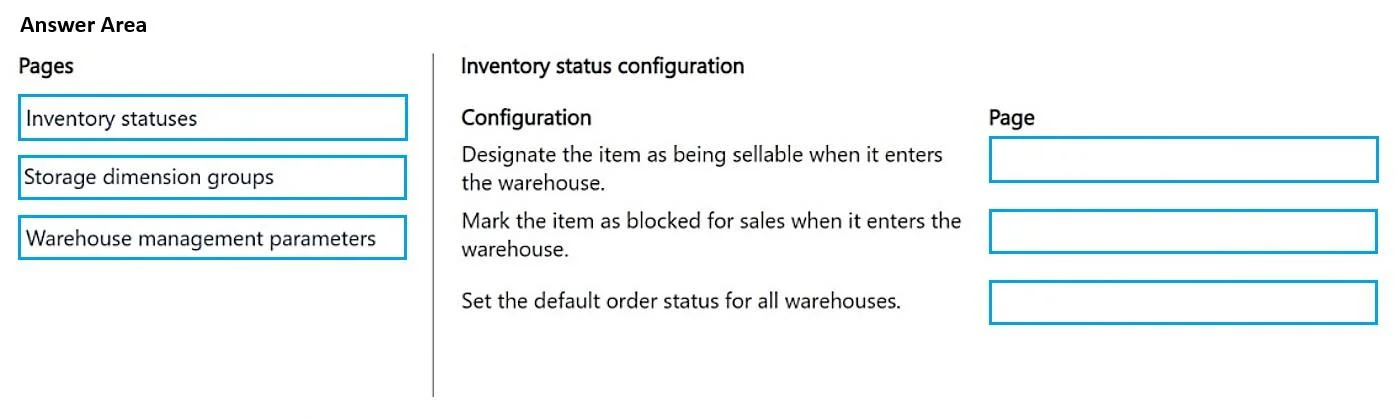
Drag and Drop Question A customer is implementing Dynamics 365 Supply Chain Management within a single legal entity. The company has five warehouses in Mexico. The company must configure a new item as not sellable when it enters a new warehouse. The configuration must be set up once and then applied to all five warehouses. The system configuration for all five locations currently has only a single status where the item is sellable in all locations at all times. You need to configure the system to meet the requirement. Which pages should you use? To answer, move the appropriate pages to the correct configurations. You may use each page once, more than once, or not at all. You may need to move the split bar between panes or scroll to view content. NOTE: Each correct selection is worth one point. Answer:

Exhibit
MB-335 question #207 exhibit

Answer Area

Drag items

Inventory statusesStorage dimension groupsWarehouse management parameters

Correct arrangement

  • Storage dimension groups
  • Inventory statuses
  • Warehouse management parameters

Explanation

D365 SCM: Inventory Status Configuration Explained

The Core Requirement

Configure an item as "not sellable" upon entering any warehouse - configured once, applied to all five warehouses automatically.


Why This Arrangement?

The three pages form a prerequisite chain: each step unlocks or uses the next.


Step 1 - Storage Dimension Groups

Purpose: Enable inventory status tracking for the item.

Inventory status is a storage dimension in D365 SCM. If the Inventory status dimension is not activated in the storage dimension group assigned to the item, the system simply cannot track or apply inventory statuses to that item at all.

This is the foundational prerequisite - nothing else works without it. You configure this on the item's dimension group, which is assigned at the item level and automatically governs behavior across all warehouses.

Common mistake: Skipping this step and going straight to defining statuses. The status configuration exists but has no effect if the dimension isn't active for the item.


Step 2 - Inventory Statuses

Purpose: Define what "not sellable" means.

This page is where you create and configure actual status records (e.g., "Blocked," "Quarantine," "Not Available"). Each status has a property controlling whether it blocks sales orders. You define the status here that will serve as the "not sellable" marker.

This step creates the value that will be referenced in Step 3.

Common mistake: Assuming a default "blocked" status already exists. You typically need to explicitly create or verify a status that has sales blocking enabled.


Step 3 - Warehouse Management Parameters

Purpose: Set the default inventory status applied when items are received.

This is the "configure once, apply everywhere" step. Warehouse management parameters is a company-level page (not per-warehouse), containing a Default inventory status ID field for receipts/arrivals. Setting it to the status created in Step 2 means every receipt at any of the five warehouses automatically inherits that status - no warehouse-by-warehouse configuration needed.

Common mistake: Thinking you need to configure each warehouse individually via the Warehouses page. That page allows overrides, but the parameters page sets the company-wide default - which is exactly what the requirement calls for.


Summary

StepPageRole
1Storage dimension groupsActivate the inventory status dimension for the item
2Inventory statusesDefine the "not sellable" status
3Warehouse management parametersSet that status as the company-wide default for inbound inventory

The chain is: enable → define → apply globally.

Topics

#inventory statuses#storage dimension groups#warehouse management#item sellability

Community Discussion

No community discussion yet for this question.

Full MB-335 Practice