
MB-335 · Question #154
Drag and Drop Question A manufacturer uses route operations and job scheduling. You use a unique calendar for a conveyor line. The company observes a decrease in the number of hours a conveyor line…
The correct answer is Select the calendar related to the resource.; Select working times.; Change the efficiency percentage on the days that need the change. Explanation: Adjusting Conveyor Line Calendar Efficiency in Dynamics 365 SCM Context In D365 Supply Chain Management, a resource's calendar controls when it is available and at what capacity. The efficiency percentage within working times scales how much of that time counts as…
Question
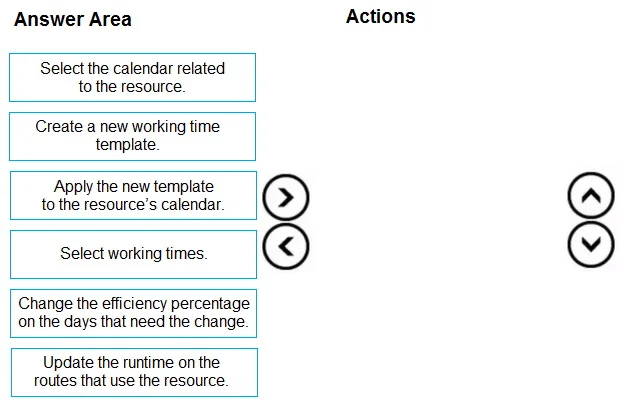
Drag and Drop Question A manufacturer uses route operations and job scheduling. You use a unique calendar for a conveyor line. The company observes a decrease in the number of hours a conveyor line resource is operational due to breakdowns. You must make a temporary change to the number of hours the resource is available. You need to adjust the efficiency percentage for the conveyor line calendar. Which three actions should you perform in sequence? To answer, move the appropriate actions from the list of actions to the answer area and arrange them in the correct order. Answer:
Exhibit
Answer Area
Drag items
Correct arrangement
- Select the calendar related to the resource.
- Select working times.
- Change the efficiency percentage on the days that need the change.
Explanation
Explanation: Adjusting Conveyor Line Calendar Efficiency in Dynamics 365 SCM
Context
In D365 Supply Chain Management, a resource's calendar controls when it is available and at what capacity. The efficiency percentage within working times scales how much of that time counts as productive capacity - for example, 80% efficiency on an 8-hour day means only 6.4 hours of effective capacity. This is the correct lever for modeling a resource degraded by breakdowns, and it can be changed per day without touching routes or templates.
Why This Specific Sequence
Step 1 - Select the calendar related to the resource
You must navigate to the correct calendar before you can change anything on it.
Every resource in D365 is linked to a specific calendar. The efficiency percentage lives inside that calendar's working time records. You must open the right calendar first - this is the entry point for all subsequent edits.
Step 2 - Select working times
Working times are the records inside the calendar that hold the efficiency field.
A calendar is a container; "working times" are the individual day/interval records within it. The efficiency percentage is a property of these records, not of the calendar header itself. You must drill into working times to see and edit it.
Step 3 - Change the efficiency percentage on the days that need the change
This is the actual targeted change - applied only to the affected days, keeping it temporary.
Once inside working times, you select only the specific days impacted by the breakdown and lower the efficiency percentage. The scheduler recalculates available capacity automatically. No routes or templates need to be touched.
Why the Excluded Items Don't Belong
| Item | Why excluded |
|---|---|
| Create a new working time template | Templates are reusable patterns for building calendars. Creating one is unnecessary here - you're making a targeted, temporary edit to existing working time records. |
| Apply the new template to the resource's calendar | Follows from the above; since no new template is created, this step has no place in the sequence. It would also overwrite existing working times, which is not the goal. |
| Update the runtime on the routes that use the resource | Route runtimes define how long an operation takes by design - they are independent of the resource's available capacity. Changing them would alter planned operation durations, not available hours. This fixes the wrong thing. |
Common Mistakes
- Confusing efficiency % with runtime on routes. Routes define how long an operation takes; calendar efficiency defines how much usable time the resource has. These are separate concerns.
- Thinking you need a new template for temporary changes. Templates are for setting up recurring schedules. For a temporary tweak, you edit working times directly.
- Skipping "Select working times." Students sometimes jump from the calendar header straight to editing, forgetting that efficiency is stored at the working-time-record level, not the calendar-header level.
Topics
Community Discussion
No community discussion yet for this question.