
MB-335 · Question #189
Drag and Drop Question A company uses Discrete manufacturing concepts to produce cables. The company's production scheduler uses internal documents to track issues on in-process production orders…
The correct answer is Create a production pool for issues.; Add the production pool to the production order.; Filter the production orders by production pool. Production Pools in Discrete Manufacturing (D365 F&O) This question tests knowledge of Production Pools in Microsoft Dynamics 365 Finance & Operations - a mechanism designed to group and filter production orders by a shared characteristic (in this case, "issues"). --- Why This…
Question
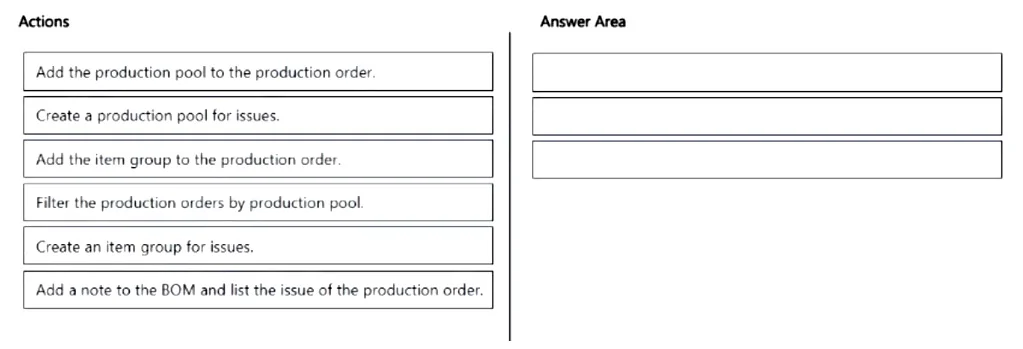
Drag and Drop Question A company uses Discrete manufacturing concepts to produce cables. The company's production scheduler uses internal documents to track issues on in-process production orders. The production scheduler must group all in-process production orders according to issues. The scheduler must be able to easily determine issues with production orders. You need to implement a method to easily identity production orders with issues. Which three actions should you perform in sequence? To answer, move the appropriate actions from the list of actions to the answer area and arrange them in the correct order. Answer:
Exhibit
Answer Area
Drag items
Correct arrangement
- Create a production pool for issues.
- Add the production pool to the production order.
- Filter the production orders by production pool.
Explanation
Production Pools in Discrete Manufacturing (D365 F&O)
This question tests knowledge of Production Pools in Microsoft Dynamics 365 Finance & Operations - a mechanism designed to group and filter production orders by a shared characteristic (in this case, "issues").
Why This Sequence?
The logic follows a natural create → assign → consume workflow. You cannot assign something that doesn't exist, and you cannot filter by something that hasn't been assigned.
Step-by-Step Breakdown
1. Create a production pool for issues.
A production pool is a user-defined grouping label that can be attached to production orders. Before anything else, the pool must exist in the system. This is the foundational setup step - without it, steps 2 and 3 are impossible. Think of it as creating a category before you can tag anything with it.
2. Add the production pool to the production order.
Once the pool exists, the scheduler assigns it to any in-process production order that has an issue. This is the data entry step - it stamps each problematic order with the "issues" pool identifier, making those orders distinguishable from orders without issues.
3. Filter the production orders by production pool.
With all issue-flagged orders tagged with the same pool, the scheduler can now filter the production orders list by that pool. This instantly surfaces only the orders with issues, satisfying the requirement to "easily determine issues with production orders."
Why the Other Items Are Wrong
| Item | Why It's Excluded |
|---|---|
| Create an item group for issues | Item groups categorize inventory items for costing/ledger purposes - they have no bearing on production order status or grouping. |
| Add the item group to the production order | Same reason - item groups aren't a production order filtering mechanism for operational issues. |
| Add a note to the BOM | Notes on a Bill of Materials are static documentation; they cannot be filtered or queried systematically across multiple production orders. |
Common Mistakes
- Confusing item groups with production pools. Item groups are an inventory/accounting concept; production pools are an operational scheduling concept. The word "group" in "item group" is a trap.
- Skipping step 1. Some candidates jump to assigning the pool, forgetting it must be created first.
- Thinking BOM notes are sufficient. A note is readable on one order at a time - it provides no cross-order visibility, which is exactly what the scenario requires.
Topics
Community Discussion
No community discussion yet for this question.