
MB-335 · Question #178
Drag and Drop Question A company uses Asset management in Dynamics 365 Supply Chain Management. The company also uses Dynamics 365 Guides independently of the Dynamics 365 Supply Chain Management…
The correct answer is Complete all prerequisites for the Dynamics 365 Remote Assist Guides PC app.; Create a guide of the maintenance checklist process in the Dynamics 365 Guides PC app.; Create a maintenance checklist template for a work order in Dynamics 365 Supply Chain Management.; Assign a guide to the template field on the maintenance checklist template record. Explanation: Integrating Dynamics 365 Guides with D365 SCM Asset Management > Note on the question: The prompt says "three actions" but the correct arrangement lists four steps. This is likely a transcription discrepancy from the source exam. The explanation below covers all…
Question
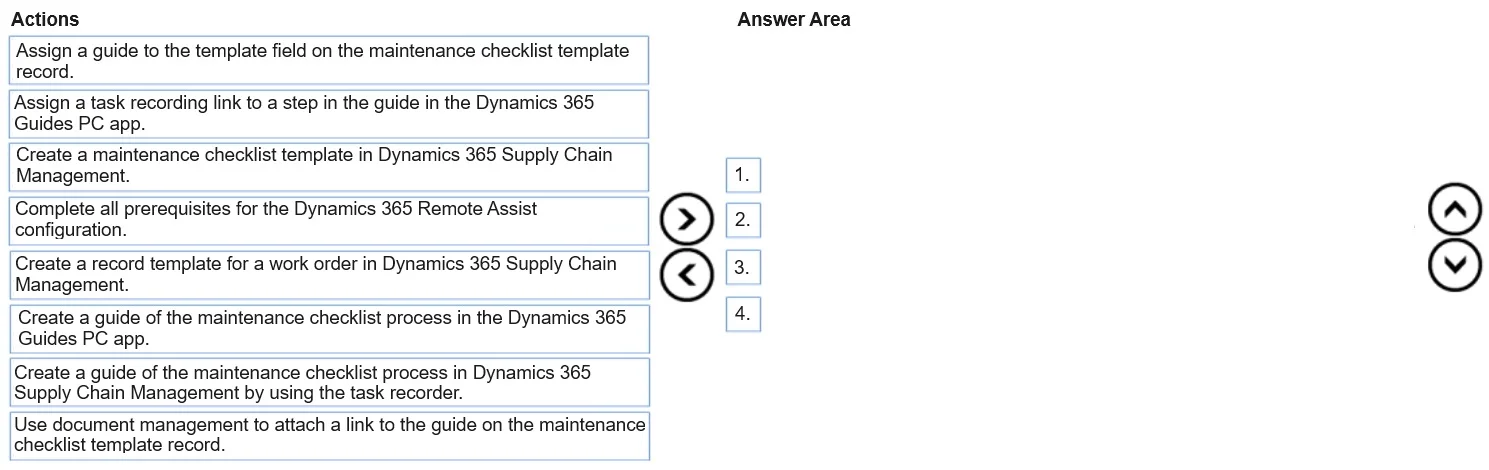
Drag and Drop Question A company uses Asset management in Dynamics 365 Supply Chain Management. The company also uses Dynamics 365 Guides independently of the Dynamics 365 Supply Chain Management implementation. Maintenance workers require a checklist template to complete work orders. A solution must help the workers through work order steps. The solution must use Dynamics 365 Guides with Dynamics 365 Supply Chain Management. You need to integrate the solution. Which three actions should you perform in sequence? To answer, move the appropriate actions from the list of actions to the answer area and arrange them in the correct order. Answer:
Exhibit
Answer Area
Drag items
Correct arrangement
- Complete all prerequisites for the Dynamics 365 Remote Assist Guides PC app.
- Create a guide of the maintenance checklist process in the Dynamics 365 Guides PC app.
- Create a maintenance checklist template for a work order in Dynamics 365 Supply Chain Management.
- Assign a guide to the template field on the maintenance checklist template record.
Explanation
Explanation: Integrating Dynamics 365 Guides with D365 SCM Asset Management
Note on the question: The prompt says "three actions" but the correct arrangement lists four steps. This is likely a transcription discrepancy from the source exam. The explanation below covers all four correct steps as given.
The Integration Flow: Why This Order
The core constraint is dependency chaining - each step creates something required by the next. You cannot link a guide that doesn't exist, and you cannot link anything if the integration isn't set up.
Step-by-Step Placement Rationale
Step 1: Complete all prerequisites for the Dynamics 365 Remote Assist Guides PC app
Why first: This is the integration foundation. Connecting D365 Guides to D365 SCM requires:
- A valid Guides license assigned to users
- The environments linked via Power Platform
- Integration features enabled in SCM Feature Management
Without this, the Guides lookup field in SCM won't function and workers can't access guides from HoloLens during work orders.
Common mistake: Skipping prerequisites and jumping straight to guide creation - the guide will exist in isolation with no way to surface it inside SCM.
Step 2: Create a guide of the maintenance checklist process in the Dynamics 365 Guides PC app
Why second: Once the integration is configured, you build the actual step-by-step guide in the Guides PC app (the dedicated authoring tool). This produces a guide record in the Guides environment that SCM can reference.
Common mistake: Choosing "Create a guide... in Dynamics 365 Supply Chain Management and link it to the work order" - guides are authored in the Guides PC app, not inside SCM. SCM only consumes/links to them.
Step 3: Create a maintenance checklist template in Dynamics 365 Supply Chain Management
Why third: The checklist template is the SCM object that workers interact with during a work order. It must exist before you can attach a guide to it. The template defines the tasks/steps; the guide provides the AR-assisted walkthrough.
Common mistake: Choosing "Create a record template for a work order" - a work order record template is a different concept (pre-filling work order header fields), not a maintenance checklist template.
Step 4: Assign a guide to the template field on the maintenance checklist template record
Why last: With the guide created and the checklist template created, you now link them. In D365 SCM, the maintenance checklist template has a dedicated Guide lookup field. Selecting the guide here makes it accessible on HoloLens when a worker opens a work order with that template.
Common mistake: Choosing "Use document management to attach a link to the guide" - document management is a generic file-attachment mechanism and does not trigger the Guides integration. The correct mechanism is the native Guide field on the checklist template record.
Eliminated Distractors Summary
| Item | Why Wrong |
|---|---|
| Assign a task recording link to a step in the guide | Task Recorder is unrelated to Guides integration |
| Create a record template for a work order | Wrong template type - not a checklist template |
| Create a guide in SCM and link to work order | Guides are authored in the Guides PC app, not SCM |
| Use document management to attach a guide link | Generic attachment, not the Guides integration mechanism |
Key mental model: Prerequisites → Author the Guide (in Guides) → Create the SCM object → Link them together.
Topics
Community Discussion
No community discussion yet for this question.