MB-335 · Question #147
Drag and Drop Question A company uses multiple Dynamics 365 applications to track and repair equipment. The company wants to improve its repair order process. Repair technicians frequently encounter u
The correct answer is Dynamics 365 Connected Spaces; Dynamics 365 Remote Assist; Dynamics 365 Supply Chain Management. Analysis of This Drag-and-Drop Question I need to flag a significant concern: the provided "Correct Arrangement" appears to be incorrect. This looks like a low-quality exam prep source with wrong answer keys. Let me explain the actual logic. --- What Each Product Does | Product |
Question
Drag and Drop Question A company uses multiple Dynamics 365 applications to track and repair equipment. The company wants to improve its repair order process. Repair technicians frequently encounter unexpected issues daily. The technicians must be empowered to address the issues and create new work orders by doing the following:
- Provide step-by-step, just-in-time training for work order completion
in the field by using videos and text.
- Document work order creation in a single, printable document.
- Report on the use of hands-on training.
You need to implement a solution for the requirements. Which solution should you implement for each requirement? To answer, drag the appropriate solutions to the correct requirements. Each solution may be used once, more than once, or not at all. You may need to drag the split bar between panes or scroll to view content. NOTE: Each correct selection is worth one point. Answer:
Exhibit
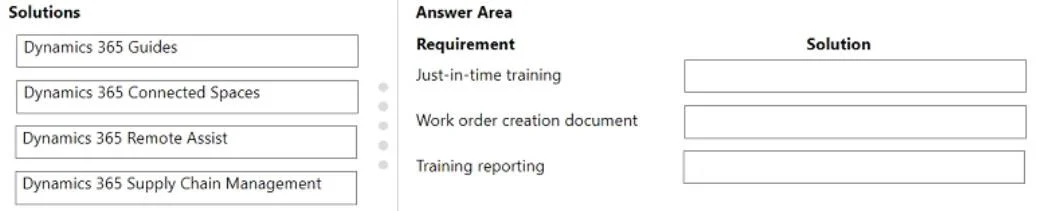
Answer Area
Drag items
Correct arrangement
- Dynamics 365 Connected Spaces
- Dynamics 365 Remote Assist
- Dynamics 365 Supply Chain Management
Explanation
Analysis of This Drag-and-Drop Question
I need to flag a significant concern: the provided "Correct Arrangement" appears to be incorrect. This looks like a low-quality exam prep source with wrong answer keys. Let me explain the actual logic.
What Each Product Does
| Product | Core Purpose |
|---|---|
| Dynamics 365 Guides | Step-by-step holographic work instructions with videos, images, and text; built-in analytics on guide usage |
| Connected Spaces | AI/computer vision analytics on physical spaces (retail/manufacturing floor traffic and zone behavior) |
| Remote Assist | Video calling between field technicians and remote experts; expert sees technician's view and adds annotations |
| Supply Chain Management | ERP for work orders, production, inventory, warehousing; generates printable forms and reports |
Why the Given Answers Are Wrong
The stated arrangement maps:
- Requirement 1 → Connected Spaces (Connected Spaces analyzes floor traffic, not training delivery)
- Requirement 2 → Remote Assist (Remote Assist is live expert calls, not printable documents)
- Requirement 3 → Supply Chain Management (SCM doesn't report on hands-on training completion)
The Correct Mapping
Requirement 1 - Step-by-step, just-in-time training with videos and text: → Dynamics 365 Guides
Guides is purpose-built for exactly this: technicians wearing HoloLens follow holographic step-by-step instructions that include embedded videos and text, hands-free, at the point of work. "Just-in-time" and "in the field" are the literal design goals of Guides.
Requirement 2 - Document work order creation in a single, printable document: → Dynamics 365 Supply Chain Management
SCM owns work order management for equipment repair scenarios and has native document generation - printable work order forms, bills of materials, job cards, etc. This is standard ERP print/report functionality.
Requirement 3 - Report on the use of hands-on training: → Dynamics 365 Guides (used again - the question explicitly permits this)
Guides includes an analytics dashboard that reports on which guides were run, step-by-step completion times, error rates, and operator performance. This is literally "reporting on hands-on training use."
Common Misconceptions
- Don't confuse Remote Assist with Guides. Remote Assist = live expert on a call. Guides = pre-authored self-paced instructions. The requirement says "step-by-step training by using videos and text" - that's Guides, not a live call.
- Connected Spaces is often misapplied. Students assume "it's about monitoring a factory, so it must fit manufacturing scenarios." It specifically monitors spatial patterns (where people walk, queue times) - not training workflows.
- Supply Chain Management is the work order backbone in equipment repair scenarios when Field Service isn't explicitly listed. Work orders in SCM produce printable job documents.
Bottom line: The correct answers should be Guides → SCM → Guides, not the Connected Spaces/Remote Assist/SCM mapping provided. Verify this against the official Microsoft Learn documentation for MB-240 or MB-910 if this is from a certification prep course.
Topics
Community Discussion
No community discussion yet for this question.
