MB-335 · Question #179
Drag and Drop Question A company uses the asset management module in Dynamics 365 Supply Chain Management. A machine on the shop floor is noisy and emitting an odd smell. The shop floor manager must…
The correct answer is Complete all prerequisites for the Dynamics 365 Remote Assist configuration.; Create a record template for a work order in Dynamics 365 Supply Chain Management.; Assign a guide to the template field on the maintenance checklist template record. Exam Explanation: D365 Asset Management - Initiating Repair Tracking with Guides Integration Scenario Summary A machine has a potential fault. The shop floor manager needs to: Alert the repair team via a trackable record Support multiple specialized repairs Ensure all records…
Question
Drag and Drop Question A company uses the asset management module in Dynamics 365 Supply Chain Management. A machine on the shop floor is noisy and emitting an odd smell. The shop floor manager must alert the repair team that the asset might require a repair, or a series of repairs, by one or more specialized repair technicians. All repair records must tie back to the initial investigation record in case of a safety audit. You need to create components to initiate the process of tracking the requests. Which three actions should you perform in sequence? To answer, move the appropriate actions from the list of actions to the answer area and arrange them in the correct order. Answer:
Exhibit
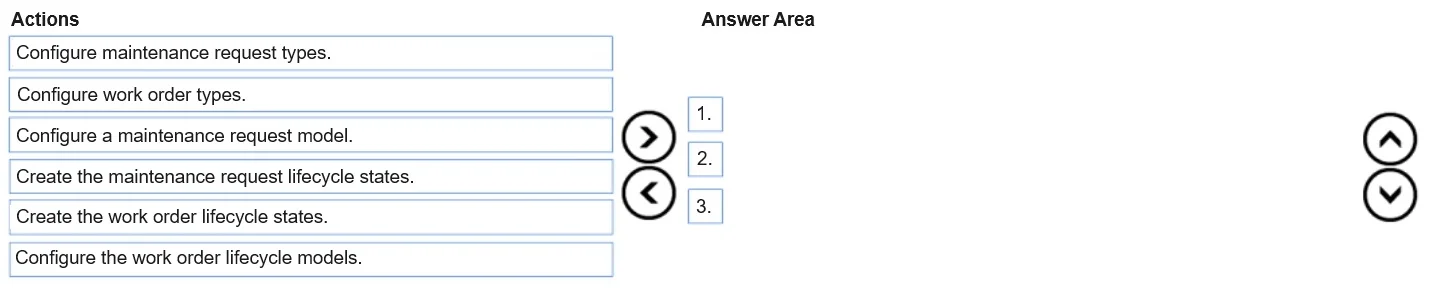
Answer Area
Drag items
Correct arrangement
- Complete all prerequisites for the Dynamics 365 Remote Assist configuration.
- Create a record template for a work order in Dynamics 365 Supply Chain Management.
- Assign a guide to the template field on the maintenance checklist template record.
Explanation
Exam Explanation: D365 Asset Management - Initiating Repair Tracking with Guides Integration
Scenario Summary
A machine has a potential fault. The shop floor manager needs to:
- Alert the repair team via a trackable record
- Support multiple specialized repairs
- Ensure all records link back to the original investigation (audit trail)
The question is about setting up the infrastructure to support this process, specifically leveraging the D365 Asset Management + D365 Guides integration.
Note on discrepancy: The "Correct Arrangement" items are slightly paraphrased from the "Available Items." This is common in Microsoft exam transcriptions. The logical mapping and technical reasoning below account for both.
Step-by-Step Reasoning
Step 1 - Complete all prerequisites for the Dynamics 365 Remote Assist / Guides configuration
Maps to: "Complete all prerequisites for the Dynamics 365 Remote Assist Guides PC app"
Why first: Before any integration between D365 Supply Chain Management and D365 Guides can work, the underlying environment must be ready. Prerequisites include:
- Active D365 Guides license
- HoloLens device setup
- Enabling the "Asset management guides" feature in Feature Management in D365 SCM
- Proper Azure AD and environment linking between D365 SCM and the Guides app
You cannot assign a guide to any record if the integration feature isn't activated. Everything downstream depends on this being complete.
Common mistake: Skipping prerequisites and trying to configure guides content or checklist templates first - the Guide field on checklist records won't appear or function if the feature isn't enabled.
Step 2 - Create a record template for a work order in Dynamics 365 Supply Chain Management
Maps to: "Create a record template for a work order in Dynamics 365 Supply Chain Management" (exact match)
Why second: The scenario requires:
- Multiple repairs by multiple technicians → multiple work order lines
- All records tie back to the initial investigation → work orders in D365 Asset Management maintain a parent reference to the originating Maintenance Request
A work order record template standardizes the structure of work orders that will be generated from the maintenance request. This ensures every repair record created from the initial alert inherits consistent structure, job types, and checklist associations - critical for the audit trail requirement.
Why before step 3: The maintenance checklist template you'll configure in step 3 is associated with work order job type setups. The work order template establishes the framework those checklists plug into.
Common mistake: Thinking you should create a Maintenance Request here instead. The question asks to create components (infrastructure/templates), not to file the actual request. The request itself is created by the shop floor manager at runtime using the infrastructure built here.
Step 3 - Assign a guide to the template field on the maintenance checklist template record
Maps to: Closest available item is "Use document management to attach a link to the guide on the maintenance checklist template record" - but the correct answer specifically uses the dedicated Guide field, not document management
Why third: Once prerequisites are met and the work order template exists, you assign a D365 Guide to the maintenance checklist template record. In D365 SCM Asset Management, the maintenance checklist template has a native Guide field (visible only after prerequisites are enabled). Assigning the guide here means:
- Technicians using HoloLens will see step-by-step AR instructions
- The guide is tied to the checklist, which is tied to the work order job type, which is tied to the work order - maintaining the full traceability chain
Common mistakes:
- Using document management (attachments) instead of the native Guide field - document management is a generic mechanism and doesn't create the proper integration linkage the Guides feature requires
- Choosing "Create a guide of the maintenance-checklist process in Guides, then link to a task in the guide" - this describes an action inside the Guides PC app, not in D365 SCM. The connection point must be made from the SCM side, on the checklist template record
- Choosing "Assign a task recording link to a step in the guide" - this is a Task Guides (in-app guidance) concept, unrelated to the Guides/HoloLens integration in Asset Management
Why the Other Items Are Incorrect
| Available Item | Why Excluded |
|---|---|
| Assign a task recording link to a step in the guide in the Guides PC app | This is for in-app Task Guides, not Asset Management / HoloLens integration |
| Create a maintenance checklist template in D365 SCM | Implied as existing infrastructure, or subsumed by step 3; not the primary sequenced action here |
| Create a guide of the maintenance checklist process in the Guides PC app | Guides content creation happens before this workflow, as part of prerequisites setup |
| Create a guide + link to a task in the guide (combined item) | Mixes app boundaries; the linkage in D365 SCM is the correct integration point, not inside the Guides app |
| Use document management to attach a link on the maintenance checklist template record | Tempting but wrong - document management bypasses the native integration; doesn't surface in the Asset Management Guides workflow properly |
Key Mental Model
Prerequisites → Work Order Template (traceability structure) → Assign Guide to Checklist Template (technician AR guidance)
The ordering follows a strict dependency chain: you can't configure what doesn't exist, you can't assign guides without the integration active, and you can't attach checklists to work orders without the work order template defined first.
Topics
Community Discussion
No community discussion yet for this question.
