MB-335 · Question #181
Drag and Drop Question You are the product design manager for a computer manufacturer. Your new laptop model is configurable. There are restrictions on which hardware components can be selected depend
The correct answer is Create a product master with dimension-based configuration technology.; Assign a product dimension group with an active configuration dimension.; Create a bill of materials version and create a configuration route.; Create the configuration variants automatically by using the Maintain configurations form.. Dimension-Based Product Configuration in Dynamics 365 SCM This question tests your knowledge of the dimension-based configuration workflow in Microsoft Dynamics 365 Supply Chain Management. Each step has a hard dependency on the previous one. --- Step 1 - Create a product master
Question
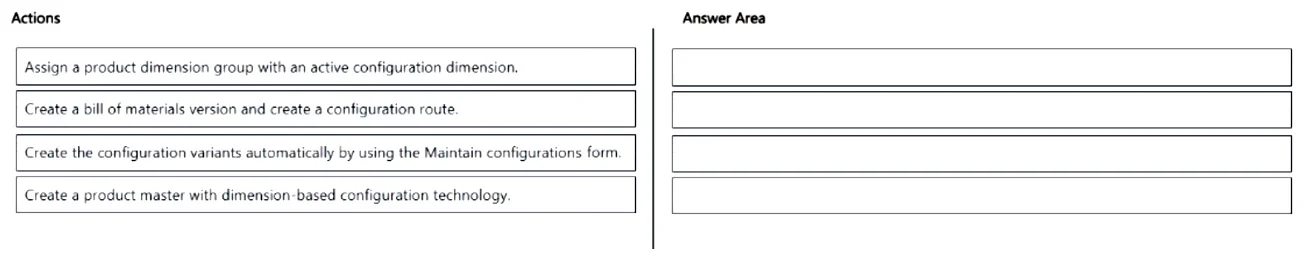
Drag and Drop Question You are the product design manager for a computer manufacturer. Your new laptop model is configurable. There are restrictions on which hardware components can be selected depending on the model. You create configuration groups for hardware and software. You need to create a new laptop item number and configurations. In which order should you perform the actions? To answer, move all actions from the list of actions to the answer area and arrange them in the correct order. Answer:
Exhibit
Answer Area
Drag items
Correct arrangement
- Create a product master with dimension-based configuration technology.
- Assign a product dimension group with an active configuration dimension.
- Create a bill of materials version and create a configuration route.
- Create the configuration variants automatically by using the Maintain configurations form.
Explanation
Dimension-Based Product Configuration in Dynamics 365 SCM
This question tests your knowledge of the dimension-based configuration workflow in Microsoft Dynamics 365 Supply Chain Management. Each step has a hard dependency on the previous one.
Step 1 - Create a product master with dimension-based configuration technology
Why first: The product master is the root object. Nothing else can exist without it. You must explicitly choose "dimension-based configuration" as the configuration technology at creation time - this cannot be changed later. All subsequent steps attach to this master.
Common mistake: Trying to add configuration variants before the master exists, or choosing the wrong configuration technology (e.g., predefined variants instead of dimension-based). Switching technology after the fact requires recreating the product.
Step 2 - Assign a product dimension group with an active configuration dimension
Why second: The product master needs a dimension group that has the Configuration dimension activated. This tells the system that this product will vary by configuration, enabling the BOM and route logic that follows. Without this, the system has no mechanism to differentiate product variants.
Common mistake: Forgetting to activate the Configuration dimension in the dimension group, or assigning a group designed for size/color variants instead.
Step 3 - Create a bill of materials version and create a configuration route
Why third: Now that the master product knows it uses dimension-based configuration, you build the BOM with configuration groups assigned to BOM lines. The configuration route maps operations to those groups. These structures define which components belong to which configuration. This step is impossible before Step 2 because the BOM/route must reference an active configuration dimension.
Common mistake: Creating the BOM without assigning configuration groups to lines - this leaves the BOM unable to differentiate variants.
Step 4 - Create the configuration variants automatically using the Maintain configurations form
Why last: This step reads the BOM configuration groups and generates all valid combinations as distinct product variants. It is purely a derived/output step - it can only run after the BOM and route define the valid combinations. Running this step produces the actual item numbers (e.g., Laptop-ConfigA, Laptop-ConfigB) that can be sold and ordered.
Common mistake: Expecting to manually create variants before the BOM is set up, or not running this step at all and wondering why no orderable variants exist.
Summary Table
| Step | Action | Dependency |
|---|---|---|
| 1 | Create product master | None - starting point |
| 2 | Assign dimension group | Requires product master |
| 3 | Create BOM version + config route | Requires active config dimension |
| 4 | Generate variants via Maintain configurations | Requires BOM with config groups |
The key principle: structure before content before output - you define the container (master), then its rules (dimension group), then its content (BOM/route), then generate the results (variants).
Topics
Community Discussion
No community discussion yet for this question.
