nerdexam
Microsoft

MB-335 · Question #199

Drag and Drop Question A company uses separate finished good item numbers for size variations of the same product. The company wants to minimize the number of variously-sized items that are created. Y

The correct answer is Create a product dimension group for size under the dimension and variant groups setup menu.; Create sizes under the dimension and variant groups setup menu.; Create a product master.; Add product dimensions to the product master.; Generate product variants.. Product Variants Setup - Sequence Explained This question covers Microsoft Dynamics 365 Finance & Operations product master configuration. The goal is to replace separate item numbers per size with a single product master that generates size variants automatically. --- The Correc

Configure products

Question

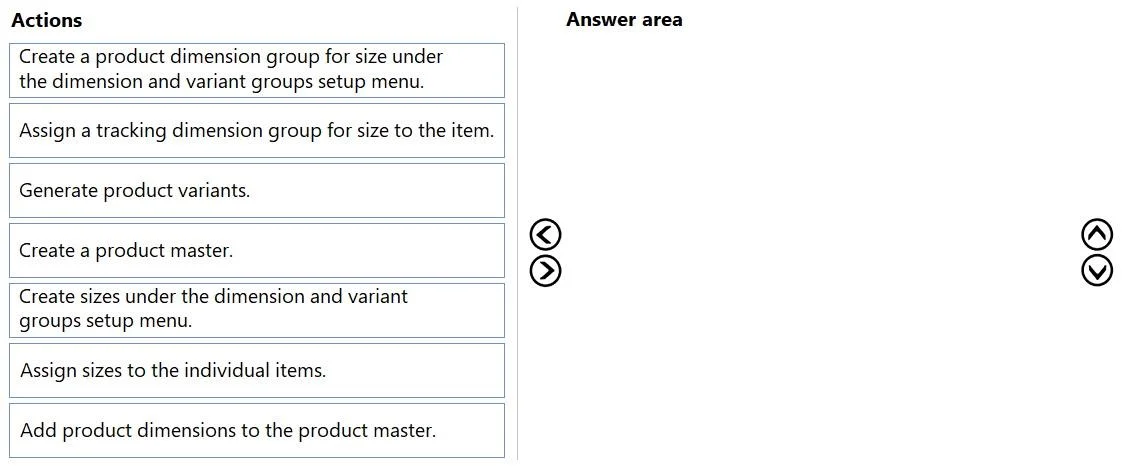
Drag and Drop Question A company uses separate finished good item numbers for size variations of the same product. The company wants to minimize the number of variously-sized items that are created. You need to perform the setup to allow variants in size to the product master. Which five actions should you perform in sequence? To answer, move the appropriate actions from the list of actions to the answer area and arrange them in the correct order. Answer:

Exhibit
MB-335 question #199 exhibit

Answer Area

Drag items

Create a product dimension group for size under the dimension and variant groups setup menu.Assign a tracking dimension group for size to the item.Generate product variants.Create a product master.Create sizes under the dimension and variant groups setup menu.Assign sizes to the individual items.Add product dimensions to the product master.

Correct arrangement

  • Create a product dimension group for size under the dimension and variant groups setup menu.
  • Create sizes under the dimension and variant groups setup menu.
  • Create a product master.
  • Add product dimensions to the product master.
  • Generate product variants.

Explanation

Product Variants Setup - Sequence Explained

This question covers Microsoft Dynamics 365 Finance & Operations product master configuration. The goal is to replace separate item numbers per size with a single product master that generates size variants automatically.


The Correct Sequence & Why

1. Create a product dimension group for size (Dimension and variant groups setup menu)

This is the foundation. The product dimension group defines which dimensions (Size, Color, Style, Configuration) are active and trackable. You must create this group first because everything downstream - the product master, the variants - depends on it existing. Without it, you have nothing to assign.

2. Create sizes under the dimension and variant groups setup menu

Once the dimension group exists, you populate the actual size values (S, M, L, XL, etc.). These are the discrete options the system will use to generate combinations. You need the dimension group established before sizes are meaningful, and you need the sizes defined before a product master can reference them.

3. Create a product master

Now you create the product master itself - the "template" item. A product master is a special item type in D365 that serves as the parent for variants. You create it after the dimension infrastructure is ready because the next step immediately assigns dimensions to it.

4. Add product dimensions to the product master

Here you assign the product dimension group (created in Step 1) to the product master. This tells the master which dimensions define its variants. Without this assignment, the system doesn't know what axes (size, color, etc.) to use when generating variants.

5. Generate product variants

With the master configured and sizes defined, you trigger variant generation. D365 automatically creates distinct product variants for each size value. This is the payoff step - one product master now covers all sizes instead of separate item numbers.


Why the Excluded Items Are Wrong

Excluded ItemWhy It's Out
Assign a tracking dimension groupTracking dimensions (Batch, Serial) are for inventory tracking, not product differentiation. Irrelevant to the size variant goal.
Assign sizes to the individual itemsThis describes the old approach - managing size on individual item records. The entire point of this scenario is to avoid that.

Common Mistakes & Misconceptions

  • Skipping Step 1 and going straight to creating sizes - Sizes must belong to a dimension group. You can't define them in isolation and assign them later.
  • Creating the product master before defining sizes - You technically can create the shell of a product master, but you cannot complete the dimension assignment (Step 4) or variant generation (Step 5) without sizes existing. Exam questions treat this as a blocking dependency.
  • Confusing "product dimension group" with "tracking dimension group" - Product dimensions define what the product is (size/color). Tracking dimensions define how inventory is tracked (batch/serial). These are entirely separate setups with different purposes.
  • Thinking "Generate product variants" is optional - Until you run Step 5, the individual size variants don't exist as usable records in the system. The product master alone cannot be used on sales orders or purchase orders.

Topics

#product variants#product dimensions#size dimension#product master

Community Discussion

No community discussion yet for this question.

Full MB-335 Practice