
MB-230 · Question #421
Case Study 6 - Lucerne Publishing Background Lucerne Publishing is a publishing company in Canada. The company publishes books for higher education. It also invests in multiple cloud-based solutions…
Sign in or unlock MB-230 to reveal the answer and full explanation for question #421. The question stem and answer options stay visible for context.
Question
Case Study 6 - Lucerne Publishing Background Lucerne Publishing is a publishing company in Canada. The company publishes books for higher education. It also invests in multiple cloud-based solutions to support the customer service, publishing, and sales departments. Current Environment Lucerne Publishing uses the following:
- The Customer Service app for the publishing customer service division.
- Omnichannel capabilities in the Customer Service app.
- Third-party apps for e-commerce so students and parents can order books or courses online.
- Customer service agents as the representatives who will resolve customers issues using
various channels.
- Resident employees who work for Lucerne Publishing and live in the buildings inside the
business center.
- A technician dispatch team that includes dispatchers who review and schedule work orders and
assign the work orders to resources on the schedule board. The company has an internal division that provides repair services such as plumbing and electrical. The division provides services to the buildings inside the company business center, and some of those are used as residences by printing employees. Requirements Customer Service - Contact Center The company has the following requirements:
- Improve agent response time in live chats with customers.
- Improve agent productivity by automating tasks. For example, the customer service manager
requests that a new case is created automatically when an agent is on a chat with a customer.
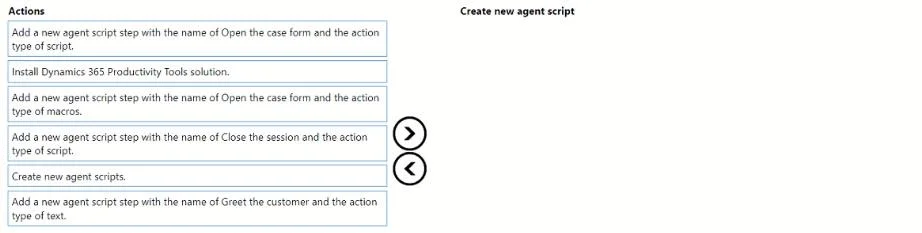
- Provide instructions for agents to use when processing book returns. The instructions must
include the following: o Greet the customer. o Automatically open the case form for the book return, o Close the session with the customer.
- Allow agents to use different channels such as short message service (SMS), social, and call
when providing service to customers.
- Enable a new text SMS channel for the agents.
- Improve the agents' capability to search using AI suggestions.
- Provide agents with real-time recommendations on similar cases and knowledge-base articles.
- Allow agents to know the customer’s point of view on the service.
- Provide a solution that will identify an agent's supervisor when a customer has a negative
experience.
- Improve how the agents' skills and profiles are maintained.
- Route calls to agents who can support French-speaking customers.
- Configure the French language as a skill for agents who support French-speaking customers.
- Provide access to the Omnichannel agent app and productivity tools for supervisors and agents.
- Provide the customer service supervisor with the ability to create agent scripts for Omnichannel
agents and a workstream for SMS. The customer service supervisor must also be able to edit an existing workstream.
- Provide the customer service supervisor with the ability to track sentiment in real time.
- Provide agents with AI suggestions on the recent contact that worked on similar cases.
Customer Service - Repairs The company has the following requirements for repair requests:
- Dispatchers must be able to track a technician and schedule jobs for technicians based on
availability.
- A dispatcher named UserA must be able to create a new view to display only unscheduled work
orders. The view must be displayed only when the work orders are open-unscheduled, and the substatus is ready to dispatch work orders.
- The technician dispatch team must be able to create a Schedule tab in the schedule board.
- Dispatchers must be able to track technicians' utilization by using personal color codes.
- The field technician's security role must be field service technician.
Issues The company reports the following issues:
- Agents spend most of their time doing repetitive tasks during support calls or chats.
- There is no guided process for agents to follow the steps when a customer calls for a book
return.
- Customer service managers are not able to provide real-time recommendations to customers
using AI suggestions.
- A new channel for SMS is not sending conversations to agents. Agents are required to answer
conversations manually.
- The company is not able to retain customers who have a negative experience with the customer
service agents.
- Agents are not able to use the schedule board to schedule repair work orders by using a custom
view.
- The skills and proficiency model are not defined for the agents. Calls from French-speaking
customers are not routed to the appropriate agents. Drag and Drop Question You need to create a new agent script for the agents. Which five actions should you recommend be performed in sequence? To answer, move the appropriate actions from the list of actions to the answer area and arrange them in the correct order. Answer:
Exhibit
Answer Area
Drag items
Unlock MB-230 to see the answer
You've previewed enough free MB-230 questions. Unlock MB-230 for full answers, explanations, the timed quiz mode, progress tracking, and the master PDF. Question stem and options stay visible so you can still see what's on the exam.