MB-230 · Question #410
Drag and Drop Question A customer has a Customer Service deployment. The customer needs to implement macros. You need to identify the security roles that are required to configure and use macros. Whic
The correct answer is Productivity tools administrator; Productivity tools user. Dynamics 365 Customer Service: Macros Security Roles The Two Requirements The question maps two tasks to two roles: | Requirement | Required Role | |---|---| | Configure macros | Productivity tools administrator | | Use macros | Productivity tools user | --- Why Each Role Goes Wh
Question
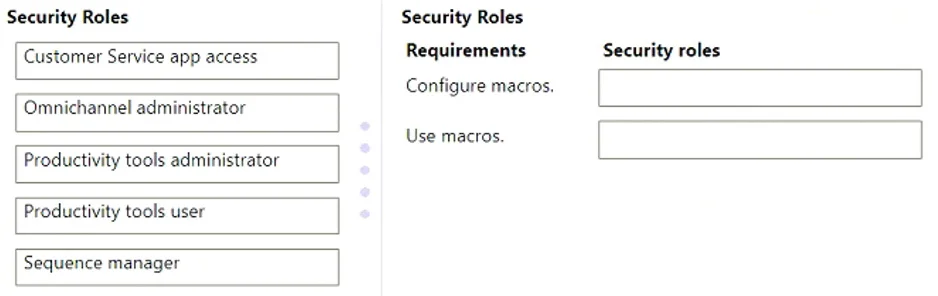
Drag and Drop Question A customer has a Customer Service deployment. The customer needs to implement macros. You need to identify the security roles that are required to configure and use macros. Which security roles are required? To answer, move the appropriate security roles to the correct requirements. You may use each security role once, more than once, or not at all. You may need to move the split bar between panes or scroll to view content. NOTE: Each correct selection is worth one point. Answer:
Exhibit
Answer Area
Drag items
Correct arrangement
- Productivity tools administrator
- Productivity tools user
Explanation
Dynamics 365 Customer Service: Macros Security Roles
The Two Requirements
The question maps two tasks to two roles:
| Requirement | Required Role |
|---|---|
| Configure macros | Productivity tools administrator |
| Use macros | Productivity tools user |
Why Each Role Goes Where
1. Productivity tools administrator → Configure macros
Macros in Dynamics 365 Customer Service are managed under the Productivity tools suite (alongside agent scripts and smart assist). The Productivity tools administrator role grants write/create/delete access to macro definitions in the admin interface. Without this role, a user cannot create, edit, or publish macros - they simply won't have the necessary table-level privileges.
2. Productivity tools user → Use macros
Agents who run macros during a session need the Productivity tools user role. This grants read/execute access to published macros and agent scripts at runtime. This role is assigned to frontline agents - it gives them the ability to trigger macros but not modify them.
Why the Other Roles Are Wrong
- Customer Service app access - Grants basic app entry, but has no macro-specific privileges. It's a prerequisite for the app, not for macros.
- Omnichannel administrator - Manages channels, queues, and routing rules. Macro configuration is outside its scope.
- Sequence manager - A Sales Insights/Sales Accelerator role entirely. Unrelated to Customer Service macros.
Common Mistakes
- Assuming
Omnichannel administratorcovers macros - it doesn't; macro management is a distinct Productivity tools concern. - Assigning only
Productivity tools administratorto agents and expecting them to run macros - configuration and usage require separate roles. - Overlooking that both roles may need to be assigned in addition to other roles (like Customer Service Representative) - they're additive, not standalone.
Topics
Community Discussion
No community discussion yet for this question.
