
MB-230 · Question #294
You are configuring Microsoft Teams chat integration for a custom model-driven application. Users report that they are unable to use the chat feature in the app. You determine that the capability…
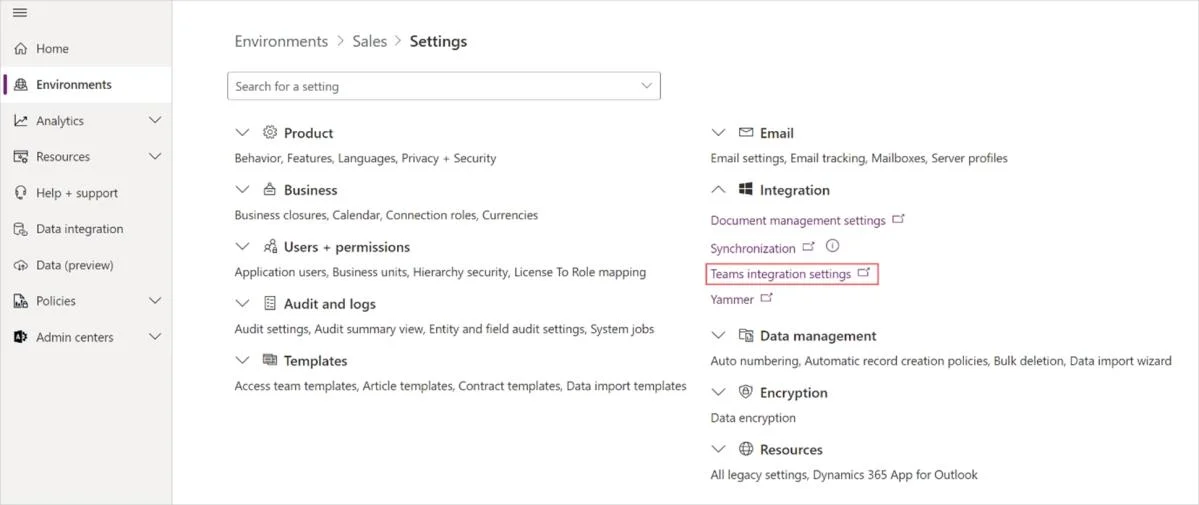
The correct answer is D. Microsoft Power Platform admin center. Enable Teams chat from Power Platform admin center 1. Sign in to Power Platform admin center. 2. Go to the Environments tab, select an environment in which you want to enable Teams chat. 3. On the Environments page, select Settings. 4. On the Settings page, expand Integration…
Question
You are configuring Microsoft Teams chat integration for a custom model-driven application. Users report that they are unable to use the chat feature in the app. You determine that the capability has not yet been enabled. You need to enable the functionality. Which area should you access to enable it?
Exhibit
Options
- AMaker Portal
- BMicrosoft Teams admin center
- CMicrosoft Dynamics 365 Customer Service admin center
- DMicrosoft Power Platform admin center
How the community answered
(26 responses)- A12% (3)
- B4% (1)
- C8% (2)
- D77% (20)
Explanation
Enable Teams chat from Power Platform admin center 1. Sign in to Power Platform admin center. 2. Go to the Environments tab, select an environment in which you want to enable Teams chat. 3. On the Environments page, select Settings. 4. On the Settings page, expand Integration, and then select Teams integration settings. 5. On the Microsoft Teams collaboration and chat page, turn on the Turn on Microsoft Teams chats inside Dynamics 365 toggle. 6. Save the changes. https://learn.microsoft.com/en-us/dynamics365/sales/teams-integration/enable-teams-chat
Topics
Community Discussion
No community discussion yet for this question.