
MB-230 · Question #279
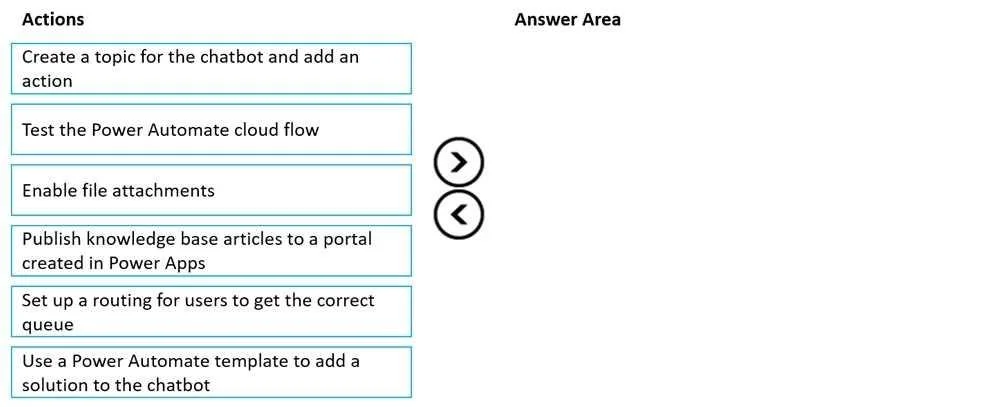
Drag and Drop Question A company wants to use Power Virtual Agents chatbots to enable customers to solve their own issues whenever possible. You create knowledge base articles. You must ensure that…
The correct answer is Publish knowledge base articles to a portal created in Power Apps; Create a topic for the chatbot and add an action; Use a Power Automate template to add a solution to the chatbot; Test the Power Automate cloud flow. Integration of Knowledge Management with Power Virtual Agents Overview The goal is to let customers self-serve by finding knowledge base articles through a chatbot. The four correct steps form a logical dependency chain: content must exist → chatbot must know what to ask →…
Question
Exhibit
Answer Area
Drag items
Correct arrangement
- Publish knowledge base articles to a portal created in Power Apps
- Create a topic for the chatbot and add an action
- Use a Power Automate template to add a solution to the chatbot
- Test the Power Automate cloud flow
Explanation
Integration of Knowledge Management with Power Virtual Agents
Overview
The goal is to let customers self-serve by finding knowledge base articles through a chatbot. The four correct steps form a logical dependency chain: content must exist → chatbot must know what to ask → automation must retrieve it → validate it works.
Step-by-Step Breakdown
Step 1: Publish knowledge base articles to a portal created in Power Apps
Why first: The chatbot can only surface content that is publicly accessible. Knowledge articles in Dynamics 365 Customer Service exist internally by default. Publishing them to a Power Apps portal (Power Pages) exposes them externally via an API that Power Automate can query. If articles aren't published to a portal, there is literally nothing for the chatbot to retrieve - all subsequent steps would fail or be pointless.
Step 2: Create a topic for the chatbot and add an action
Why second: With articles now accessible, you define the conversational flow inside Power Virtual Agents. A topic handles a specific customer intent (e.g., "I need help with billing"). Inside that topic, you add a Call an action node - a placeholder that will invoke a Power Automate flow. You create the topic structure before wiring in the flow because the action node is where you will later attach the flow created in Step 3.
Step 3: Use a Power Automate template to add a solution to the chatbot
Why third: Microsoft provides pre-built Power Automate templates specifically for searching Dynamics 365 knowledge articles. You select a template, configure it to query the published portal, and it generates a cloud flow that is packaged as a solution and exposed to the PVA action node you created in Step 2. This is the actual retrieval engine - it takes the user's query from the chatbot and returns matching articles.
Step 4: Test the Power Automate cloud flow
Why last: Once everything is wired together (articles published → topic created → flow configured), you run end-to-end tests to confirm the flow correctly retrieves and returns knowledge articles. Testing validates the entire integration; doing it earlier would test an incomplete or non-functional configuration.
Why the Other Items Are Excluded
| Item | Why excluded |
|---|---|
| Enable file attachments | For letting users upload files in chat - unrelated to knowledge base retrieval |
| Set up routing for users to get the correct queue | For escalating to human agents - this is post-deflection, not self-service knowledge retrieval |
Common Mistakes
- Publishing articles too late - Developers sometimes try to build the chatbot flow first, only to find there is no endpoint to call. Publishing must come first.
- Swapping Steps 2 and 3 - It feels natural to "build the automation first, then attach it." But in PVA, you define the conversational structure (topic + action node) before selecting/generating the flow to attach to that node.
- Confusing queue routing with knowledge integration - Queue routing is for human-agent escalation. Knowledge management is for avoiding escalation. These are separate workflows.
- Skipping the portal publish step - Assuming internal Dynamics 365 articles are automatically accessible to PVA. They are not; they require portal publication to be queryable externally.
Topics
Community Discussion
No community discussion yet for this question.