
MB-230 · Question #285
You are evaluating Copilot in Customer Service for a company that has a new environment. Copilot features are already enabled. The company requires use of the capabilities within model-driven Power…
The correct answer is D. Enable Copilot features for custom apps. Customer Service, Configure copilot features for custom case forms and custom apps You can configure the Copilot case summary on custom case forms and enable the Copilot features for custom apps. Display Copilot case summary on custom case forms When you enable the Copilot case…
Question
You are evaluating Copilot in Customer Service for a company that has a new environment. Copilot features are already enabled. The company requires use of the capabilities within model-driven Power Apps apps developed by the company, to display summary information regarding cases. Default Customer Service forms are used in each app. Users report that the functionality does not work as expected in the custom apps. You need to resolve the issue. What should you do?
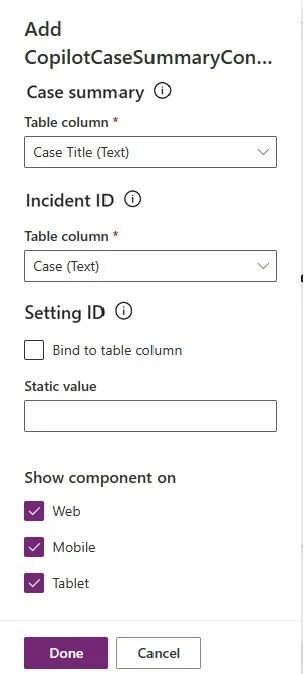
Exhibit
Options
- AAdd the CopilotCaseSummaryControl to the form.
- BAssign the Customer Service Representative security role.
- CEnable the Case summary Copilot AI feature.
- DEnable Copilot features for custom apps.
How the community answered
(50 responses)- A4% (2)
- B10% (5)
- C14% (7)
- D72% (36)
Explanation
Customer Service, Configure copilot features for custom case forms and custom apps You can configure the Copilot case summary on custom case forms and enable the Copilot features for custom apps. Display Copilot case summary on custom case forms When you enable the Copilot case summary feature, agents can see the case summary by default on out-of-the-box case forms. You can perform the following steps for the application to display the Copilot case summary on your custom case forms. 1. In Power Apps, add the msdyn_CopilotCaseSummaryLibrary.js web resource to your solution. Learn more in Add a web resource to a solution. 2. Select Add existing > More > Developer > Custom Control. 3. Search for and add the mscrmcontrols.csintelligence.copilotcasesummarycontrol custom 4. Select Tables, select Case, and then select Forms. 5. Create a new form or use an existing form. Learn more in Create, edit, or configure forms using the model-driven form designer. CopilotCaseSummaryControl and drag it on to the form. 7. Set the values of the following fields as: 8. Case Summary: Any unused string column. Copy the unique name of the specified column. 9. Incident ID: Case (Text) 10. Save and publish the customizations https://learn.microsoft.com/en-us/dynamics365/customer-service/administer/copilot-powerapps-
Topics
Community Discussion
No community discussion yet for this question.