MB-230 · Question #284
Drag and Drop Question A company uses Dynamic 365 Customer Service. The company asks you to create an application to assist customer service agents. The app must meet the following requirements: - Dis
The correct answer is Create a canvas app.; Configure SharePoint connector.; Add a form.; Add a gallery.. Explanation: Building a Canvas App for Dynamics 365 Customer Service Why These Four, In This Order --- Step 1: Create a canvas app Why canvas, not model-driven? The requirements contain two dead giveaways: "Align to brand guidelines" - Model-driven apps have a fixed Microsoft UI
Question
Drag and Drop Question A company uses Dynamic 365 Customer Service. The company asks you to create an application to assist customer service agents. The app must meet the following requirements:
- Display Case data from Customer Service and asset image data from the
online document repository of the company.
- Display image data within a scrollable gallery.
- Align to the brand guidelines of the company.
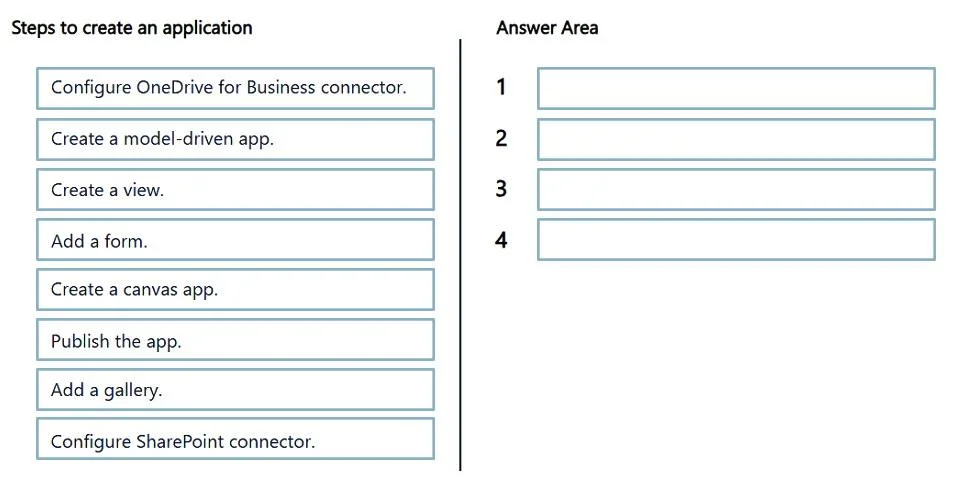
You need to build the app. Which four actions should you perform in sequence? To answer, move the appropriate actions from the list of actions to the answer area and arrange them in the correct order. Answer:
Exhibit
Answer Area
Drag items
Correct arrangement
- Create a canvas app.
- Configure SharePoint connector.
- Add a form.
- Add a gallery.
Explanation
Explanation: Building a Canvas App for Dynamics 365 Customer Service
Why These Four, In This Order
Step 1: Create a canvas app
Why canvas, not model-driven? The requirements contain two dead giveaways:
- "Align to brand guidelines" - Model-driven apps have a fixed Microsoft UI shell you cannot meaningfully customize. Canvas apps give you pixel-level control over layout, colors, fonts, and branding.
- Multiple heterogeneous data sources - Canvas apps natively connect to both Dynamics 365 (for Case data) and document repositories simultaneously. Model-driven apps are tightly coupled to Dataverse/Dynamics tables.
Common mistake: Choosing Create a model-driven app because the data comes from Dynamics 365. The data source doesn't dictate the app type - the UI requirements do.
Step 2: Configure SharePoint connector
Why SharePoint, not OneDrive for Business? The question says "online document repository of the company." In the Microsoft 365 ecosystem:
- SharePoint = enterprise/team document management (company repository)
- OneDrive for Business = individual personal cloud storage
You configure the connector second because you must have an app before you can add connectors to it, and the connector must be configured before you can bind it to a control.
Common mistake: Choosing Configure OneDrive for Business connector. OneDrive is personal storage, not a company repository. The distinction is tested deliberately here.
Step 3: Add a form
Why a form for Case data? A Form control in canvas apps is the standard way to display structured record data from a data source - in this case, Dynamics 365 Case records. It maps fields to a display layout automatically.
It comes before the gallery because:
- The form handles the primary business data (Cases from Dynamics 365)
- Logically, you lay out your primary data display before adding supplementary media content
Common mistake: Skipping the form and trying to use labels/text fields manually. The form control is the correct, efficient approach for displaying entity records.
Step 4: Add a gallery
Why a gallery last? The requirement explicitly states "scrollable gallery" - the Gallery control in canvas apps is built for exactly this: displaying a collection of items (images from SharePoint) in a scrollable, repeating layout. You bind it to the SharePoint connector configured in Step 2.
It comes last because:
- The connector (Step 2) must exist before the gallery can be bound to it
- The form (Step 3) handles the Dynamics data; the gallery layers on the image display
Why the Other Items Were Excluded
| Item | Why Excluded |
|---|---|
| Create a model-driven app | Cannot meet brand guideline requirements |
| Configure OneDrive for Business connector | Personal storage, not a company repository |
| Create a view | Views are a model-driven/Dataverse concept; irrelevant to canvas apps |
| Publish the app | A deployment step - the question asks how to build the app, not deploy it |
The Core Logic in One Sentence
You build a canvas app (for branding flexibility), connect it to SharePoint (the company repository, not OneDrive), add a form (for structured Dynamics Case data), and add a gallery (for scrollable image display from SharePoint) - in that dependency order.
Topics
Community Discussion
No community discussion yet for this question.
