nerdexam
Microsoft

MB-230 · Question #275

Drag and Drop Question A company is implementing Omnichannel for Customer Service. You must set up the system to minimize human error and automate actions. The requirements to set up the system are…

The correct answer is Productivity automation; Session connector; Omnichannel connector. Dynamics 365 Omnichannel Macro Types - Explained The Four Macro Types (Quick Reference) | Type | Purpose | |---|---| | Productivity automation | CRM record operations (create, update, open forms) | | Session connector | Agent workspace/tab management | | Omnichannel connector |…

implement multi-session experiences for Customer Service

Question

Drag and Drop Question A company is implementing Omnichannel for Customer Service. You must set up the system to minimize human error and automate actions. The requirements to set up the system are as follows: - Representatives must create a new support record when a customer contacts them through chat. - Knowledge base articles must open in a separate tab when representatives research answers. - When a knowledge base article resolves a customer issue, representatives must send the article to the customer via chat. You need to set up the macros. Which macro type should you use? To answer, drag the appropriate macro types to the correct requirements. Each macro type may be used once, more than once, or not at all. You may need to drag the split bar between panes or scroll to view content. NOTE: Each correct selection is worth one point. Answer:

Exhibit
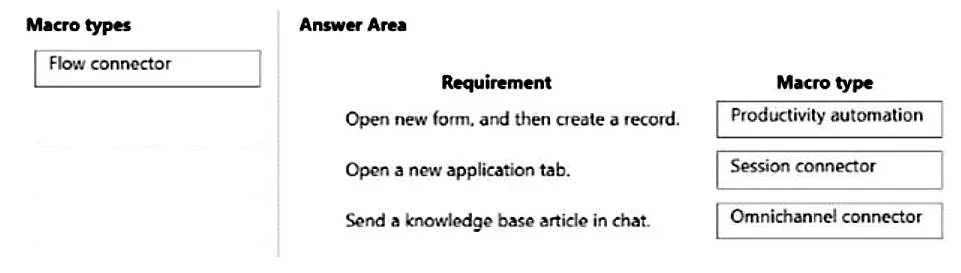
MB-230 question #275 exhibit

Answer Area

Drag items

Flow connectorSession connectorOmnichannel connectorProductivity automation

Correct arrangement

  • Productivity automation
  • Session connector
  • Omnichannel connector

Explanation

Dynamics 365 Omnichannel Macro Types - Explained

The Four Macro Types (Quick Reference)

TypePurpose
Productivity automationCRM record operations (create, update, open forms)
Session connectorAgent workspace/tab management
Omnichannel connectorActions sent through the communication channel (chat, SMS, etc.)
Flow connectorTriggers a Power Automate flow

Placement Breakdown

Requirement 1 → Productivity automation "Representatives must create a new support record when a customer contacts them via chat."

Creating a Case (support record) is a CRM data operation - it writes to Dataverse, not to the chat channel and not to a tab. Productivity automation covers actions like create record, update record, and open entity form. This is the correct type because the action is purely within the CRM layer.


Requirement 2 → Session connector "Knowledge base articles must open in a separate tab when representatives research answers."

Opening something in a new tab is a workspace/session-level action - it controls what the agent sees in their browser session, not what the customer sees. Session connector handles tab operations: open tab, focus tab, refresh tab. Nothing is sent to the customer here, so Omnichannel connector would be wrong.


Requirement 3 → Omnichannel connector "When a knowledge base article resolves a customer issue, representatives must send the article to the customer via chat."

Sending content to the customer through the chat channel is an Omnichannel connector action. This type interfaces directly with the live conversation channel. A common mistake here is choosing Productivity automation - but that only affects CRM records, not what gets sent over chat.


Common Mistakes

  • Confusing Session connector with Omnichannel connector: "Open in a tab" = session (agent's view); "Send to customer" = Omnichannel (customer's channel). The direction of the action is the key differentiator.
  • Using Flow connector by default for automation: Flow connector is specifically for triggering Power Automate flows - none of these three requirements call for an external flow.
  • Applying Productivity automation to the send-article step: Creating a record ≠ sending a chat message. Productivity automation never touches the communication channel.

Topics

#macros#Omnichannel#productivity automation#session connector

Community Discussion

No community discussion yet for this question.

Full MB-230 Practice