nerdexam
Microsoft

MB-230 · Question #276

Drag and Drop Question A company deploys Dynamics 365 Customer Service. The company plans to use IoT to collect information about manufacturing equipment. Work orders must be automatically generated w

The correct answer is Azure IoT Central; Azure IoT Hub; Power Automate. Connected Customer Service - Explanation This question tests knowledge of the Connected Customer Service (CCS) architecture in Dynamics 365, which integrates IoT signals with field service workflows. --- The Architecture (in order) 1. Azure IoT Central Role: Device management and

implement Connected Customer Service

Question

Drag and Drop Question A company deploys Dynamics 365 Customer Service. The company plans to use IoT to collect information about manufacturing equipment. Work orders must be automatically generated when malfunctions are detected to ensure that malfunctions are corrected quickly. You need to design a Connected Customer Service solution. What should you use? To answer, drag the appropriate implementation types to the correct requirements. Each implementation type may be used once, more than once, or not at all. You may need to drag the split bar between panes or scroll to view content. NOTE: Each correct selection is worth one point. Answer:

Exhibit
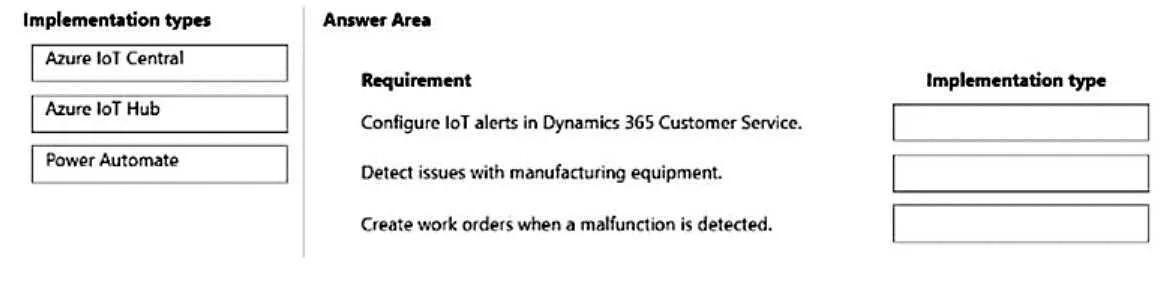
MB-230 question #276 exhibit

Answer Area

Drag items

Azure IoT CentralAzure IoT HubPower Automate

Correct arrangement

  • Azure IoT Central
  • Azure IoT Hub
  • Power Automate

Explanation

Connected Customer Service - Explanation

This question tests knowledge of the Connected Customer Service (CCS) architecture in Dynamics 365, which integrates IoT signals with field service workflows.


The Architecture (in order)

1. Azure IoT Central

Role: Device management and monitoring platform

IoT Central is a fully managed SaaS IoT application built on top of IoT Hub. It provides:

  • Device registration, templates, and dashboards with minimal coding
  • A built-in rules engine to detect anomalies (e.g., equipment malfunction thresholds)
  • Native integration with Dynamics 365 Connected Customer Service

Why it goes first: It's the customer-facing IoT management layer - the platform where devices are enrolled and monitored. It's the recommended starting point for CCS deployments that don't require deep custom development.


2. Azure IoT Hub

Role: Cloud messaging gateway / telemetry ingestion

IoT Hub is the underlying PaaS service that receives raw device-to-cloud messages. IoT Central is actually built on top of IoT Hub. When you need:

  • Custom data pipelines
  • Advanced routing of telemetry
  • More control over processing logic

Why it goes second: It represents the lower-level, more customizable alternative. In CCS, you choose either IoT Central or a direct IoT Hub integration depending on complexity needs. IoT Hub handles the raw message ingestion before any business logic runs.


3. Power Automate

Role: Automated workflow trigger for work order creation

Once an IoT alert is raised (by IoT Central or Hub), Power Automate acts as the automation bridge - it listens for the alert event and automatically creates a work order in Dynamics 365 Customer Service.

Why it goes third: It sits at the end of the pipeline, translating IoT signals into business actions. This is what fulfills the requirement: "work orders must be automatically generated when malfunctions are detected."


Common Mistakes

MisconceptionReality
Confusing IoT Central and IoT HubCentral is SaaS (managed, less code); Hub is PaaS (flexible, more code). Central is built on top of Hub.
Thinking IoT Hub creates work ordersIoT Hub only ingests telemetry - it has no business logic or Dynamics 365 awareness.
Skipping Power AutomateWork orders don't appear automatically; a flow must bridge the IoT alert to Dynamics 365.
Using Power Automate for device managementPower Automate handles workflows, not device registration or telemetry ingestion.

Summary Flow

Manufacturing Equipment
        ↓ telemetry
  Azure IoT Hub (raw ingestion)
        ↓ built on top
Azure IoT Central (device mgmt + anomaly rules)
        ↓ alert triggered
   Power Automate (workflow)
        ↓ creates
  Dynamics 365 Work Order

Topics

#Connected Customer Service#Azure IoT Central#Azure IoT Hub#Power Automate

Community Discussion

No community discussion yet for this question.

Full MB-230 Practice