MB-230 · Question #416
Drag and Drop Question You work for a company that installs residential security systems. The company uses Dynamics 365 Customer Service. The company wants to monitor all its installed devices. The…
The correct answer is IoT Hub; Logic Apps; Service bus queue. Connected Customer Service: Feature Placement Explained The Three Requirements and Their Answers --- Position 1 → IoT Hub Requirement: "A place for messages to flow back and forth for IoT messages" Why: Azure IoT Hub is purpose-built for bi-directional device communication…
Question
Drag and Drop Question You work for a company that installs residential security systems. The company uses Dynamics 365 Customer Service. The company wants to monitor all its installed devices. The company plans to deploy Connected Customer Service. The deployment must include the following:
- Provide a place for messages to flow back and forth for IoT messages
to the IoT hub.
- Automate a way to check for messages and open a case when an error is
detected.
- Provide a place for the back end to securely connect virtually with
the customers' alarms. You need to choose which feature to configure to ensure the Connected Customer Service works correctly. Which feature should you use? To answer, drag the appropriate features to the correct options. Each feature may be used once, more than once, or not at all. You may need to drag the split bar between panes or scroll to view content. NOTE: Each correct selection is worth one point. Answer:
Exhibit
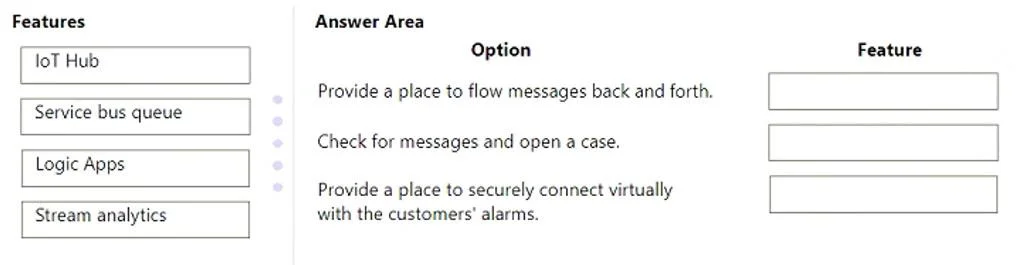
Answer Area
Drag items
Correct arrangement
- IoT Hub
- Logic Apps
- Service bus queue
Explanation
Connected Customer Service: Feature Placement Explained
The Three Requirements and Their Answers
Position 1 → IoT Hub Requirement: "A place for messages to flow back and forth for IoT messages"
Why: Azure IoT Hub is purpose-built for bi-directional device communication. Security alarm devices register with IoT Hub and send telemetry (device-to-cloud) while also receiving commands (cloud-to-device). It is literally the gateway that IoT devices talk through. Nothing else in the list handles direct device connectivity.
Position 2 → Logic Apps Requirement: "Automate a way to check for messages and open a case when an error is detected"
Why: Azure Logic Apps provides workflow automation with connectors. In Connected Customer Service, a Logic App polls the message stream, evaluates conditions (e.g., device reports an error), and then calls the Dynamics 365 connector to automatically create a case. It is the glue between Azure infrastructure and the CRM layer.
Position 3 → Service Bus Queue Requirement: "A place for the back end to securely connect virtually with customers' alarms"
Why: Azure Service Bus Queue is an enterprise messaging buffer. It decouples the backend systems from direct device connections, providing secure, reliable queuing. Backend services read from and write to the queue without needing a live connection to the alarm itself - this is the "virtual, secure" connection described.
Common Mistakes
| Mistake | Correction |
|---|---|
| Using Stream Analytics for case creation | Stream Analytics processes data streams for analytics/aggregation - it does not trigger CRM actions. Logic Apps does. |
| Swapping IoT Hub and Service Bus | IoT Hub faces the devices; Service Bus faces the backend. They serve different sides of the architecture. |
| Thinking Logic Apps is redundant if you have Stream Analytics | Stream Analytics can detect anomalies, but it cannot natively open a Dynamics 365 case - Logic Apps handles that integration. |
Architecture Flow (Mental Model)
Alarm Device → IoT Hub → Service Bus Queue → Logic Apps → Dynamics 365 Case
(device) (gateway) (secure buffer) (automation) (outcome)
Topics
Community Discussion
No community discussion yet for this question.
