MB-230 · Question #201
Drag and Drop Question A company uses Dynamics 365 Customer Service. The administrator enables in-app notifications. Agents observe notifications in the app but are unsure which behavior triggers them
The correct answer is Missed notification; Rejected work notification; Maximum number of sessions open. Dynamics 365 Customer Service: In-App Notifications Explained Context In Dynamics 365 Customer Service, in-app notifications alert agents about specific events tied to their work activity. Each notification type is triggered by a distinct agent behavior. --- Item-by-Item Breakdow
Question
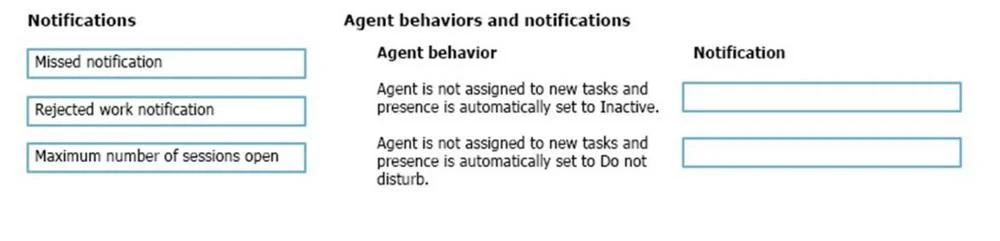
Drag and Drop Question A company uses Dynamics 365 Customer Service. The administrator enables in-app notifications. Agents observe notifications in the app but are unsure which behavior triggers them. You need to identify which notification will appear based on the activity of the agent. Which notification belongs to each behavior? To answer, move the appropriate notifications to the correct agent behaviors. You may use each notification once, more than once, or not at all. You may need to move the split bar between panes or scroll to view content. NOTE: Each correct selection is worth one point. Answer:
Exhibit
Answer Area
Drag items
Correct arrangement
- Missed notification
- Rejected work notification
- Maximum number of sessions open
Explanation
Dynamics 365 Customer Service: In-App Notifications Explained
Context
In Dynamics 365 Customer Service, in-app notifications alert agents about specific events tied to their work activity. Each notification type is triggered by a distinct agent behavior.
Item-by-Item Breakdown
1. Missed Notification
Trigger behavior: An agent receives an incoming work assignment but does not respond before the configured timeout expires.
- The routing engine sends the agent a pop-up/toast notification for a new conversation or case.
- If the agent ignores it and the timer runs out, a Missed notification appears to inform them the item was already reassigned or returned to queue.
- Key point: This is passive - no deliberate agent action causes it; inaction does.
2. Rejected Work Notification
Trigger behavior: An agent actively clicks Reject/Decline on an incoming work item.
- Unlike a missed notification, this requires a deliberate choice by the agent.
- After rejecting, the system notifies the agent with a Rejected work notification confirming the item was declined and rerouted.
- Key point: This is active - the agent explicitly refuses the assignment.
3. Maximum Number of Sessions Open
Trigger behavior: An agent attempts to accept a new work item but has already reached the session capacity limit set by the administrator.
- Dynamics 365 allows admins to cap concurrent sessions per agent.
- When that cap is hit and a new assignment arrives, the agent sees this notification explaining why they cannot accept more work.
- Key point: This is a capacity constraint notification, not a routing or acceptance decision.
Common Misconceptions
| Misconception | Clarification |
|---|---|
| Missed = same as Rejected | No - missed is timeout/inaction; rejected is deliberate refusal |
| Max sessions = a system error | No - it's expected behavior enforcing configured limits |
| These notifications alert supervisors | No - these are agent-facing; supervisors use separate dashboards |
Summary Table
| Agent Behavior | Notification |
|---|---|
| Timeout expires without response | Missed notification |
| Agent clicks Reject/Decline | Rejected work notification |
| Agent at session capacity gets new work | Maximum number of sessions open |
The arrangement is straightforward because each notification maps 1-to-1 to a unique agent state: inaction, deliberate rejection, or capacity overflow.
Topics
Community Discussion
No community discussion yet for this question.
