MB-230 · Question #183
Drag and Drop Question A company plans to enable Copilot in Dynamics 365 Customer Service for customer service agents. The company identifies the following scenarios where Copilot capabilities would…
The correct answer is Ask a Question; Case summary; Conversation summary. Dynamics 365 Copilot Feature Mapping - Explained The Three Requirements vs. Four Features | Requirement | Correct Feature | |---|---| | Pull info from company FAQ website to respond to customers | Ask a Question | | Extract/summarize a Knowledge article linked to a case | Case…
Question
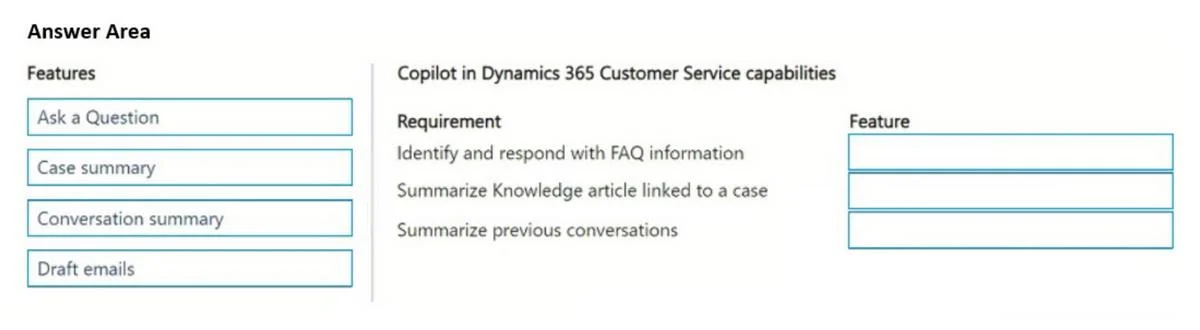
Drag and Drop Question A company plans to enable Copilot in Dynamics 365 Customer Service for customer service agents. The company identifies the following scenarios where Copilot capabilities would be advantageous:
- Automatically identify information from the FAQ website of the
company and include the information when responding to a customer.
- Extract and summarize information from a Knowledge article linked to
a case.
- Summarize previous interactions between a customer on a case.
You need to enable the Copilot capability for each requirement. Which features should you enable? To answer, move the appropriate features to the correct requirements. You may use each feature once, more than once, or not at all. You may need to move the split bar between panes or scroll to view content. NOTE: Each correct selection is worth one point. Answer:
Exhibit
Answer Area
Drag items
Correct arrangement
- Ask a Question
- Case summary
- Conversation summary
Explanation
Dynamics 365 Copilot Feature Mapping - Explained
The Three Requirements vs. Four Features
| Requirement | Correct Feature |
|---|---|
| Pull info from company FAQ website to respond to customers | Ask a Question |
| Extract/summarize a Knowledge article linked to a case | Case summary |
| Summarize previous customer interactions on a case | Conversation summary |
Individual Placement Explanations
1. Ask a Question → FAQ website / responding to customers
"Ask a Question" is the Copilot feature that lets agents pose natural-language questions to Copilot, which then searches configured external and internal knowledge sources - including company FAQ websites - and returns a synthesized answer the agent can use in their response. This is the only feature that actively queries configured web/knowledge sources on demand.
2. Case summary → Knowledge article linked to a case
"Case summary" generates a structured overview of a specific case, which includes content from linked knowledge articles, case notes, and key details. It doesn't search the web - it works within the scope of what's attached to the case record itself.
3. Conversation summary → Previous interactions on a case
"Conversation summary" is designed specifically to summarize conversation/chat history - prior interactions, messages, and exchanges between the agent and customer on a case. This gives agents context when picking up an ongoing or returned case.
Common Mistakes
- Confusing "Case summary" with "Conversation summary": Case summary is about the case record (notes, linked articles, metadata). Conversation summary is about the dialogue history (what was said). They sound similar but target different data.
- Using "Ask a Question" for knowledge articles: Ask a Question searches configured sources dynamically; it's not the right tool when the article is already linked to the case - that's Case summary's job.
- Draft emails is a distractor here. It helps compose email replies but doesn't address any of the three listed requirements.
Topics
Community Discussion
No community discussion yet for this question.
