nerdexam
Microsoft

MB-230 · Question #180

Drag and Drop Question A company uses Dynamics 365 Customer Service. Customer service agents must be able to connect individual cases to a Microsoft Teams channel, to enhance productivity and collabor

The correct answer is Assign the System Admin role.; Turn on Enhanced Microsoft Teams Integration.; Turn on linking of Dynamics 365 records to Microsoft Teams channels.. Dynamics 365 + Teams Channel Integration: Explanation The Core Goal Agents need to link a case record to a Teams channel - enabling team collaboration directly from a case. This requires three specific steps in a dependency chain. --- Why This Specific Order Step 1: Assign the Sy

implement multi-session experiences for Customer Service

Question

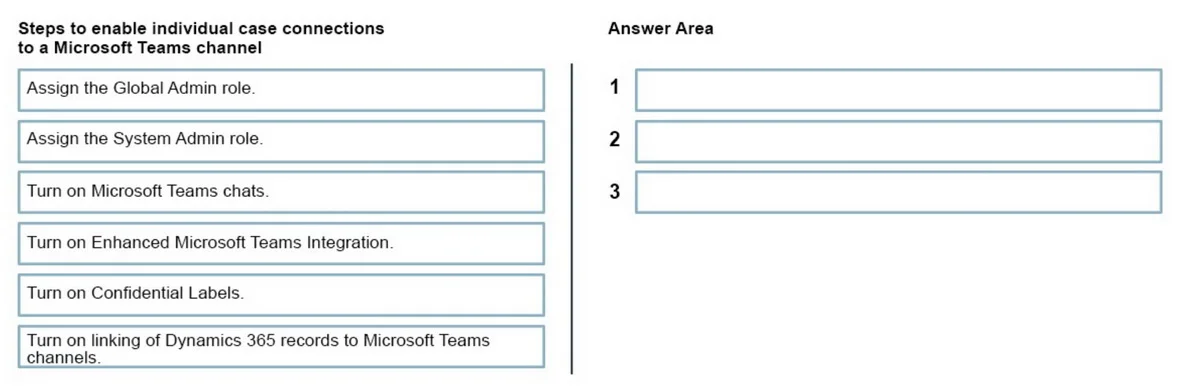
Drag and Drop Question A company uses Dynamics 365 Customer Service. Customer service agents must be able to connect individual cases to a Microsoft Teams channel, to enhance productivity and collaboration. You need to enable this capability for the customer service agents. Which three actions should you perform in sequence? To answer, move the appropriate actions from the list of actions to the answer area and arrange them in the correct order. Answer:

Exhibit
MB-230 question #180 exhibit

Answer Area

Drag items

Assign the Global Admin role.Assign the System Admin role.Turn on Microsoft Teams chats.Turn on Enhanced Microsoft Teams Integration.Turn on Confidential Labels.Turn on linking of Dynamics 365 records to Microsoft Teams channels.

Correct arrangement

  • Assign the System Admin role.
  • Turn on Enhanced Microsoft Teams Integration.
  • Turn on linking of Dynamics 365 records to Microsoft Teams channels.

Explanation

Dynamics 365 + Teams Channel Integration: Explanation

The Core Goal

Agents need to link a case record to a Teams channel - enabling team collaboration directly from a case. This requires three specific steps in a dependency chain.


Why This Specific Order

Step 1: Assign the System Admin role

Why first: You need Dynamics 365 administrative privileges before you can touch any integration settings. The System Admin role is the correct Dynamics 365 role that grants access to the Power Platform Admin Center and D365 settings.

Common mistake: Choosing Global Admin instead. Global Admin is a Microsoft 365 / Azure AD role. While it grants broad cloud permissions, it is not the Dynamics 365-specific role required to configure these settings. The exam is specifically testing Dynamics 365 administration.


Step 2: Turn on Enhanced Microsoft Teams Integration

Why second: This is the prerequisite feature that must be enabled before any record-to-channel linking is possible. Enhanced Integration replaces the basic Teams integration and unlocks the deeper embedding of Teams functionality within D365 records.

Common mistake: Skipping this and jumping straight to linking. The linking toggle simply won't be available without Enhanced Integration being on first - it's a dependency.


Step 3: Turn on linking of Dynamics 365 records to Microsoft Teams channels

Why third: This is the specific capability that lets agents associate an individual case with a Teams channel. It only becomes accessible after Enhanced Integration is enabled (Step 2). This is the direct answer to the business requirement.


Why the Discarded Items Are Wrong

ItemWhy Excluded
Global Admin roleWrong scope - this is an M365/Azure AD role, not a D365 admin role
Turn on Microsoft Teams chatsEnables embedded chat panels inside records (1:1/group chats), NOT channel linking - a key distinction
Turn on Confidential LabelsRelates to Microsoft Information Protection/sensitivity labeling; unrelated to Teams channel integration

Key Takeaway

The chain is: Right role → Enable the parent feature → Enable the child feature. Each step is blocked without the previous one being satisfied first.

Topics

#Microsoft Teams integration#Enhanced Teams Integration#Dynamics 365 records#Teams channels

Community Discussion

No community discussion yet for this question.

Full MB-230 Practice