nerdexam
Microsoft

MB-230 · Question #175

Drag and Drop Question An agent resolves a case for a customer by using Dynamics 365 Customer Service. The customer must receive a corporate feedback survey to describe how the experience was. All…

The correct answer is Start a survey from the Case form.; Select the feedback survey from the list of surveys.; Select the recipient, email template, and locale values.; Send the Customer Voice survey from Dynamics 365 solution. Sending a Customer Voice Survey After Case Resolution in Dynamics 365 The Correct Sequence 1. Start a survey from the Case form The process begins directly on the Case form - not from a separate Customer Voice portal or standalone menu. This is the correct entry point because…

Manage cases in Customer Service

Question

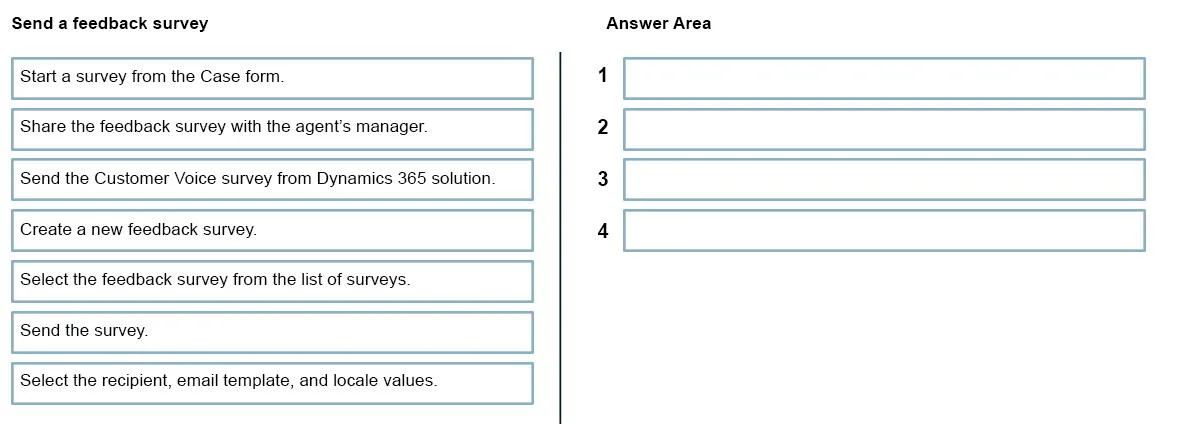
Drag and Drop Question An agent resolves a case for a customer by using Dynamics 365 Customer Service. The customer must receive a corporate feedback survey to describe how the experience was. All agents will have access to the survey. You need to send the survey. Which four actions should you perform in sequence? To answer, move the appropriate actions from the list of actions to the answer area and arrange them in the correct order. Answer:

Exhibit
MB-230 question #175 exhibit

Answer Area

Drag items

Start a survey from the Case form.Share the feedback survey with the agent's manager.Send the Customer Voice survey from Dynamics 365 solution.Create a new feedback survey.Select the feedback survey from the list of surveys.Send the survey.Select the recipient, email template, and locale values.

Correct arrangement

  • Start a survey from the Case form.
  • Select the feedback survey from the list of surveys.
  • Select the recipient, email template, and locale values.
  • Send the Customer Voice survey from Dynamics 365 solution.

Explanation

Sending a Customer Voice Survey After Case Resolution in Dynamics 365

The Correct Sequence

1. Start a survey from the Case form

The process begins directly on the Case form - not from a separate Customer Voice portal or standalone menu. This is the correct entry point because the survey must be contextually linked to the resolved case. Starting here ensures the survey is tied to the specific case record, which enables Dynamics 365 to auto-populate case-related data (customer info, case ID, etc.) into the survey invitation.

Common mistake: Agents might try to navigate to Customer Voice separately and send from there. That breaks the case association and is also the wrong workflow path for this scenario.


2. Select the feedback survey from the list of surveys

Once you initiate the survey process from the Case form, Dynamics 365 presents a list of available surveys. You pick the corporate feedback survey here. This step exists because an organization typically has multiple surveys (CSAT, NPS, product feedback, etc.) - you must identify the correct one.

Common mistake: Confusing this with "Create a new feedback survey." The scenario specifies the survey already exists and is shared with all agents, so creating a new one is incorrect and unnecessary.


3. Select the recipient, email template, and locale values

After choosing the survey, you configure the delivery details: who receives it (the customer), which email template wraps it, and the locale (language/region). This must happen before sending - it defines the how and to whom of the delivery.

Common mistake: Skipping straight to "Send" without configuring recipient/template/locale, which would result in an incomplete or failed send. These fields are required before the send action is available.


4. Send the Customer Voice survey from Dynamics 365 solution

The final action dispatches the configured survey to the customer. The phrasing "from Dynamics 365 solution" is intentional - it confirms the send happens within the integrated Dynamics 365 + Customer Voice workflow, not from a standalone email client.


Why the Distractors Are Wrong

DistractorWhy it's excluded
Share the feedback survey with the agent's managerThe scenario says all agents already have access - no sharing step is needed
Create a new feedback surveyThe survey already exists; creating a new one contradicts the scenario
Send the survey (generic)This is a vague duplicate of step 4; the correct answer specifies the Customer Voice send action from Dynamics 365

Key Takeaway

The sequence follows a contextual initiation → selection → configuration → execution pattern. Every step must be completed inside Dynamics 365 (not in Customer Voice directly) to maintain the case linkage and shared-access model described in the scenario.

Topics

#Customer Voice survey#case resolution#survey distribution#feedback management

Community Discussion

No community discussion yet for this question.

Full MB-230 Practice