MB-230 · Question #146
Drag and Drop Question A Dynamics 365 Customer Service organization uses routing rules to escalate cases. Security roles have not been modified or created. You need to modify the routing rule set that
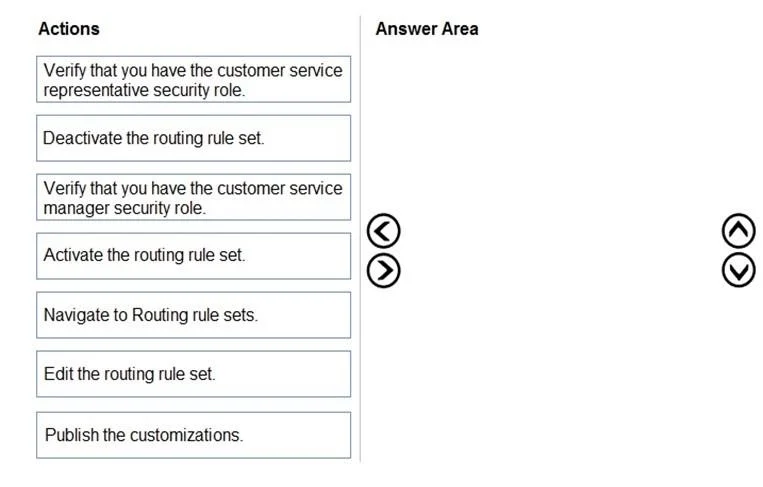
The correct answer is Verify that you have the customer service manager security role.; Navigate to Routing rule sets.; Deactivate the routing rule set.; Edit the routing rule set.; Activate the routing rule set.. Dynamics 365 Routing Rule Set - Question Explained --- Context In Dynamics 365 Customer Service, routing rule sets that are currently active are read-only. Modifying them requires a specific workflow: deactivate → edit → reactivate. Additionally, this task requires a specific sec
Question
Exhibit
Answer Area
Drag items
Correct arrangement
- Verify that you have the customer service manager security role.
- Navigate to Routing rule sets.
- Deactivate the routing rule set.
- Edit the routing rule set.
- Activate the routing rule set.
Explanation
Dynamics 365 Routing Rule Set - Question Explained
Context
In Dynamics 365 Customer Service, routing rule sets that are currently active are read-only. Modifying them requires a specific workflow: deactivate → edit → reactivate. Additionally, this task requires a specific security role.
Step-by-Step Breakdown
1. Verify that you have the customer service manager security role.
The Customer Service Manager role - not the Representative role - holds the out-of-box permissions to deactivate, edit, and activate routing rule sets. The question says roles have not been modified, so defaults apply. You verify your role first because if you don't have the right permissions, none of the subsequent steps will work. This also satisfies least privilege: you confirm you're using exactly the role required - no more.
Common mistake: Choosing the Customer Service Representative role. CSR cannot manage routing rule sets by default. The distractor item exists specifically to test this.
2. Navigate to Routing rule sets.
Once you've confirmed permissions, you locate the routing rule set. This must come after the role check - you don't navigate first and then realize you lack access.
3. Deactivate the routing rule set.
Active routing rule sets are locked for editing in Dynamics 365. The system enforces this - the Edit button is effectively unavailable on an active rule set. Deactivation takes it offline temporarily so changes can be made.
Common mistake: Trying to edit before deactivating. The UI will not allow direct edits to an active set.
4. Edit the routing rule set.
Now that the rule set is inactive, you can modify the routing rules. This step only works after deactivation.
5. Activate the routing rule set.
After editing, you reactivate the rule set so the system resumes using it to route cases. Leaving it deactivated means no automatic routing occurs.
Why the Two Excluded Items Are Wrong
| Excluded Item | Why It's Wrong |
|---|---|
| Verify CSR security role | CSR lacks permission to manage routing rule sets. Choosing this role means you couldn't complete the task at all. |
| Publish the customizations | Publishing applies to metadata (entities, fields, forms). Routing rule sets are data records, not customizations - no publish step is needed. |
Key Principle
The whole sequence reflects a standard Dynamics 365 constraint: active records of certain types are immutable. The deactivate → edit → activate pattern appears repeatedly across Dynamics 365 (SLAs, routing rules, entitlements), so recognizing it is essential.
Topics
Community Discussion
No community discussion yet for this question.