
70-663 · Question #48
Your network contains two subnets named Subnet1 and Subnet2. Subnet1 contains all company servers. Subnet2 contains all client computers. Subnet1 and Subnet2 are separated by a firewall. Some client…
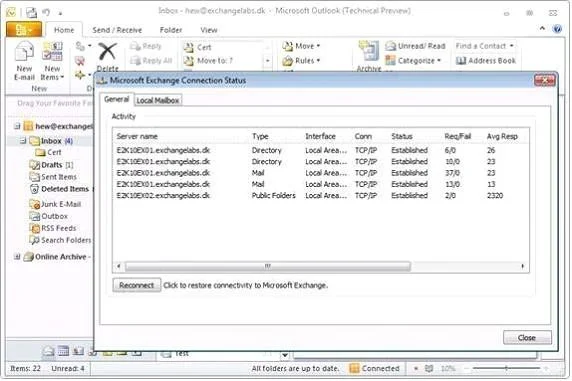
The correct answer is C. Open TCP ports 80 and 443 from the client subnet to Server3. "RPC Client access service" in the Mailbox server is used for only public folder access. When the outlook client queries for Public folders, it directly connects to the PF server (You can view it by checking the "Connection status" from outlook). This request is taken care of…
Question
Your network contains two subnets named Subnet1 and Subnet2. Subnet1 contains all company servers. Subnet2 contains all client computers. Subnet1 and Subnet2 are separated by a firewall. Some client computers connect by using Outlook Any where and some client computers connect by using MAP1. You plan to deploy the Exchange Server 2010 servers shown in the following table. You need to ensure that users can access their mailboxes and public folders by using Microsoft Office Outlook. What should you configure on the firewall?
Exhibit
Options
- AOpen TCP ports, 80, 443, 135 and 1024 to 65535 from the client subnet to Server3.
- BOpen TCP ports 80, 135 and 1024 to 65535 from the client subnet to Server1.
- COpen TCP ports 80 and 443 from the client subnet to Server3.
- DOpen TCP ports 441, 135, and 1024 to 65535 from the client subnet to Server1.
How the community answered
(31 responses)- A10% (3)
- B3% (1)
- C81% (25)
- D6% (2)
Explanation
"RPC Client access service" in the Mailbox server is used for only public folder access. When the outlook client queries for Public folders, it directly connects to the PF server (You can view it by checking the "Connection status" from outlook). This request is taken care of by the "RPC Client access service" in the mailbox server. In Exchange Server 2010 the Client Access server role was expanded to include a new service called the RPC Client Access Service. This service allows Outlook clients to connect via MAPI/RPC to the Client Access server for mailbox access, however they do still connect directly to mailbox servers for public folder access. Outlook clients inside your firewall access the Client Access server to send and retrieve messages. Outlook clients outside the firewall can access the Client Access server by using Outlook Anywhere (which uses RPC over HTTP). However, Outlook clients that are viewing or modifying public folders access the Client Access server by using RPC over TCP. By default the RPC Client Access service on an Exchange 2010 Client Access server uses the TCP End Point Mapper port (TCP/135) and the dynamic RPC port range (6005-59530) for outgoing connections, every time an Outlook clients establish a connection to Exchange. Connections to CAS: Autodiscover, OAB, Availability, Exchange ActiveSync (mobile), Outlook web app, Outlook anywhere access, POP/IMAP and now on top of all this now all Outlook users connect to CAS server too. The RPC Client Access Service utilizes the TCP port 135 EndPointMapper on an Exchange 2010 server. This behavior is by design. This port should be open along with the dynamic RPC range TCP 1024-65535 between your internal client network and the CAS Server or arrays and your Mailbox servers.
Topics
Community Discussion
No community discussion yet for this question.