
70-663 · Question #213
Your network contains an Active Directory domain named contoso.com. All domain controllers run Windows Server 2008 R2. The network contains two Active Directory sites named Los Angeles and San…
The correct answer is F. From the Exchange Management Console (EMC), enable Windows Integrated. The light version of OWA is available by default and can be used by anyone who checks the box to use the light version when logging in. To prevent users from being prompted for a password all you have to do is enable Windows Integrated Authentication on Server2. You can…
Question
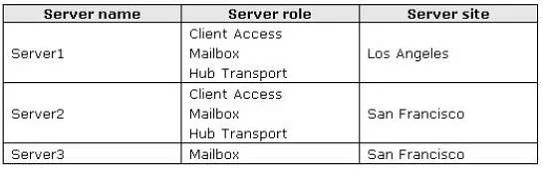
Your network contains an Active Directory domain named contoso.com. All domain controllers run Windows Server 2008 R2. The network contains two Active Directory sites named Los Angeles and San Francisco. All traffic to and from the Internet is routed through Los Angeles. You have an Exchange Server 2010 Service Pack 1 (SP1) organization that contains three servers. The servers are configured as shown in the following table. Server1 has Windows Integrated Authentication enabled for the default OWA virtual directory. You need to configure the Exchange environment to meet the following requirements.
- Ensure that users can access their mailbox from the Internet by using
the light version of Outlook Web App.
- Prevent users from being prompted for a username and a password when
they connect to Outlook Web App from a domain-joined client computer on the internal network. What should you do? (Choose all that apply.)
Exhibit
Options
- AFrom the Exchange Management Console (EMC), enable Windows Integrated
- BFrom the Exchange Management Console (EMC) on Server1, enable forms-based
- CCreate a new OWA virtual directory named OWA2 on Server1.
- DFrom Internet Information Services (IIS) Manager on Server2, enable forms-based
- EFrom Internet Information Services (IIS) Manager on Server1, enable forms-based
- FFrom the Exchange Management Console (EMC), enable Windows Integrated
How the community answered
(38 responses)- A3% (1)
- B8% (3)
- C16% (6)
- D3% (1)
- F71% (27)
Explanation
The light version of OWA is available by default and can be used by anyone who checks the box to use the light version when logging in. To prevent users from being prompted for a password all you have to do is enable Windows Integrated Authentication on Server2. You can configure Integrated Windows authentication for Outlook Web App in Microsoft Exchange Server 2010. Integrated Windows authentication enables the server to authenticate users who are signed in to the network without prompting them for their user name and password and without transmitting information that isn't encrypted over the network.
Topics
Community Discussion
No community discussion yet for this question.