
70-663 · Question #63
You have an Exchange Server 2007 organization. All users connect to mailboxes by using Microsoft Office Outlook 2003. You plan to transition the organization to Exchange Server 2010. You need to…
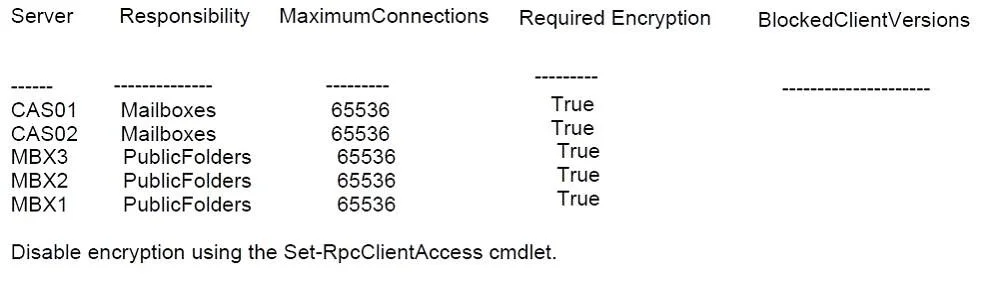
The correct answer is D. Implement Outlook Anywhere and modify the Outlook RPC encryption settings. If you use Outlook 2003 with Exchange Server 2010 you must disable RPC encryption on the [PS] C:\Windows\system32>Get-RpcClientAccess There are three main tasks to deploy Outlook Anywhere in an Exchange environment: Enable and configure Outlook Anywhere on the Client Access…
Question
You have an Exchange Server 2007 organization. All users connect to mailboxes by using Microsoft Office Outlook 2003. You plan to transition the organization to Exchange Server 2010. You need to recommend a solution for mailbox access that meets the following requirements:
- Minimize support costs
- Minimize software costs
- Provide access to Public folders
What should you recommend?
Exhibit
Options
- AImplement POP3 and IMAP4 access
- BImplement Personal Archive and forms-based authentication
- CImplement Autodiscover and upgrade all client computers to Outlook 2010
- DImplement Outlook Anywhere and modify the Outlook RPC encryption settings
How the community answered
(33 responses)- A15% (5)
- B3% (1)
- C6% (2)
- D76% (25)
Explanation
If you use Outlook 2003 with Exchange Server 2010 you must disable RPC encryption on the [PS] C:\Windows\system32>Get-RpcClientAccess There are three main tasks to deploy Outlook Anywhere in an Exchange environment: Enable and configure Outlook Anywhere on the Client Access server Configure the perimeter firewall to allow SSL/HTTPS connections from external networks to the Client Access server Configure the Outlook clients to use Outlook Anywhere when connecting from remote networks
Topics
Community Discussion
No community discussion yet for this question.