
70-663 · Question #185
A corporate environment includes Exchange Server 2007 SP2 and an Active Directory Domain Services (AD DS) domain named contoso.com. The Client Access server, cas01.contoso.com, has an SSL…
The correct answer is A. Set the Client Access server AutoDiscoverServiceInternalUri property to. Exchange 2010 publishes the AutoDiscoverServiceInternalUri in AD as soon as you install the Outlook clients look for this property in AD and poll Autodiscover to check that there settings are correct. You are getting the certificate errors because the clients are seeing the new…
Question
A corporate environment includes Exchange Server 2007 SP2 and an Active Directory Domain Services (AD DS) domain named contoso.com. The Client Access server, cas01.contoso.com, has an SSL certificate. The SSL certificate includes mail.contoso.com and autodiscover.contoso.com. Outlook Anywhere is disabled. Client computers run Microsoft Office Outlook 2007. After you transition the Exchange Server environment to Exchange Server 2010, Outlook displays a warning message indicating that the SSL certificate is not trusted for connections to cas01.contoso.com. You need to recommend an approach to resolving the problem. What should you recommend?
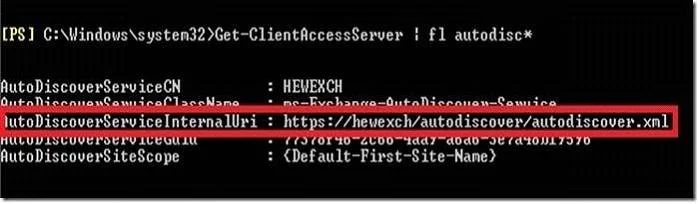
Exhibit
Options
- ASet the Client Access server AutoDiscoverServiceInternalUri property to
- BSet the Client Access server array FQDN property to mail.contoso.com.
- CSet the Autodiscover virtual directory ExternalUrl property to autodiscover.contoso.com.
- DSet the Autodiscover virtual directory InternalUrl property to mail.contoso.com.
How the community answered
(25 responses)- A76% (19)
- B16% (4)
- C4% (1)
- D4% (1)
Explanation
Exchange 2010 publishes the AutoDiscoverServiceInternalUri in AD as soon as you install the Outlook clients look for this property in AD and poll Autodiscover to check that there settings are correct. You are getting the certificate errors because the clients are seeing the new servers but cannot check their settings. To configure the servers run the following: Set-ClientAccessServer -AutoDiscoverServiceInternalUri: https://CasArrayName.domain.com/ Autodiscover/Autodiscover.xml Check the AutoDiscoverServiceInternalUri with the following command: Get-ClientAccessServer | ft Identity,AutoDiscoverServiceInternalUri
Topics
Community Discussion
No community discussion yet for this question.