
70-663 · Question #124
A corporate environment includes Exchange Server 2010 and Active Directory Domain Services (AD DS). You need to recommend a solution for preventing a specific group of users from changing their AD…
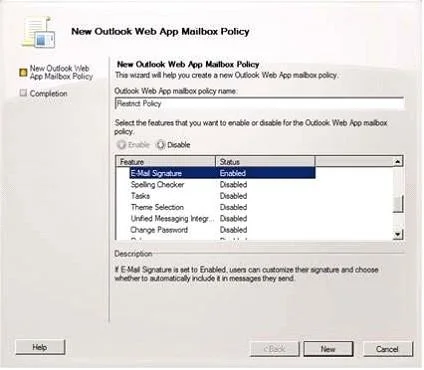
The correct answer is A. Create a new Outlook Web App mailbox policy. Use Microsoft Office Outlook Web App mailbox policies to create organization-level policies to manage access to features in Outlook Web App. Outlook Web App mailbox policies allow you to create multiple policies at the organization level and apply them to individual mailboxes…
Question
A corporate environment includes Exchange Server 2010 and Active Directory Domain Services (AD DS). You need to recommend a solution for preventing a specific group of users from changing their AD DS passwords in Outlook Web App (OWA). The solution must not affect other users. What should you recommend?
Exhibit
Options
- ACreate a new Outlook Web App mailbox policy
- BConfigure the authentication settings on the OWA virtual directory
- CConfigure OWA virtual directory segmentation
- DCreate a new managed folder mailbox policy
How the community answered
(46 responses)- A74% (34)
- B4% (2)
- C9% (4)
- D13% (6)
Explanation
Use Microsoft Office Outlook Web App mailbox policies to create organization-level policies to manage access to features in Outlook Web App. Outlook Web App mailbox policies allow you to create multiple policies at the organization level and apply them to individual mailboxes. Then Policy is applied to a user/group. In general there are several ways to impact Password change feature: You can enable or disable the Change Password feature for a single user by configuring the user's mailbox, or For multiple users by configuring the /owa virtual directory. You can enable or disable the Change Password feature by using segmentation. Segmentation is a method of customization for OWA. With segmentation, an administrator simply controls which components of OWA are visible to the end user. Many enterprises want their users to have access to the full range of functionality through the OWA client. However, some users might require only a limited set of features to complete their daily duties. To configure segmentation right-click the OWA site and select Properties. The Segmentation tab lists the userlevel OWA components that can be toggled on and off for users of the Client Access Exchange Server 2010 introduces OWA mailbox policies. These policies allow administrators to apply segmentation selections to individual users or groups of users, rather than to everyone who connects to OWA on a specific Client Access server. Even though the feature includes "mailbox" in its name, these policies are technically not applied to mailboxes but rather to the web application that's used to access mailbox data. When the Client Access server role is installed, a default OWA mailbox policy is put in place. By default, all the listed, segmentable features are enabled in the default policy.
Topics
Community Discussion
No community discussion yet for this question.