
70-663 · Question #139
A corporate environment includes an on-premise deployment of Exchange Server 2010 SP1 and client computers that run Microsoft Outlook 2010. An Active Directory Domain Services (AD DS) domain named…
The correct answer is C. Create a new Autodiscover virtual directory. There are two domains: contoso.com and cloud.contoso.com. So there are two SMTP name spaces. When the client tries to connect to your Microsoft Exchange messaging environment, the client locates the Autodiscover service on the Internet by using the right side of the user's…
Question
A corporate environment includes an on-premise deployment of Exchange Server 2010 SP1 and client computers that run Microsoft Outlook 2010. An Active Directory Domain Services (AD DS) domain named contoso.com contains user accounts for all employees. The company plans to move the mailboxes of the Sales team members to a cloud-based Exchange Server 2010 SP1 service provider. Sales team members will have primary email addresses of contoso.com and secondary email addresses of cloud.contoso.com. You need to recommend a solution for ensuring that the Autodiscover service continues to configure Outlook for all users. What should you recommend?
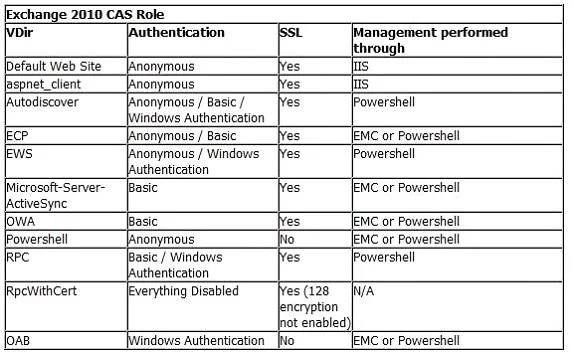
Exhibit
Options
- ARun the Export-AutoDiscoverConfig cmdlet.
- BMail-enable the on-premise AD DS user accounts of the Sales team members with email
- CCreate a new Autodiscover virtual directory.
- DConfigure the ExternalUrl property of the Autodiscover virtual directory to autodiscover.cloud.
How the community answered
(30 responses)- A3% (1)
- B7% (2)
- C73% (22)
- D17% (5)
Explanation
There are two domains: contoso.com and cloud.contoso.com. So there are two SMTP name spaces. When the client tries to connect to your Microsoft Exchange messaging environment, the client locates the Autodiscover service on the Internet by using the right side of the user's e-mail address that was entered. Notice that, for the Autodiscover service to function correctly, this must be the user's primary The Autodiscover service URL will be either of the following URLs: https://<smtp-address-domain>/autodiscover/autodiscover.xml https://autodiscover.<smtp-address-domain>/autodiscover/autodiscover.xml. For on-premise users to use the autodiscover service (where a user's mailbox resides on- premise) there needs to be an A host record (other options are available, see the white paper ) created in external DNS that points to the externally facing IP address of the configured listener on TMG for example(for more details on publishing Exchange 2010 with UAG and TMG please see the following white paper - For user's who have a mailbox located in O365 there needs to be a CNAME record created for the service address space office365.company.com that points to autodiscover.outlook.com. Example-autodiscover.office365.company.com ->; autodiscover.outlook.com When an on- premise mailbox is migrated to O365 their on-premise TargetAddress attribute will be updated to point to office365.company.com service namespace. Therefore when a user's mailbox has been migrated to Office365 and Outlook attempts to autodiscover, Exchange will return the TargetAddress back to the user and Outlook will then lookup the autodiscover service at office365.company(which in turn points to O365) and will create the profile. See the diagram below for the process flow. About Autodiscover: Autodiscover service provides the following information to the client: The user's display name Separate connection settings for internal and external connectivity The location of the user's Mailbox server The URLs for various Outlook features that govern functionality such as free/busy information, Unified Messaging, and the offline address book Outlook Anywhere server settings When a user's Exchange information is changed, Outlook automatically reconfigures the user's profile using the Autodiscover service. For example, if a user's mailbox is moved or the client can't connect to the user's mailbox or to available Exchange features, Outlook will contact the Autodiscover service and automatically update the user's profile to include the information that's required to connect to the mailbox and Exchange features. For external access, or using DNS, the client locates the Autodiscover service on the Internet by using the primary SMTP domain address from the user's e-mail address. New-AutodiscoverVirtualDirectory -Websitename <websitename>-BasicAuthentication:$true- WindowsAuthentication:$true
Topics
Community Discussion
No community discussion yet for this question.