
70-663 · Question #140
A corporate environment includes Exchange Server 2010 SP1 and an Active Directory Domain Services (AD DS) domain. Client computers run Microsoft Outlook 2010. You need to recommend an approach for…
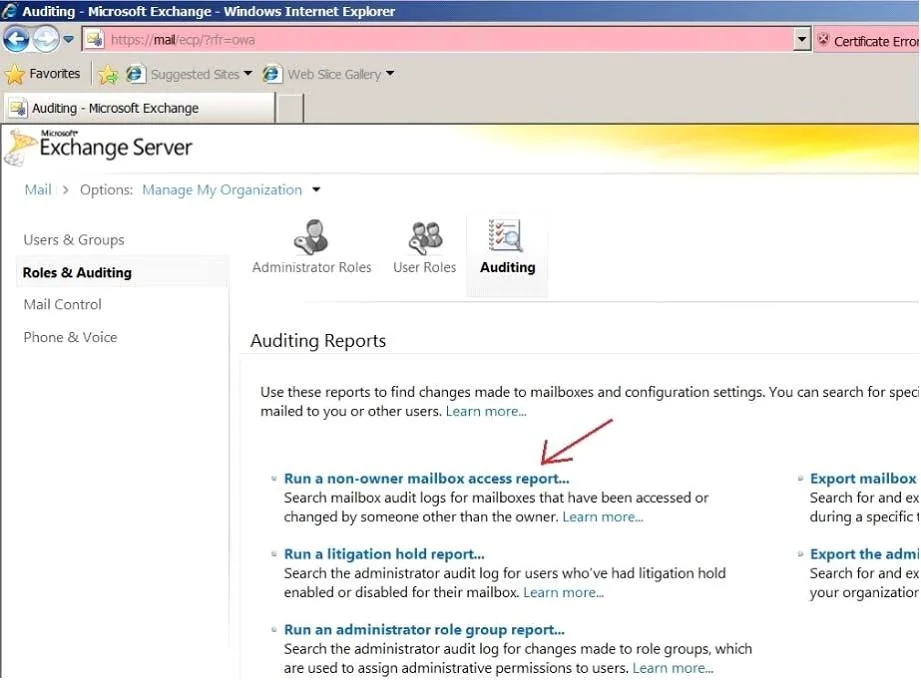
The correct answer is A. Run a report from the Exchange Control Panel (ECP). The Non-Owner Mailbox Access Report in the Exchange Control Panel lists the mailboxes that have been accessed by someone other than the person who owns the mailbox. You have to enable mailbox audit logging for each mailbox that you want to run a non- owner mailbox access report…
Question
A corporate environment includes Exchange Server 2010 SP1 and an Active Directory Domain Services (AD DS) domain. Client computers run Microsoft Outlook 2010. You need to recommend an approach for identifying when a mailbox is accessed by someone other than the mailbox owner. What should you recommend?
Exhibit
Options
- ARun a report from the Exchange Control Panel (ECP).
- BRun the Get-LogonStatistics cmdlet.
- CSearch the message tracking logs.
- DRun the Search-AdminAuditLog cmdlet.
How the community answered
(21 responses)- A81% (17)
- B5% (1)
- C10% (2)
- D5% (1)
Explanation
The Non-Owner Mailbox Access Report in the Exchange Control Panel lists the mailboxes that have been accessed by someone other than the person who owns the mailbox. You have to enable mailbox audit logging for each mailbox that you want to run a non- owner mailbox access report for. If mailbox audit logging isn't enabled, you won't get any results when you run a report. To enable mailbox audit logging for a single mailbox, run the following Windows PowerShell command: Set-Mailbox "Florence Flipo" -AuditEnabled $true
Topics
Community Discussion
No community discussion yet for this question.