
Microsoft
70-178 · Question #55
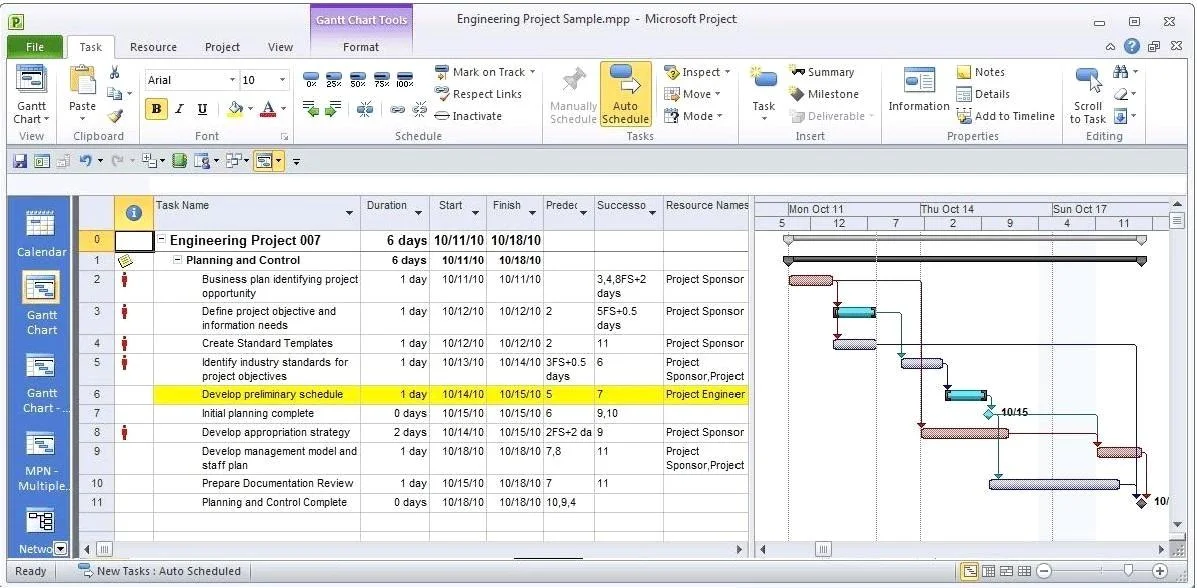
You manage a project according to the schedule as shown in the exhibit. (Click the Exhibit button.) You need to set the Task Mode for task 4 to be the same as task 6. What should you do?
Sign in or unlock 70-178 to reveal the answer and full explanation for question #55. The question stem and answer options stay visible for context.
Planning a Project
Question
You manage a project according to the schedule as shown in the exhibit. (Click the Exhibit button.) You need to set the Task Mode for task 4 to be the same as task 6. What should you do?
Exhibit
Options
- ACreate a task dependency from Task 4 to Task 6.
- BSet Task 4 as critical.
- CAdd a 1 day lead to Task 4.
- DSet Task 4 as manually scheduled.
Unlock 70-178 to see the answer
You've previewed enough free 70-178 questions. Unlock 70-178 for full answers, explanations, the timed quiz mode, progress tracking, and the master PDF. Question stem and options stay visible so you can still see what's on the exam.
Topics
#task mode#manual scheduling#auto scheduled#task settings