
300-510 · Question #246
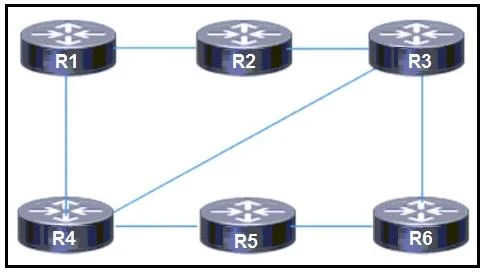
Refer to the exhibit. IS-IS is the IGP for the network, where routers R1, R2, R3, and R4 are Level 1 routers in Area 12 and routers R5 and R6 are Level 2 routers in area 16. According to the network…
The correct answer is D. Configure routers R5 and R6 as Level 1/2 routers. Option D resolves the issue because when R5 and R6 are configured as Level 2-only routers, their specific routes exist exclusively in the L2 topology database - L1 routers in Area 12 cannot learn them as specific prefixes and instead rely on a default route injected by the…
Question
Refer to the exhibit. IS-IS is the IGP for the network, where routers R1, R2, R3, and R4 are Level 1 routers in Area 12 and routers R5 and R6 are Level 2 routers in area 16. According to the network design, router R1 must send traffic to R6 using R4 as its next hop. To meet the requirement, a network engineer configured route filtering on R2 to prevent the route to R6 from being advertised from R2. However, R1 is still using R2 as the next hop. Which action must the engineer take to resolve the issue?
Exhibit
Options
- AMove all routers into the same IS-IS area.
- BDisable wide area metrics and use only cost to perform the route manipulation.
- CManipulate link costs to provide the desired routing through R4.
- DConfigure routers R5 and R6 as Level 1/2 routers.
How the community answered
(32 responses)- A31% (10)
- B16% (5)
- C6% (2)
- D47% (15)
Explanation
Option D resolves the issue because when R5 and R6 are configured as Level 2-only routers, their specific routes exist exclusively in the L2 topology database - L1 routers in Area 12 cannot learn them as specific prefixes and instead rely on a default route injected by the nearest Level 1/2 border router. Because R1 is routing toward R6 via a default route (not a specific prefix), filtering that specific prefix on R2 has no effect - R1 still follows the default route, which may still prefer R2. Configuring R5 and R6 as Level 1/2 enables IS-IS route leaking, allowing their specific prefixes to be redistributed into the L1 area, where the filtering on R2 can then actually suppress R1's knowledge of the route through R2, forcing R1 to prefer R4.
Why the distractors are wrong:
- A - Collapsing everything into one area destroys the hierarchical design and is unnecessary; the real issue is route visibility across levels, not area separation.
- B - Wide vs. narrow metrics affect the metric values carried in LSPs, not whether L2 routes are visible to L1 routers; metric type is irrelevant to this filtering problem.
- C - Cost manipulation could shift path preference for the default route globally, but it can't surgically control routing to a specific L2 destination when no specific route exists in the L1 area.
Memory tip: Think "L1 is blind to L2 specifics - it only sees a default exit." If you need to filter or manipulate a specific L2 destination within an L1 area, you must first make that route visible as a specific prefix via L1/2 route leaking - otherwise you're filtering a route that was never there.
Topics
Community Discussion
No community discussion yet for this question.