
300-440 · Question #81
Drag and Drop Question Drag and drop the commands from the bottom onto the blanks where the code is missing in the configuration to complete the Cloud onRamp for SaaS over SIG tunnels and enable…
The correct answer is sla-class cisco_class latency 10; sla-class cisco_class preferred-color biz-internet; app-route-policy cisco_route_policy; ip sdwan route vrf 1 192.168.0.1 service sig; ip nbar protocol-discovery; ip nbar protocol-discovery; ip nbar protocol-discovery. Cloud onRamp for SaaS over SIG - Drag-and-Drop Explained Overview of What's Being Configured This configuration builds three logical layers: 1. SLA policy - defines path quality requirements 2. Routing directives - steers traffic to the SIG tunnel 3. NBAR discovery - enables…
Question
Exhibit
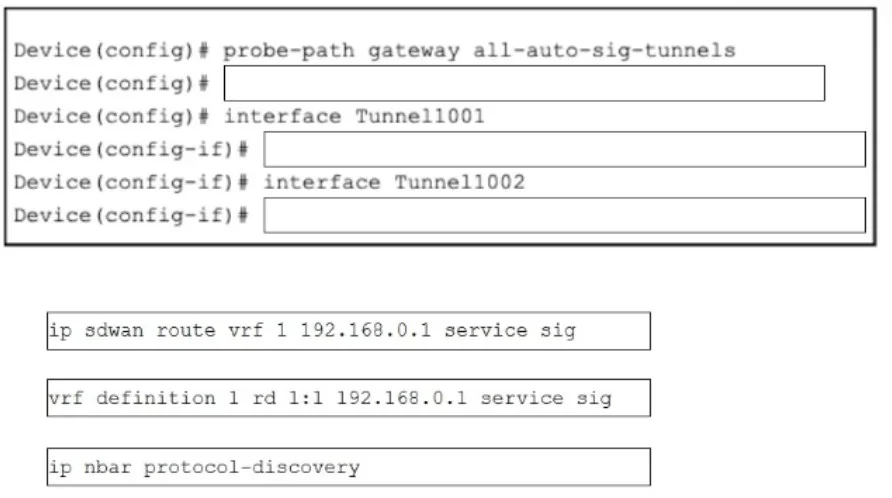
Answer Area
Drag items
Correct arrangement
- sla-class cisco_class latency 10
- sla-class cisco_class preferred-color biz-internet
- app-route-policy cisco_route_policy
- ip sdwan route vrf 1 192.168.0.1 service sig
- ip nbar protocol-discovery
- ip nbar protocol-discovery
- ip nbar protocol-discovery
Explanation
Cloud onRamp for SaaS over SIG - Drag-and-Drop Explained
Overview of What's Being Configured
This configuration builds three logical layers:
- SLA policy - defines path quality requirements
- Routing directives - steers traffic to the SIG tunnel
- NBAR discovery - enables application recognition on interfaces
The 7 blanks fit into a partial config template. Here's the full picture:
Item-by-Item Breakdown
Blank 1: sla-class cisco_class latency 10
Why here: This opens the SLA class definition by naming it (cisco_class) and setting a latency threshold of 10 ms. It must come first because the app-route policy in Blank 3 references this class by name - you can't reference what doesn't exist yet.
Blank 2: sla-class cisco_class preferred-color biz-internet
Why here: This is the second attribute of the same SLA class. It tells SD-WAN to prefer the biz-internet transport color when this SLA class is evaluated. It belongs immediately after Blank 1 because it's still part of the same SLA class block - order within the block matters for readability and some platforms require grouped attributes.
Blank 3: app-route-policy cisco_route_policy
Why here: This applies the app-aware routing policy (cisco_route_policy) that ties back to the SLA class defined in Blanks 1–2. It must follow the SLA class definition - the policy engine needs the SLA class to already be declared before it can be bound to a route policy.
Blank 4: ip sdwan route vrf 1 192.168.0.1 service sig
Why here: This injects an SD-WAN static route into VRF 1, pointing 192.168.0.1 out through the SIG (Secure Internet Gateway) service. This is the actual forwarding instruction that redirects SaaS-bound traffic into the SIG tunnel. It goes after the policy configuration because the route leverages the policy context already established.
Blanks 5, 6, 7: ip nbar protocol-discovery (×3)
Why three times: ip nbar protocol-discovery is an interface-level command - it must be applied individually to each interface where you want application recognition. In a typical Cloud onRamp for SaaS deployment, this is enabled on:
- WAN interface 1 (e.g., biz-internet uplink)
- WAN interface 2 (e.g., a second uplink)
- LAN-facing interface (so app traffic is classified as it enters the device)
NBAR is required for Cloud onRamp for SaaS - without it, the router cannot identify SaaS application flows, and the SLA-based path selection has nothing to act on.
Why the Distractor Was Wrong
| Distractor | Why Not Used |
|---|---|
vrf definition 1 rd 1:1 192.168.0.1 service sig | This is malformed - VRF definition syntax doesn't include destination IPs or service sig. It's a red herring mixing VRF definition syntax with SDWAN route syntax. |
Common Mistakes
- Applying NBAR only once - the most common error. Candidates assume it's a global command; it's per-interface.
- Putting
app-route-policybefore the SLA class - the policy must reference an already-defined SLA class. - Choosing the VRF distractor - it looks plausible but is syntactically invalid for this context.
- Thinking
preferred-coloris optional - without it, SD-WAN won't know which transport to prefer, making the SLA class functionally incomplete for SIG steering.
Topics
Community Discussion
No community discussion yet for this question.