
300-440 · Question #82
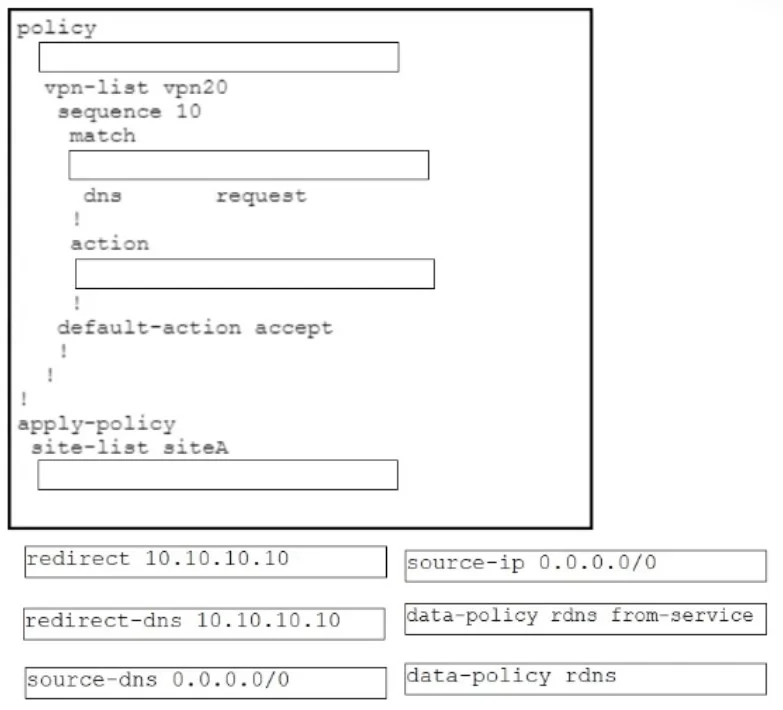
Drag and Drop Question Drag and drop the code snippets from the bottom onto the boxes in the Cisco vManage configuration to configure unconditional DNS redirect to send all DNS requests to a server…
The correct answer is data-policy rdns; source-ip 0.0.0.0/0; redirect-dns 10.10.10.10; redirect 10.10.10.10; data-policy rdns from-service. Cisco vManage Unconditional DNS Redirect - Configuration Explained Overview of the Configuration This builds a centralized data policy in Cisco SD-WAN that intercepts all DNS requests (port 53) from any source and forces them to 10.10.10.10. "Unconditional" means it catches DNS…
Question
Exhibit
Answer Area
Drag items
Correct arrangement
- data-policy rdns
- source-ip 0.0.0.0/0
- redirect-dns 10.10.10.10
- redirect 10.10.10.10
- data-policy rdns from-service
Explanation
Cisco vManage Unconditional DNS Redirect - Configuration Explained
Overview of the Configuration
This builds a centralized data policy in Cisco SD-WAN that intercepts all DNS requests (port 53) from any source and forces them to 10.10.10.10. "Unconditional" means it catches DNS traffic regardless of what DNS server the client originally targeted.
Item-by-Item Breakdown
Position 1 - data-policy rdns
This declares and names the data policy. rdns is just the policy name. This is the top-level container - everything else nests inside it. It must come first because you cannot define match/action rules without a named policy context.
Common mistake: Confusing this with
data-policy rdns from-service. The definition of the policy (rdns) comes first; the application of it comes last.
Position 2 - source-ip 0.0.0.0/0
This is the match condition. Using 0.0.0.0/0 means "match traffic from any source IP" - this is what makes the redirect unconditional. Every DNS query, regardless of origin, is caught.
Key distinction vs. the unused item:
source-dns 0.0.0.0/0is the match field for conditional DNS redirect - it matches by the destination DNS server address. For unconditional redirect, you match onsource-ip, notsource-dns. The question specifically asks for unconditional, sosource-dnsis deliberately not used.
Position 3 - redirect-dns 10.10.10.10
This is the action taken when the match is hit. It tells the SD-WAN fabric to redirect DNS queries to 10.10.10.10. This is the SD-WAN-specific action command that enables DNS steering behavior.
Position 4 - redirect 10.10.10.10
In the vManage CLI hierarchy, redirect is a sub-command of redirect-dns, explicitly specifying the target IP. The two lines together form a parent/child relationship:
redirect-dns 10.10.10.10   ← action type
 redirect 10.10.10.10      ← explicit target (sub-command level)
Common mistake: Thinking these two lines are redundant and only one is needed. In some vManage versions, the CLI template requires both lines at different indentation levels to fully commit the redirect target.
Position 5 - data-policy rdns from-service
This is the apply-policy step - it binds the policy rdns to a site/VPN and specifies the direction: from-service means traffic originating from the service (LAN) side of the WAN edge. This is where endpoint DNS queries come from, so this direction is required.
Common mistake: Using
from-tunnelinstead offrom-service. DNS requests come from LAN clients, not from the WAN/tunnel side.
Why source-dns 0.0.0.0/0 Is Unused
| Scenario | Match field used |
|---|---|
| Unconditional redirect (this question) | source-ip 0.0.0.0/0 |
| Conditional redirect (intercept queries to a specific DNS server) | source-dns <specific-ip> |
Using source-dns 0.0.0.0/0 in a conditional policy to match all DNS servers would effectively be unconditional too, but source-ip is the correct and idiomatic approach for unconditional redirect in vManage.
Final Configuration Structure
data-policy rdns                        ← (1) policy definition
  ...
   match
    source-ip 0.0.0.0/0               ← (2) match ALL sources
   action accept
    redirect-dns 10.10.10.10          ← (3) DNS redirect action
     redirect 10.10.10.10             ← (4) explicit redirect target
apply-policy
  ...
   data-policy rdns from-service      ← (5) apply to LAN-side traffic
The logical flow is: define → match → act → sub-specify → apply. Each step is a dependency on the prior one.
Topics
Community Discussion
No community discussion yet for this question.