
300-440 · Question #84
Drag and Drop Question An engineer must use the CLI to disable the weak SSH-1 encryption algorithm in Cisco vManage Drag and drop the commands from the left into the order on the right to accomplish…
The correct answer is system; ssh-server; no kex-algo sha1; commit. Cisco vManage CLI: Disabling SSH-1 (SHA-1 KEX) - Command Order Explained The Sequence `` system ssh-server no kex-algo sha1 commit ` --- Why This Order 1. system Purpose: Enter the system configuration hierarchy. vManage CLI uses a hierarchical, mode-based configuration model…
Question
Exhibit
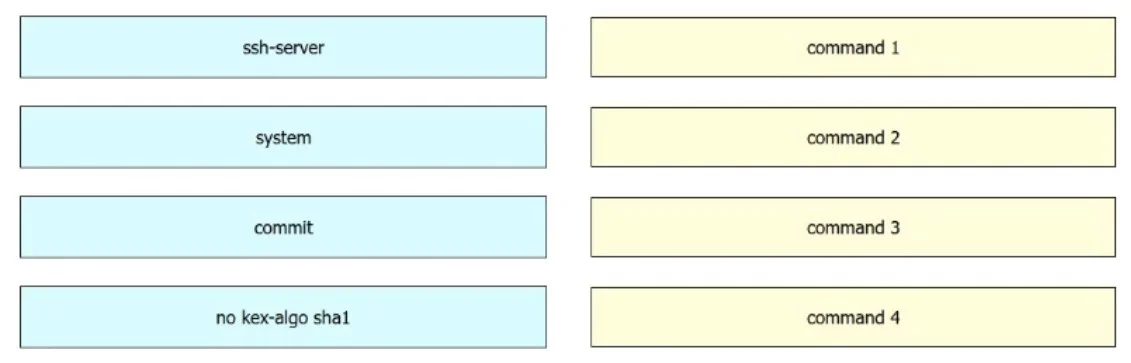
Answer Area
Drag items
Correct arrangement
- system
- ssh-server
- no kex-algo sha1
- commit
Explanation
Cisco vManage CLI: Disabling SSH-1 (SHA-1 KEX) - Command Order Explained
The Sequence
system
ssh-server
no kex-algo sha1
commit
Why This Order
1. system
Purpose: Enter the system configuration hierarchy.
vManage CLI uses a hierarchical, mode-based configuration model (similar to Junos/NSO - not traditional Cisco IOS). You must navigate into the correct context before issuing subcommands. system is the top-level context that contains SSH server settings.
Mistake: Running
ssh-serverat the top level will fail - it's a sub-context, not a standalone command.
2. ssh-server
Purpose: Enter the SSH server configuration submode within system.
This narrows the context to SSH-specific settings. Only after entering this submode does no kex-algo sha1 become a valid command.
Mistake: Skipping this step and trying to run
no kex-algo sha1directly undersystemwill produce an error - the command isn't recognized outside its submode.
3. no kex-algo sha1
Purpose: Disable the SHA-1 key exchange algorithm for SSH.
The no prefix removes/disables the specified setting. kex-algo sha1 refers to the SSH-1-era SHA-1-based key exchange, which is cryptographically weak and commonly flagged in security audits. This is the actual security hardening action.
Mistake: Confusing
kex-algo(key exchange algorithm) with cipher or MAC settings - they are separate SSH security parameters.
4. commit
Purpose: Persist the staged configuration change.
vManage uses a candidate configuration model: changes are staged in memory and do not take effect until committed. Forgetting commit means your change disappears when the session ends.
Mistake: Assuming the change is live after step 3. Without
commit, nothing is saved.
Summary Table
| Step | Command | Role |
|---|---|---|
| 1 | system | Navigate to system config context |
| 2 | ssh-server | Enter SSH submode |
| 3 | no kex-algo sha1 | Disable the weak algorithm |
| 4 | commit | Activate the change |
The pattern is: navigate → navigate → configure → commit - a standard workflow for any vManage CLI hardening task.
Topics
Community Discussion
No community discussion yet for this question.