
300-440 · Question #31
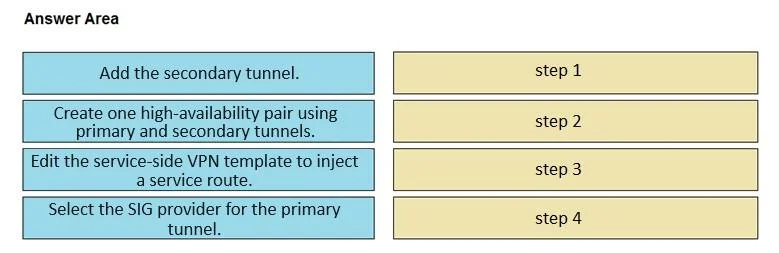
Drag and Drop Question An engineer must configure cloud connectivity with Cisco Umbrella Secure Internet Gateway (SIG) in active/backup mode. The engineer already configured the SIG Credentials and…
The correct answer is Select the SIG provider for the primary tunnel.; Add the secondary tunnel.; Create one high-availability pair using primary and secondary tunnels.; Edit the service-side VPN template to inject a service route. Cisco Umbrella SIG Active/Backup Configuration - Step-by-Step Explanation Background: This task occurs inside a Cisco SD-WAN (vManage) SIG Tunnel template. The SIG Credentials and SIG Feature Templates are already done - you're now building tunnel topology and steering traffic…
Question
Exhibit
Answer Area
Drag items
Correct arrangement
- Select the SIG provider for the primary tunnel.
- Add the secondary tunnel.
- Create one high-availability pair using primary and secondary tunnels.
- Edit the service-side VPN template to inject a service route.
Explanation
Cisco Umbrella SIG Active/Backup Configuration - Step-by-Step Explanation
Background: This task occurs inside a Cisco SD-WAN (vManage) SIG Tunnel template. The SIG Credentials and SIG Feature Templates are already done - you're now building tunnel topology and steering traffic through it.
Why This Order?
The logic follows a build-then-bind-then-route pattern: define the tunnels first, pair them into HA, then tell the network to use them.
Step-by-Step Breakdown
Step 1 - Select the SIG provider for the primary tunnel
You must establish the primary tunnel before anything else can exist. Inside the SIG tunnel template, selecting the SIG provider (Umbrella) initializes the primary tunnel object. Without this anchor, there is no tunnel to pair against. This is a prerequisite for every subsequent step.
Step 2 - Add the secondary tunnel
Once the primary tunnel exists, you add the secondary (backup) tunnel - also pointing to Umbrella SIG, but to a different data center endpoint. The secondary tunnel cannot be defined in isolation; it is added in relation to the primary tunnel context already open in the template.
Step 3 - Create one high-availability pair using primary and secondary tunnels
With both tunnels now defined, you pair them explicitly into an active/backup HA group. vManage requires both tunnels to pre-exist before the HA pairing option is available. This step tells the system: "if the primary fails, fail over to the secondary." You cannot create an HA pair with only one tunnel.
Step 4 - Edit the service-side VPN template to inject a service route
This is always last because it references the SIG tunnel infrastructure that was just built. You add a service route (typically a default route 0.0.0.0/0 pointing to the SIG) into the service-side VPN (commonly VPN 1). This steers internet-bound traffic through the Umbrella SIG tunnel. Doing this before the tunnels and HA pair exist would reference objects that don't yet exist in the template.
Common Mistakes
| Mistake | Why It's Wrong |
|---|---|
| Trying to create the HA pair before both tunnels exist | vManage requires both tunnel objects to be present before pairing |
| Injecting the service route before the SIG tunnel is configured | The route has no valid next-hop SIG interface to reference |
| Adding the secondary tunnel first | The primary must be defined first; it anchors the tunnel template |
| Skipping the HA pair and relying on two independent tunnels | Without explicit pairing, active/backup behavior is not guaranteed - you'd have two independent tunnels, not a failover pair |
Key mental model: Think of it as infrastructure before policy - build the tunnels (steps 1–2), define the relationship between them (step 3), then apply routing policy that uses them (step 4).
Topics
Community Discussion
No community discussion yet for this question.