
300-440 · Question #30
Drag and Drop Question Refer to the exhibit. These configurations are complete: - Create an account in the Equinix portal. - Associate the Equinix account with Cisco vManage. - Configure the global…
The correct answer is Ensure that you have UUIDs for the required number of Cisco SD-WAN Virtual Edge Instances that you want to deploy as Interconnect Gateways.; Create the necessary network segments.; Create the Interconnect Gateway at the Equinix location that is closest to your SD-WAN branch location.; Attach Cisco SD-WAN Virtual Edge to the Equinix device template. Cisco SD-WAN Cloud Interconnect with Equinix - Step Ordering Explained Context Three steps are already done: Equinix account created, account associated with vManage, and global Interconnect Gateway settings configured. The remaining four steps must follow a logical dependency…
Question
Exhibits
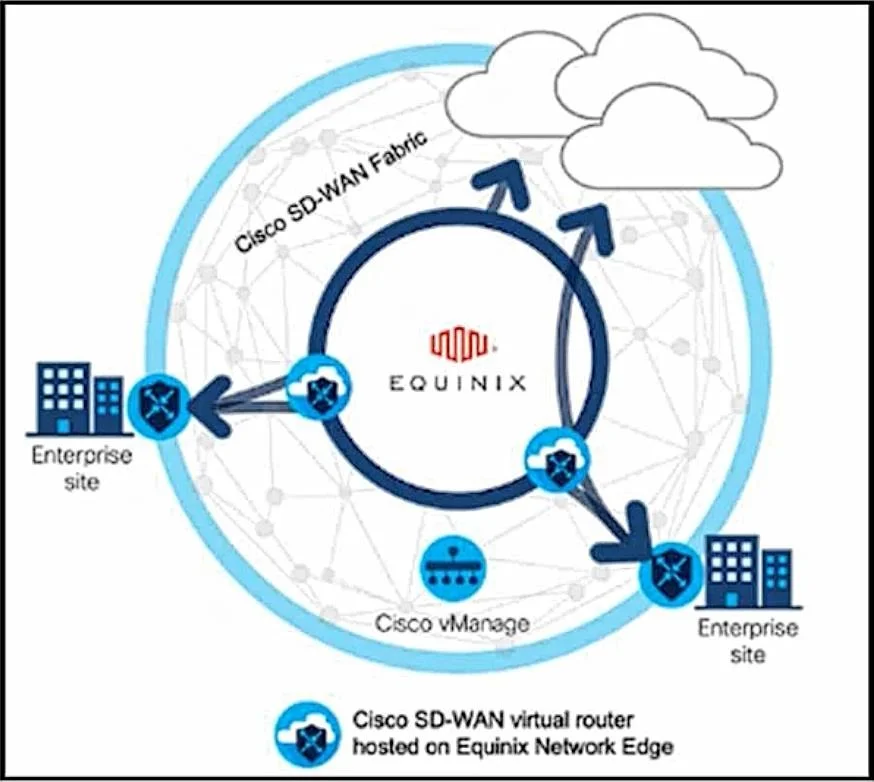
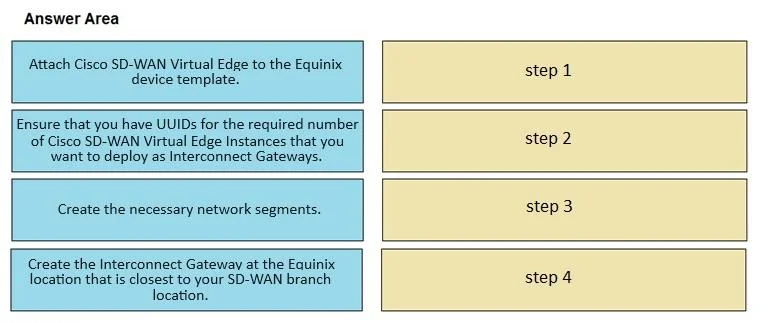
Answer Area
Drag items
Correct arrangement
- Ensure that you have UUIDs for the required number of Cisco SD-WAN Virtual Edge Instances that you want to deploy as Interconnect Gateways.
- Create the necessary network segments.
- Create the Interconnect Gateway at the Equinix location that is closest to your SD-WAN branch location.
- Attach Cisco SD-WAN Virtual Edge to the Equinix device template.
Explanation
Cisco SD-WAN Cloud Interconnect with Equinix - Step Ordering Explained
Context
Three steps are already done: Equinix account created, account associated with vManage, and global Interconnect Gateway settings configured. The remaining four steps must follow a logical dependency chain - each step enables the next.
Step-by-Step Breakdown
Step 1 - Ensure UUIDs for the required Cisco SD-WAN Virtual Edge Instances
UUIDs are pre-assigned identifiers tied to your virtual edge licenses. You must confirm you have the correct UUIDs before any deployment work begins because:
- vManage uses these UUIDs to identify and track which virtual instances will serve as Interconnect Gateways.
- Without valid UUIDs, you cannot reference or provision the virtual edges in subsequent steps.
Common mistake: Skipping this or treating it as optional. If you don't have enough UUIDs for the number of gateways you plan to deploy, the entire workflow stalls later.
Step 2 - Create the necessary network segments
Network segments define the logical partitions (analogous to VRFs/VPNs) that the Interconnect Gateway will route traffic through. They must exist before the gateway is created because:
- The Interconnect Gateway configuration binds to specific segments during creation.
- You cannot associate a gateway with a segment that doesn't yet exist.
Common mistake: Trying to create the gateway first and expecting to add segments later. The segment association happens at gateway creation time.
Step 3 - Create the Interconnect Gateway at the Equinix location
With UUIDs confirmed and segments defined, you can now instantiate the Interconnect Gateway. Location selection (closest Equinix site to your SD-WAN branch) matters for latency. This step:
- Consumes one of the UUIDs from Step 1.
- Binds to the network segments from Step 2.
- Provisions the virtual edge as a gateway in the Equinix fabric.
Common mistake: Choosing a geographically distant Equinix location. The question explicitly calls out selecting the closest location to the branch - this is a design requirement, not just a preference.
Step 4 - Attach Cisco SD-WAN Virtual Edge to the Equinix device template
This is always last because it is the activation/provisioning step. The device template pushes the full SD-WAN configuration (policies, routing, segmentation) to the virtual edge. It requires:
- The gateway to already exist (Step 3) so there is a target to attach to.
- Segments and UUIDs already resolved so the template can reference them correctly.
Common mistake: Treating template attachment as a setup step rather than a final push. Attaching before the gateway exists has nothing to attach to.
Summary of the Dependency Chain
UUID inventory → Segment creation → Gateway instantiation → Template attachment
(what you have)   (logical fabric)   (physical placement)    (config push)
Each step is a hard prerequisite for the next - you cannot reorder without breaking a dependency.
Topics
Community Discussion
No community discussion yet for this question.