
300-440 · Question #32
Drag and Drop Question An engineer needs to configure enhanced policy-based routing (ePBR) for IPv4 by using Cisco vManage. Drag and drop the steps from the left onto the order on the right to…
The correct answer is Configure an extended ACL.; Configure a class map that matches the ACL.; Configure the policy map with the action to set the next hop.; Apply the service policy on the interface. ePBR Configuration Order Explained ePBR in Cisco vManage uses the Modular QoS CLI (MQC) framework. MQC has a strict dependency chain - each step must reference an object created in the previous step, so the order is not arbitrary; it is architecturally required. --- Step 1…
Question
Exhibit
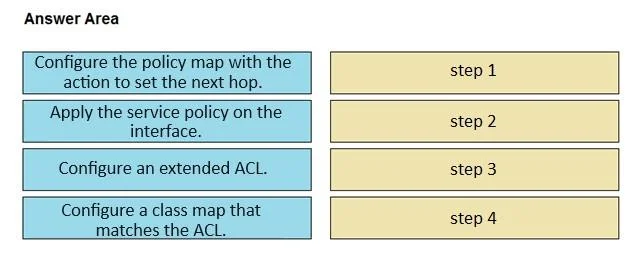
Answer Area
Drag items
Correct arrangement
- Configure an extended ACL.
- Configure a class map that matches the ACL.
- Configure the policy map with the action to set the next hop.
- Apply the service policy on the interface.
Explanation
ePBR Configuration Order Explained
ePBR in Cisco vManage uses the Modular QoS CLI (MQC) framework. MQC has a strict dependency chain - each step must reference an object created in the previous step, so the order is not arbitrary; it is architecturally required.
Step 1 - Configure an Extended ACL
Why first: The ACL defines which traffic to match (e.g., source/destination IP, protocol, port). Nothing else can be built until you have a named object to reference. An extended ACL is required (not standard) because ePBR typically needs to match on both source and destination criteria.
Common mistake: Using a standard ACL. Standard ACLs only match on source IP, which is insufficient for most ePBR policies.
Step 2 - Configure a Class Map that Matches the ACL
Why second: The class map references the ACL by name (match access-group name <acl-name>). If the ACL does not exist yet, this configuration fails or is invalid. The class map's sole job is to classify traffic using the previously defined ACL.
Common mistake: Trying to define the class map first and expecting to add the ACL reference later. The reference must resolve at configuration time.
Step 3 - Configure the Policy Map with the Action to Set the Next Hop
Why third: The policy map references the class map (class <class-map-name>) and then defines the action - in this case, set ip next-hop <address>. The policy map cannot reference a class map that hasn't been created yet.
Common mistake: Confusing the policy map with the class map. The class map answers "what traffic?"; the policy map answers "what do I do with it?"
Step 4 - Apply the Service Policy on the Interface
Why last: The service-policy command references the policy map and activates the entire chain on a specific interface (e.g., ip policy route-map equivalent via service-policy type pbr input <policy-map-name>). This is the activation step - nothing takes effect in the data plane until this is applied.
Common mistake: Applying the service policy to the wrong direction. For ePBR routing incoming traffic, the policy is applied inbound (input) on the ingress interface, not outbound.
Summary of the Dependency Chain
Extended ACL  →  Class Map  →  Policy Map  →  Service Policy on Interface
  (defines     (classifies    (sets action:    (activates in
  the traffic)  traffic via ACL) next-hop IP)    data plane)
Each object is a prerequisite for the next. Breaking this order results in forward-reference errors or a policy that does nothing.
Topics
Community Discussion
No community discussion yet for this question.