
300-440 · Question #85
Drag and Drop Question Refer to the exhibit. An engineer needs to enable QoS on the egress interface at the Montreal branch. Drag and drop the commands from the bottom onto the blanks where the code…
The correct answer is Montreal-Branch(config)# policy; Montreal-Branch(config-policy)# cloud-qos; Montreal-Branch(config-interface-ge0/1)# commit and-quit. QoS Configuration on Egress Interface - Explanation This question tests knowledge of the hierarchical CLI configuration sequence required to enable QoS on an SD-WAN branch router (likely Versa Networks or similar platform). --- The Correct Sequence and Why Step 1…
Question
Exhibit
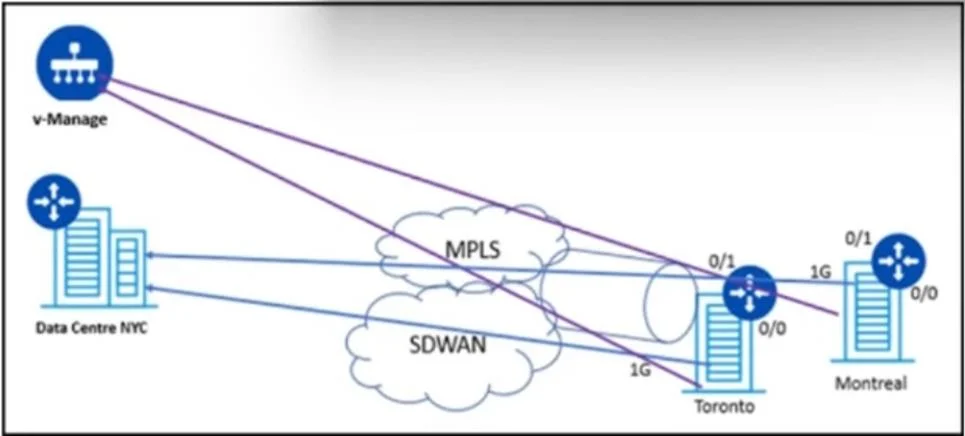
Answer Area
Drag items
Correct arrangement
- Montreal-Branch(config)# policy
- Montreal-Branch(config-policy)# cloud-qos
- Montreal-Branch(config-interface-ge0/1)# commit and-quit
Explanation
QoS Configuration on Egress Interface - Explanation
This question tests knowledge of the hierarchical CLI configuration sequence required to enable QoS on an SD-WAN branch router (likely Versa Networks or similar platform).
The Correct Sequence and Why
Step 1: Montreal-Branch(config)# policy
Starting from global configuration mode (config), this command enters the policy sub-context. You must define or enter a policy container before you can configure QoS parameters within it. You cannot jump directly to cloud-qos from global config - the CLI enforces this hierarchy. This is always the entry point for policy-related configuration.
Step 2: Montreal-Branch(config-policy)# cloud-qos
Now inside the policy context (config-policy), this command enables cloud-based QoS on that policy. The prompt confirms you are in the correct sub-mode. This is the actual feature activation step - it tells the device to apply cloud QoS rules to traffic governed by this policy.
Step 3: Montreal-Branch(config-interface-ge0/1)# commit and-quit
After the policy is configured and the interface (ge0/1 - the egress interface at Montreal) has been set up, commit and-quit saves and applies all pending configuration changes and exits the configuration session. The and-quit flag is important - commit alone would apply changes but keep you in config mode.
The Unused Item: Entering configuration mode terminal
This is system output/feedback, not a command you type. It is the message the device displays when you enter configuration mode. A common mistake is treating informational CLI output as a configurable step.
Common Mistakes
| Mistake | Why It's Wrong |
|---|---|
Typing cloud-qos from (config) directly | Wrong context - must enter policy sub-mode first |
Using commit without and-quit | Applies changes but stays in config mode; and-quit exits cleanly |
| Including "Entering configuration mode terminal" | It is status output, not a command |
| Reversing steps 1 and 2 | CLI hierarchy is strict - policy must precede cloud-qos |
Core concept: CLI configuration is hierarchical. You move from global config → policy context → feature command → commit. Skipping or reordering any level will cause a command error.
Topics
Community Discussion
No community discussion yet for this question.