
300-440 · Question #80
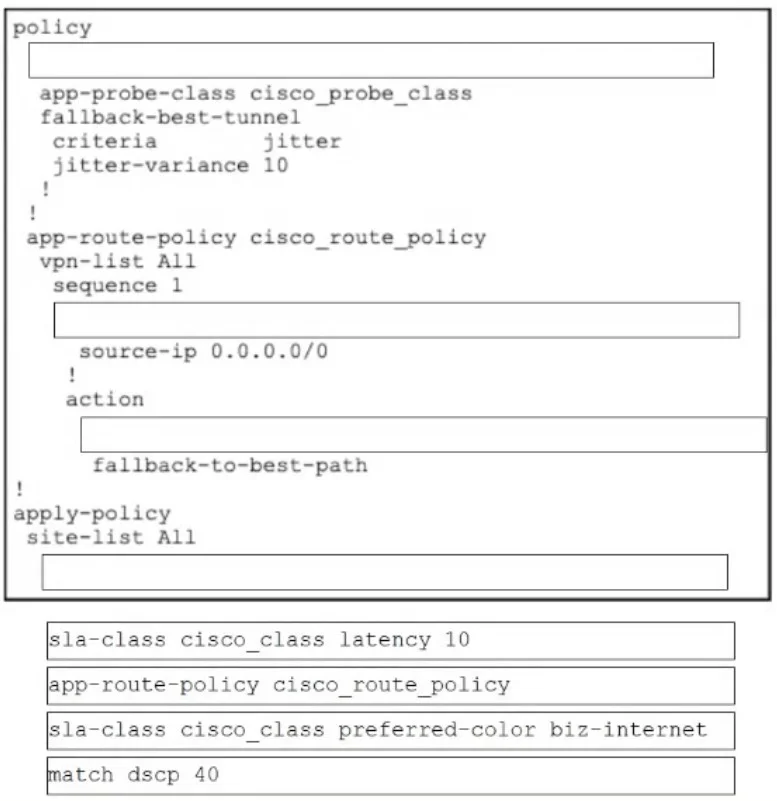
Drag and Drop Question Drag and drop the commands from the bottom onto the blanks where the code is missing in the configuration for an application probe class with a 10ms latency and a default DSCP…
The correct answer is sla-class cisco_class latency 10; match dscp 40; sla-class cisco_class preferred-color biz-internet; app-route-policy cisco_route_policy. Cisco SD-WAN vSmart App-Route Policy - Drag & Drop Explained This question tests your knowledge of how Cisco SD-WAN (vSmart) policy configuration is structured. The config follows a strict top-down hierarchy: define → match → act → apply. --- The Full Configuration Context The…
Question
Exhibit
Answer Area
Drag items
Correct arrangement
- sla-class cisco_class latency 10
- match dscp 40
- sla-class cisco_class preferred-color biz-internet
- app-route-policy cisco_route_policy
Explanation
Cisco SD-WAN vSmart App-Route Policy - Drag & Drop Explained
This question tests your knowledge of how Cisco SD-WAN (vSmart) policy configuration is structured. The config follows a strict top-down hierarchy: define → match → act → apply.
The Full Configuration Context
The blanks exist within a template like this:
policy
  [BLANK 1]          ← Define the SLA class
  !
  app-route-policy cisco_route_policy
    vpn-list ...
      sequence 10
        match
          [BLANK 2]  ← Match condition
        !
        action sla-class
          [BLANK 3]  ← Action using SLA class
        !
      !
    !
  !
!
apply-policy
  site-list [name]
    [BLANK 4]        ← Attach policy to sites
Item-by-Item Breakdown
1. sla-class cisco_class latency 10 → Position 1
This goes first because you must define the SLA class before referencing it anywhere else. The SLA class sets the performance threshold - here, 10ms latency. If this weren't defined first, the action in position 3 would reference a nonexistent object. This belongs at the top of the policy block.
2. match dscp 40 → Position 2
This is the traffic selector inside the policy sequence's match block. DSCP 40 (Expedited Forwarding / CS5) identifies which packets this rule applies to. The match condition must come before the action - you identify the traffic first, then decide what to do with it.
3. sla-class cisco_class preferred-color biz-internet → Position 3
This is the action: route matching traffic over biz-internet transport if it meets the cisco_class SLA (latency ≤ 10ms). It references the SLA class defined in position 1, so it must come after the definition. This sits inside the action sla-class block.
4. app-route-policy cisco_route_policy → Position 4
This goes in the apply-policy section at the end, which attaches the policy to specific sites. You first define everything (SLA class, policy sequences, match/action rules), then bind the whole policy to your site list. Applying before defining would reference nothing.
Common Mistakes
| Mistake | Why It's Wrong |
|---|---|
Putting app-route-policy at the top | It's a reference in apply-policy, not a definition block header - it belongs at the end |
| Swapping positions 1 and 3 | You can't reference cisco_class in an action before defining it as an SLA class |
Putting match dscp 40 after the action | Match always precedes action in any Cisco policy sequence |
Confusing preferred-color as a definition | It's an action parameter, not a standalone config object |
The key mental model: Define → Match → Act → Apply. Every SD-WAN policy on vSmart follows this exact order.
Topics
Community Discussion
No community discussion yet for this question.