
300-440 · Question #34
Drag and Drop Question An engineer must configure an AppGoE service node for WAN optimization for applications that are hosted in the cloud using Cisco vManage for C8000V or C8500L-8S4X devices…
The correct answer is Click Configuration, select Templates, and then select Feature Templates.; Click Add Template, select the device, and then click Select template.; Click CLI Add-On Template and enter the name and description.; Paste the CLI configuration and then click Save. Explanation: Configuring AppQoE CLI Add-On Template in Cisco vManage This question covers creating a CLI Add-On Feature Template in Cisco vManage to configure an AppQoE (Application Quality of Experience) service node for WAN optimization on C8000V or C8500L-8S4X devices. These…
Question
Exhibit
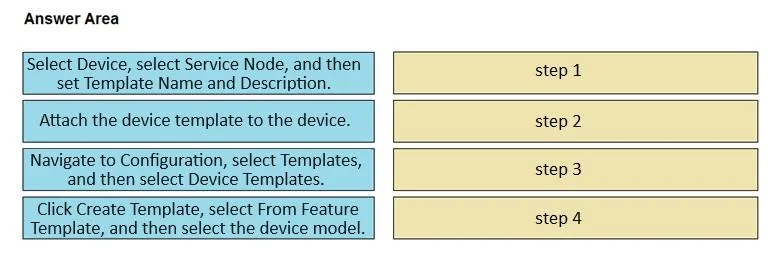
Answer Area
Drag items
Correct arrangement
- Click Configuration, select Templates, and then select Feature Templates.
- Click Add Template, select the device, and then click Select template.
- Click CLI Add-On Template and enter the name and description.
- Paste the CLI configuration and then click Save.
Explanation
Explanation: Configuring AppQoE CLI Add-On Template in Cisco vManage
This question covers creating a CLI Add-On Feature Template in Cisco vManage to configure an AppQoE (Application Quality of Experience) service node for WAN optimization on C8000V or C8500L-8S4X devices. These devices require CLI-level configuration for AppQoE because the GUI-based templates don't expose all necessary AppQoE parameters natively.
Why This Order?
The sequence follows the mandatory UI navigation hierarchy in vManage - you cannot reach a later step without completing the prior one. Each step unlocks the next.
Step-by-Step Breakdown
Step 1 - Click Configuration, select Templates, and then select Feature Templates.
This is the entry point. In vManage, all template work begins under Configuration > Templates > Feature Templates. Feature Templates are reusable building blocks that define device behavior. You must be here before any template can be created. Skipping navigation to this section means you have no context to work in.
Step 2 - Click Add Template, select the device, and then click Select template.
Once inside Feature Templates, you initiate creation by clicking Add Template. You must select the device model (C8000V or C8500L-8S4X) at this stage because template types and available options are device-specific - vManage filters what's available based on the platform. This must come before choosing the template type because the template type list is populated after device selection.
Step 3 - Click CLI Add-On Template and enter the name and description.
After the device is selected, you choose the template type. CLI Add-On Template is selected here specifically because AppQoE service node configuration requires CLI commands that aren't available in standard GUI-based feature templates. You also provide a name and description at this stage - this is metadata required before vManage will let you proceed to the configuration body.
Step 4 - Paste the CLI configuration and then click Save.
Only after the template is named and the type is set does the CLI input field become available. You paste the AppQoE-relevant CLI configuration (e.g., service-insertion, appqoe, tcp-proxy commands) and then save. Saving last is required - vManage validates and commits the template only at this point.
Common Mistakes and Misconceptions
| Mistake | Why It's Wrong |
|---|---|
| Jumping to "Add Template" before navigating to Feature Templates | The Add Template button doesn't exist until you're in the Feature Templates section |
| Selecting the template type before selecting the device | Device selection filters available template types - order is enforced by the UI |
| Trying to paste CLI before naming the template | The name/description fields are on the same screen as template type selection; they must be filled before the CLI editor appears |
| Confusing CLI Add-On with CLI Template | CLI Template replaces all config; CLI Add-On Template appends CLI to existing feature templates - AppQoE uses Add-On to layer on top of existing device config |
Key Takeaway
This sequence is not arbitrary - it reflects vManage's wizard-style UI flow where each screen depends on data entered in the previous one. The CLI Add-On Template approach is specifically chosen for AppQoE because it allows you to inject unsupported CLI config without overriding the rest of the device's managed configuration.
Topics
Community Discussion
No community discussion yet for this question.