
300-440 · Question #35
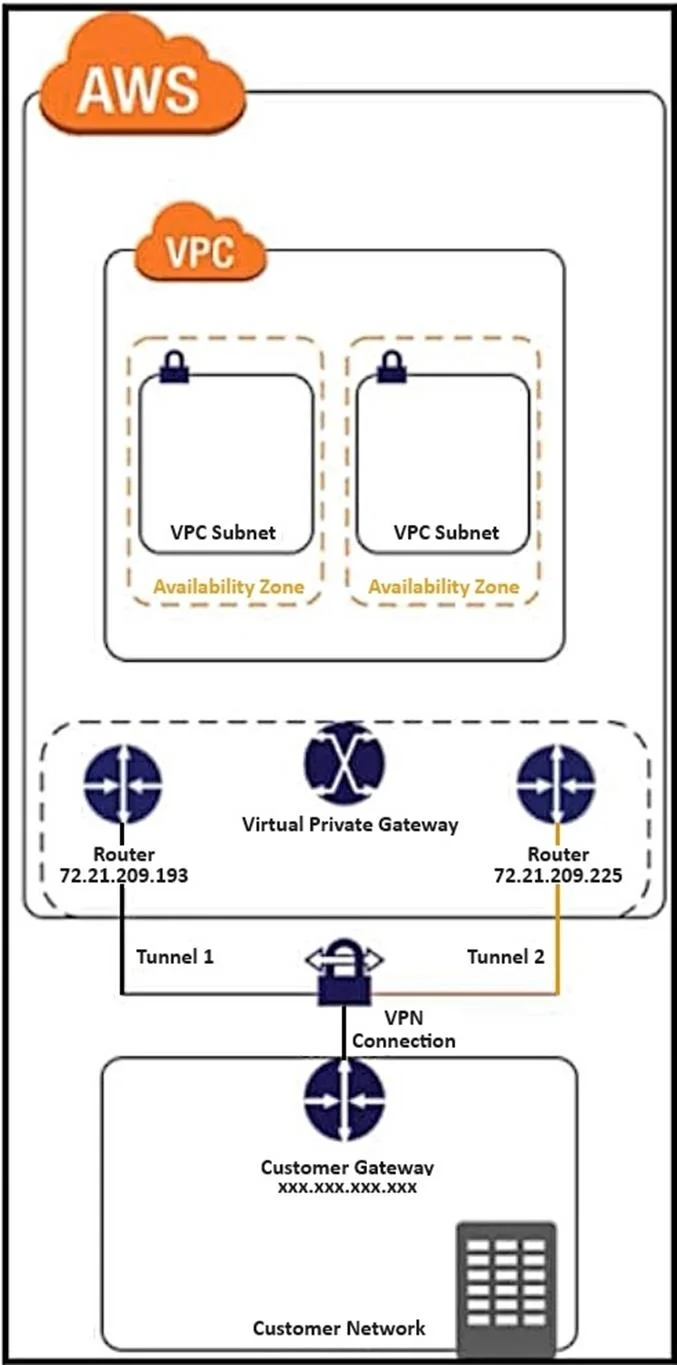
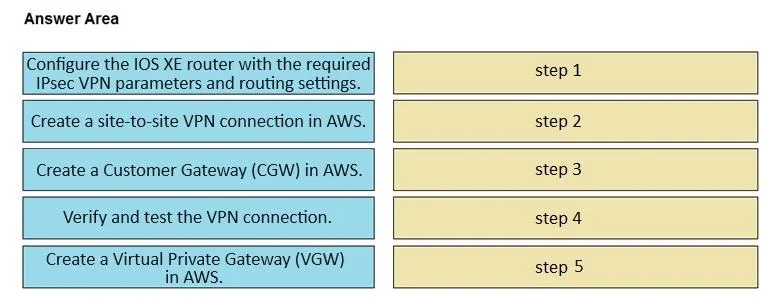
Drag and Drop Question Refer to the exhibit. Drag and drop the steps from the left onto the order on the right to configure a site-to-site VPN connection between an on-premises Cisco IOS XE router…
The correct answer is Create a Virtual Private Gateway (VGW) in AWS.; Create a Customer Gateway (CGW) in AWS.; Create a site-to-site VPN connection in AWS.; Configure the IOS XE router with the required IPsec VPN parameters and routing settings.; Verify and test the VPN connection. Site-to-Site VPN: Cisco IOS XE to AWS - Step Order Explained The ordering follows a logical dependency chain: AWS infrastructure must exist before the router can connect to it, and verification always comes last. --- Step 1: Create a Virtual Private Gateway (VGW) in AWS The VGW…
Question
Exhibits
Answer Area
Drag items
Correct arrangement
- Create a Virtual Private Gateway (VGW) in AWS.
- Create a Customer Gateway (CGW) in AWS.
- Create a site-to-site VPN connection in AWS.
- Configure the IOS XE router with the required IPsec VPN parameters and routing settings.
- Verify and test the VPN connection.
Explanation
Site-to-Site VPN: Cisco IOS XE to AWS - Step Order Explained
The ordering follows a logical dependency chain: AWS infrastructure must exist before the router can connect to it, and verification always comes last.
Step 1: Create a Virtual Private Gateway (VGW) in AWS
The VGW is the AWS-side VPN endpoint - it attaches to your VPC and represents AWS's half of the tunnel. It must be created first because every subsequent step depends on it existing. Without a VGW, there is nothing for the site-to-site VPN connection to terminate on.
Common mistake: Trying to create the VPN connection before attaching a VGW to the VPC. AWS will block this - the VPN connection requires an active VGW.
Step 2: Create a Customer Gateway (CGW) in AWS
The CGW is AWS's logical representation of your on-premises router - it stores the public IP address (and optionally BGP ASN) of your Cisco IOS XE device. It must exist before step 3 because the site-to-site VPN connection references both the VGW and the CGW.
Common mistake: Confusing the CGW with actual hardware. The CGW is just a configuration object in AWS - it does not install anything on your router.
Step 3: Create a Site-to-Site VPN Connection in AWS
This links the VGW and CGW together, generating the VPN tunnel details (pre-shared keys, outside IP addresses, IKE/IPsec parameters). AWS provides a downloadable configuration file specifically for Cisco IOS XE at this point - you cannot get this config until both endpoints are defined.
Common mistake: Skipping this step and trying to manually configure IPsec on both sides without AWS-generated parameters. This leads to tunnel mismatches.
Step 4: Configure the IOS XE Router with IPsec VPN Parameters and Routing
Using the AWS-generated configuration (from step 3), you configure IKEv1/v2 policies, IPsec transform sets, crypto maps, tunnel interfaces, and static/BGP routes on the router. This step comes after all AWS setup because the router needs the AWS tunnel endpoint IPs and pre-shared keys that only exist after step 3.
Common mistake: Configuring the router first with guessed parameters. The AWS tunnel outside IP addresses are dynamically assigned - you cannot know them until AWS creates the connection.
Step 5: Verify and Test the VPN Connection
Verification always comes last. You check tunnel status in both AWS (the console shows "UP/DOWN" per tunnel) and on the IOS XE router (show crypto isakmp sa, show crypto ipsec sa, ping across the tunnel).
Common mistake: Verifying before routing is configured on the router. Both ISAKMP phase 1 and IPsec phase 2 must complete, and traffic must have a valid route - checking too early gives false negatives.
The Core Mental Model
AWS side first (VGW → CGW → VPN Connection)
    ↓
On-prem side second (IOS XE config uses AWS-generated params)
    ↓
Verify last (both sides must be up)
AWS objects form a dependency chain within AWS itself, and the router configuration is intentionally last because it consumes outputs from AWS (tunnel IPs, keys, crypto settings).
Topics
Community Discussion
No community discussion yet for this question.