
300-440 · Question #36
Drag and Drop Question An engineer must edit the settings of a site-to-site IPsec VPN connection between an on- premises Cisco IOS XE router and Amazon Web Services (AWS). IPsec must be configured…
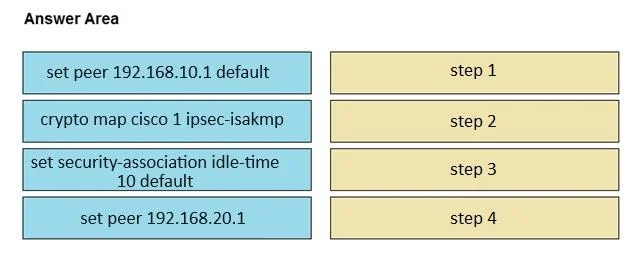
The correct answer is crypto map cisco 1 ipsec-isakmp; set peer 192.168.10.1 default; set peer 192.168.20.1; set security-association idle-time 10 default. IPsec Crypto Map Command Ordering - Explained This question tests your knowledge of the correct sequence for configuring a multi-peer crypto map entry on Cisco IOS XE. --- The Correct Sequence `` crypto map cisco 1 ipsec-isakmp set peer 192.168.10.1 default set peer…
Question
Exhibit
Answer Area
Drag items
Correct arrangement
- crypto map cisco 1 ipsec-isakmp
- set peer 192.168.10.1 default
- set peer 192.168.20.1
- set security-association idle-time 10 default
Explanation
IPsec Crypto Map Command Ordering - Explained
This question tests your knowledge of the correct sequence for configuring a multi-peer crypto map entry on Cisco IOS XE.
The Correct Sequence
crypto map cisco 1 ipsec-isakmp
set peer 192.168.10.1 default
set peer 192.168.20.1
set security-association idle-time 10 default
Item-by-Item Explanation
1. crypto map cisco 1 ipsec-isakmp - Must come first
This is the entry point command that creates or enters the crypto map configuration context. It specifies:
cisco- the crypto map name (matches the question's "named Cisco")1- the sequence number (first entry, as specified)ipsec-isakmp- IKE-negotiated mode (required for dynamic SA negotiation with AWS)
All set sub-commands below are only valid inside this context. Nothing else can precede it - this is non-negotiable.
2. set peer 192.168.10.1 default - Primary peer
The default keyword designates this as the primary/default peer. In a multi-peer crypto map:
- IOS XE tries peers in the order they are listed
- The
defaultkeyword marks the peer to use when no more-specific match exists - This is the first AWS VPN tunnel endpoint (primary path)
Common mistake: Students sometimes put the non-default peer first, thinking "default" means fallback/secondary. It actually marks the primary endpoint, and its listing position also controls try-order.
3. set peer 192.168.20.1 - Secondary/failover peer
No default keyword here - this is the backup peer. When the primary peer's security association goes idle or fails, IOS XE automatically fails over to this peer. In AWS site-to-site VPN configurations, AWS provides two tunnel endpoints for redundancy - this is the second one.
Common mistake: Reversing the order of peers 2 and 3. The primary (default) peer must be declared before the secondary.
4. set security-association idle-time 10 default - SA idle timer
This sets how long an idle Security Association is kept before being torn down. When the SA is cleared due to idle timeout, the router attempts to re-establish using the next available peer - implementing the failover behavior described. The default keyword applies this as the baseline idle-time for the map entry.
Note on the value discrepancy: The question states "120 seconds of idle time" but the command shows
idle-time 10. This appears to be an exam discrepancy - the question is testing which command and where it belongs in the sequence, not the specific value. On real IOS XE hardware, you would useset security-association idle-time 120to match 120 seconds.
Common mistake: Placing the SA idle-time before the peer commands. While IOS may accept it either way, the correct and expected convention is: establish who you're talking to (peers) before setting how long to keep the conversation alive (SA timers).
Summary of Logic Flow
| Step | Purpose |
|---|---|
| Enter crypto map context | Required before any sub-commands |
| Define primary peer | First tried, marked default |
| Define secondary peer | Failover target |
| Set SA idle time | Controls when IOS abandons idle SA and fails over |
The ordering follows a natural dependency chain: you must define where before you define how long.
Topics
Community Discussion
No community discussion yet for this question.