
300-440 · Question #37
Drag and Drop Question An engineer must configure a site-to-site IPsec VPN connection between an on-premises Cisco IOS XE router In Controller mode and AWS. The IKE version must be changed from…
The correct answer is Create the groups of interest.; Configure the topology.; Create the application-aware routing policy.; Apply the application-aware routing policy to a specific VPN and sites. Application-Aware Routing Policy - Step Order Explained This question tests knowledge of the Cisco vManage centralized policy configuration workflow for SD-WAN. The four steps follow a strict dependency chain: each step requires the previous one to already exist before it can…
Question
Exhibit
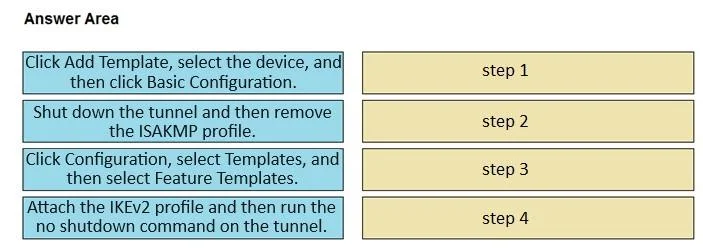
Answer Area
Drag items
Correct arrangement
- Create the groups of interest.
- Configure the topology.
- Create the application-aware routing policy.
- Apply the application-aware routing policy to a specific VPN and sites.
Explanation
Application-Aware Routing Policy - Step Order Explained
This question tests knowledge of the Cisco vManage centralized policy configuration workflow for SD-WAN. The four steps follow a strict dependency chain: each step requires the previous one to already exist before it can be configured.
Why This Order?
Think of it as building a house: you lay the foundation before framing walls, and frame walls before adding the roof.
Step-by-Step Breakdown
Step 1 - Create the groups of interest These are the prerequisite building blocks (lists): site lists, VPN lists, prefix lists, app lists, TLOC lists, etc. Nothing else can reference these objects until they exist. Attempting to configure a topology or policy without defined groups is impossible in vManage - the UI won't populate the selection fields.
Step 2 - Configure the topology With groups defined, you now describe how traffic is permitted to flow between sites (hub-and-spoke, full mesh, custom). The topology references the site/VPN lists created in Step 1. The AAR policy (Step 3) then routes traffic within that topology, so topology must come first.
Step 3 - Create the application-aware routing policy Now you define matching criteria and routing actions (e.g., prefer a specific TLOC or SLA path for certain app traffic). This policy consumes both the groups of interest (for matching) and the topology (for path context). It cannot be meaningfully constructed without both.
Step 4 - Apply the policy to a specific VPN and sites This is the activation step. The policy has no effect until it is pushed to specific sites and VPNs via vManage. This is always last - you cannot apply something that hasn't been created yet.
Common Mistakes
| Mistake | Why It's Wrong |
|---|---|
| Applying the policy before creating it | Obvious dependency violation - the policy must exist first |
| Creating the AAR policy before groups of interest | The policy wizard requires lists to already be defined |
| Skipping topology and going straight to AAR policy | In vManage's wizard flow, topology is a distinct required stage; the policy defines routing behavior, topology defines routing scope |
| Confusing "groups of interest" with the policy itself | Groups are passive data objects (lists); the policy is the active logic that references them |
Note on the IKEv2 Context
The IKEv2 change itself is typically done in a VPN interface feature template (changing the ike-version parameter), not through AAR policy. The question likely reflects a scenario where, after updating the IKE template, the engineer also needs to configure or update AAR policy to steer VPN traffic appropriately - hence the policy workflow steps being tested.
Topics
Community Discussion
No community discussion yet for this question.