
300-440 · Question #50
Drag and Drop Question Refer to the exhibit. Drag and drop the commands from the bottom onto the blanks where the code is missing in the Cisco IKEv2 configuration to bring up the IPsec tunnel…
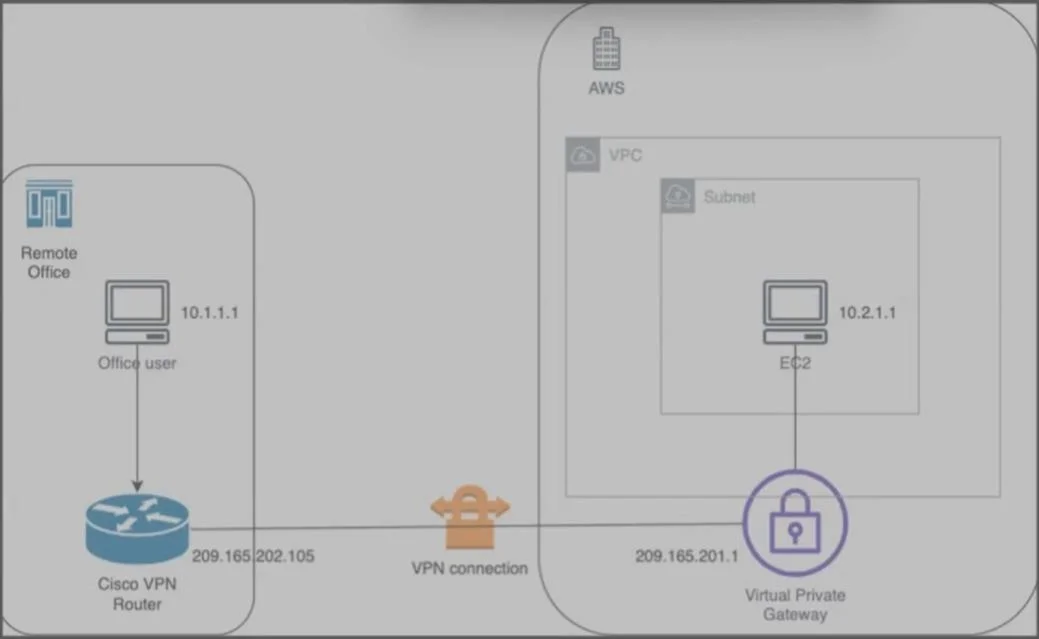
The correct answer is proposal Prop-DEMO; address 209.165.201.1; match address local 209.165.202.105. IKEv2 IPsec Tunnel Configuration Explanation Context This question configures a Cisco IKEv2 tunnel from a remote office router (local IP: 209.165.202.105) to an AWS Virtual Private Gateway (remote IP: 209.165.201.1). There are three blanks across different IKEv2 config blocks…
Question
Exhibit
Answer Area
Drag items
Correct arrangement
- proposal Prop-DEMO
- address 209.165.201.1
- match address local 209.165.202.105
Explanation
IKEv2 IPsec Tunnel Configuration Explanation
Context
This question configures a Cisco IKEv2 tunnel from a remote office router (local IP: 209.165.202.105) to an AWS Virtual Private Gateway (remote IP: 209.165.201.1). There are three blanks across different IKEv2 config blocks.
Placement 1: proposal Prop-DEMO (in the IKEv2 Policy)
crypto ikev2 policy POL-1
  [BLANK 1] → proposal Prop-DEMO
Why this goes here: An IKEv2 policy must reference an IKEv2 proposal by name. The proposal defines the cipher suite (encryption, integrity, DH group). The exhibit shows a proposal already defined as Prop-DEMO - the policy must reference that exact name.
Why not Prop-POC: Prop-POC either isn't defined in the exhibit or defines different parameters. Referencing an undefined proposal means IKEv2 negotiation never starts - the tunnel stays down.
Placement 2: address 209.165.201.1 (in the IKEv2 Keyring)
crypto ikev2 keyring KEYRING-1
  peer AWS-VGW
    [BLANK 2] → address 209.165.201.1
    pre-shared-key ...
Why this goes here: The keyring's peer block needs the remote peer's IP address to know who to associate the pre-shared key with. The AWS VGW is the remote peer, so its IP (209.165.201.1) goes here.
Why not 209.165.202.105: That's the local router's own IP. Putting your own IP as the remote peer address is a common misconfiguration - IKEv2 would never find the actual AWS endpoint.
Placement 3: match address local 209.165.202.105 (in the IKEv2 Profile)
crypto ikev2 profile PROF-1
  [BLANK 3] → match address local 209.165.202.105
  authentication local pre-share
  keyring local KEYRING-1
Why this goes here: match address local binds the IKEv2 profile to a specific local interface IP. It tells the router: "only use this profile when IKEv2 traffic arrives on the interface with IP 209.165.202.105." This is the Cisco router's own IP, so it correctly ties the profile to the right interface.
Why not match address local 209.165.201.1: That's the remote AWS peer's IP - you cannot match a local profile to a remote address. This would cause the profile to never activate, leaving the tunnel down.
Common Mistakes & Misconceptions
| Mistake | Why It Fails |
|---|---|
| Swapping local/remote IPs in the keyring | Pre-shared key is never found for the real peer |
| Referencing a proposal name that doesn't exist | Policy has no valid cipher suite; Phase 1 never completes |
Using match address local with the remote IP | Profile never matches incoming IKEv2 packets; tunnel stays down |
Confusing match address local (profile binding) with identity local (identity sent to peer) | Different commands with different purposes |
Key mental model: Think of it as three layers - the proposal defines what algorithms to use, the keyring defines who the remote peer is, and the profile defines which local interface to apply everything to.
Topics
Community Discussion
No community discussion yet for this question.